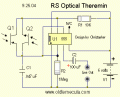
now I should know this one: higher current in a transistor's base produces higher current at the emitter side, now I ask this because practice show me something that I'm not sure about: will an increase in VOLTAGE at the base produce what: higher current or higher voltage because of higher voltage or higher? I can't get any sound from the theremin when using a volt ramp up on 2x 2N3904 to replace the optoisolator. the emitter and colector of both transistors are connected, the one side going to pin 2 and the other to R1_10k. Is that why I should use the optoisolator? because it converts volt to current, or should it work with the 2N3904 like in "theremin 03" and the now updated "theremin 04" (pin 6 wasn't connected with pin 2) EDIT and the now updated theremin 05 (out was shorted with pin 3)
Chillum, remember ohm's law. Voltage and current are a married couple, you can't have one without the other, and increasing one will increase the other if input resistance remains constant. And another thing is to keep in mind that bjt transistors are current driven devices.
Chillum, remember ohm's law. Voltage and current are a married couple, you can't have one without the other, and increasing one will increase the other if input resistance remains constant. And another thing is to keep in mind that bjt transistors are current driven devices.
well that's what I thought (ohm's law -- volt ramp on bjt should work vs current source), now the question rephrased: do I need to convert volt to current (optoisolator) for the fact that bjt transistors are current driven, because in spite of ohms law, higher voltage on the bjt doesn't produce any sound... (and I know the theremin works, I tested it with LDRs, just doesn't produce fart, it produces whoowhie)
well that's what I thought (ohm's law -- volt ramp on bjt should work vs current source), now the question rephrased: do I need to convert volt to current (optoisolator) for the fact that bjt transistors are current driven, because in spite of ohms law, higher voltage on the bjt doesn't produce any sound... (and I know the theremin works, I tested it with LDRs, just doesn't produce fart, it produces whoowhie)
I think the farting sound in the video was produced due to poor lighting conditions during testing, which made the optotransistors break their current at a certain frequency and produced clicking noises resembling the sound you want to reproduce.
Yes, of course it can... you don't have to resource to an MCU for this... But I think that @ronv is far more capable than me of solving this nuance quickly.
This should produce the output wav file that you wanted.
To add the line, simply click on the "Aa" icon on the top menu (to the right), and select "SPICE directive" option in the dialog box. Then run the sim afterwards, and your wav file should appear in the root directory of your C drive
This should produce the output wav file that you wanted.
To add the line, simply click on the "Aa" icon on the top menu (to the right), and select "SPICE directive" option in the dialog box. Then run the sim afterwards, and your wav file should appear in the root directory of your C drive
It does exactly what the breadboard does, click on, click off. :-( PS thing doesn't want to upload the file (I added .txt at the end, cause .wav is not permitted -- still no upload)
It does exactly what the breadboard does, click on, click off. :-( PS thing doesn't want to upload the file (I added .txt at the end, cause .wav is not permitted -- still no upload)
there they have both high and low circuits for both high and low light, now our's isn't a type they have an example for, I don't know whether the R1 is leading or following, because it's actually both...
I think we might need both a ramp up and a ramp down?
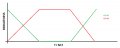
@cmartinez I think I misunderstood the configuration of the transistors, the one is leading, the other trailing, making the fade of the hand produce something more like what you suggested long ago:
@cmartinez I think I misunderstood the configuration of the transistors, the one is leading, the other trailing, making the fade of the hand produce something more like what you suggested long ago:View attachment 83828
@ronv we need your expertise friend: we have now come to a point were I realized the two transistors in parallel means [The common emitter circuit is the most commonly used circuit for a phototransistor. When light is detected, output moves from a high to low voltage state] and [The common collector circuit, also known as an emitter follower circuit, produces an output that moves from a low to high state as light is detected] from [http://www.globalspec.com/learnmore/optics_optical_components/optoelectronics/phototransistors] so the two transistors in parallel means we've got one leading and the other trailing, which means the hand in the video from the end of the link in the first post, actually ramp up the one transistor while ramping down the other one. Could you fathom a ramp down aswell, if you have the time, please?
I think I understand now,
Since you want to make several notes lets forget about the photo transistors and ramps and stuff, and just make several notes.
You can switch in different resistors for R1 to change the frequency.
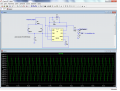
The sim will output a wave file to the LTSpice main directory.
I think I understand now,
Since you want to make several notes lets forget about the photo transistors and ramps and stuff, and just make several notes.
You can switch in different resistors for R1 to change the frequency.
The sim will output a wave file to the LTSpice main directory.
I think I understand now,
Since you want to make several notes lets forget about the photo transistors and ramps and stuff, and just make several notes.
You can switch in different resistors for R1 to change the frequency.
The sim will output a wave file to the LTSpice main directory.
@ronv very impressive except for the fact that it's a chainsaw sound, the man in the video had fart sound, is there any signal processing we can do on the chainsaw to get it to sound like a fart? or would a ramp down be easier?

 Facebook
 Google
 GitHub
 Linkedin