ADS1231: data conversion noise

Thread Starter

kevinnas

Joined Jul 31, 2017
77
Hello.
I have converted the data from my full bridge load cell using the ads1231 adc and an Arduino Nano. My setup is the same as the application example pg16 data sheet attached below with 3.04V AVDD and 3.1V DVDD.
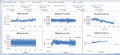
The problem is I am not sure if I am getting good or bad noise performance etc (I have attached some of my results below at no load, loaded in the positive and negative direction with the maximum load for that load cell 5kohm. I do not know how they obtained their graphs on page 7 of the data sheet, could you please help in how I can convert my values to the same scale? I know to convert my decimal values to a voltage it is Vin = Output Code * LSB Size.
LSB = 1.49*10^-9 (FSR/2^24bit)
and FSR is Vref/gain (3.04/128)
Which means for example at no load output code is 341000 * 1.49*10^-9 = 0.49mV (Which is the same as my measured Vinpp-Vinn)
I cannot see how they obtained the conversion data in nV for their Noise vs. Time data, could someone help with this? and also if I can verify that my data is okay then I can work changing the excitation voltage to 5V and work on improving the noise, but at the moment I cannot go further without knowing that as it is it is ok. Another thing is my data for 80sps seems too consistent and repeating a similar parten & I do not know if this is to do with my power supply frequency or how I am obtaining the data? how can I get rid of that if that is the case to make the data more similar to the data sheet
 

Attachments

joeyd999

Joined Jun 6, 2011
6,279
The problem is I am not sure if I am getting good or bad noise performance.
No, you're not getting good performance.

This is clearly illustrated on the 80sps no load graph. There is clearly a periodicity to the data...this is caused either at your source (50/60 hz pickup?), your power supply rails, or injected somewhere in the signal chain. The base noise from this part should look random, i.e. relatively flat across frequency.

What I would do is FFT the data and discover the frequency at which the peaks are occurring. This will give you a strong clue as to where they are coming from.

Get the periodic noise issue resolved. Only until then will you begin approaching the noise performance capable of the chip, at which time you can start looking for random noise sources.

If you want/can, post your schematic and I'll take a look at it for you.
 

Thread Starter

kevinnas

Joined Jul 31, 2017
77
Hi joeyd99. Thanks for your reply.
My schematic is exactly the diagram on page 16 of the data sheet, Instead of the MSP430 I am using an arduino Uno.
3.04V AVDD/VREFP and 3.1V DVDD I am using a 2231A-30-3 Tripple channel DC Power supply. You mentioned that my data is not good at 80sps, but what about at 10sps? It does not seem to have any periodic issues at that speed?
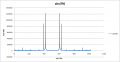
I have done the fft of the 80sps no load data but I am not sure what that actually means, I am not too familiar with FFT.
upload_2017-10-3_14-19-34.png
 

joeyd999

Joined Jun 6, 2011
6,279
Hi joeyd99. Thanks for your reply.
My schematic is exactly the diagram on page 16 of the data sheet, Instead of the MSP430 I am using an arduino Uno.
3.04V AVDD/VREFP and 3.1V DVDD I am using a 2231A-30-3 Tripple channel DC Power supply. You mentioned that my data is not good at 80sps, but what about at 10sps? It does not seem to have any periodic issues at that speed?
I have done the fft of the 80sps no load data but I am not sure what that actually means, I am not too familiar with FFT.
View attachment 136397
Very pretty! Yes, this is quite helpful.

Ignore the 10sps response for now. There is not enough spectral resolution for analysis, and any peaks can be significantly dampened by the sinc(x) response of the digital filter.

Ok, so at 80 sps, the max frequency is 40 hz at the center of your graph. It looks like you have 1024 samples, so the 512nd sample represents 40 hz. You have a 40hz/512 = .078125 Hz spectral resolution, so you can calculate the frequency of the two peaks (the other two are just mirrored "negative" frequency) by multiplying the sample number at which the peak occurs by 0.07825. Calculate and tell me the two frequencies.

Just FYI: the resulting frequencies are not necessarily the actual frequencies of the noise. It will be aliased if the noise source is greater than 40 hz. But lets see what the numbers are first, and take it from there.

Edit: there are smaller peaks which you'll need to get rid of eventually if you really want full performance. But let's pick the low hanging fruit first.
 

joeyd999

Joined Jun 6, 2011
6,279
The two peaks are at the 395th and 419th samples = 30.859375 and 32.734375
They are likely aliased much higher frequencies, then. If they were 50/60Hz, I'd suspect powerline hum.

The large peak looks like it is being modulated, due to the softness of the knee at the base of the peak. Probably from a switching power regulator. Is there one present somewhere? The smaller peak is significantly sharper...probably some signal being coupled into your signal (or present on the PS) at a very specific and unchanging frequency. This is where your scope on the AC setting and high gain can be valuable.

To differentiate between PS and signal noise, it may be helpful to tack a large ceramic cap (1 uF or higher) between the +/- signal inputs. See what this does to your noise. If the noise does not decrease, then the source is very likely your power supply -- or being injected via the digital pins.

It seems you are collecting the data by connecting the Arduino to a PC? The PC can easily inject noise into your system. Can you collect and store the data while the PC is detached and then read it out afterward?
 

joeyd999

Joined Jun 6, 2011
6,279
Further, can you run it straight from batteries -- maybe in conjunction with a linear regulator? This will give you 100% confidence that the noise is PS related or not.
 

joeyd999

Joined Jun 6, 2011
6,279
Oh! And you have to remember how sensitive a 24 bit weighing system is.

I had a problem once that was driving me nuts. The DC performance was awful -- the output was slowing varying up and down. The circuit was perfect -- demonstrably no injected noise.

It turned out there was some heavy machinery operating on a lower floor of the building. While I couldn't feel any vibration, it was being coupled into the weighing platform causing the slow oscillation (aliased down from the higher frequency of the machinery).
 

Thread Starter

kevinnas

Joined Jul 31, 2017
77
Hello.
No I do not have anything else connected other than the ads1231, Arduino uno, dc power supply, a pc and a load cell.
Sorry I do not have any other way to collect the data without a PC. Surely it should be possible using the same setup as many examples online use an arduino connected to the PC?.
I will try to place a 1uF cap between AINP and AINN and see what happens. If it is a problem with powerline hum then how would I go about it?
and if it was my power supply/digital pins what would be the solutions?
and also do u have any idea how they might have obtained the noise/time graphs on page 7 of the data sheet?
 

joeyd999

Joined Jun 6, 2011
6,279
Hello.
No I do not have anything else connected other than the ads1231, Arduino uno, dc power supply, a pc and a load cell.
Is the power supply switching? Is there a switcher on the Arduino? If not, I strongly suspect the PC.

Sorry I do not have any other way to collect the data without a PC. Surely it should be possible using the same setup as many examples online use an arduino connected to the PC?.
I don't use Arduino. I don't know what kind of AC load it could impress on the PS, so I don't know about that.

I do know that connection to a PC can cause noise injection. Been there, done that. My successful solution in the past has been to buffer the pins from the PC using a CMOS buffer with a separate quiet power supply.

I will try to place a 1uF cap between AINP and AINN and see what happens. If it is a problem with powerline hum then how would I go about it?
It's not. You'd see peaks at precisely 20Hz (for 60 Hz power) or 30Hz (for 50 hz power). I don't see that.

and if it was my power supply/digital pins what would be the solutions?
Lots of filtering on the power pins of the A/D. And buffering of the digital inputs.

and also do u have any idea how they might have obtained the noise/time graphs on page 7 of the data sheet?
Yes, an ideal reference design using very expensive instrumentation. It is possible to approach their results, but never exceed them.
 

Thread Starter

kevinnas

Joined Jul 31, 2017
77
Yes, an ideal reference design using very expensive instrumentation. It is possible to approach their results, but never exceed them.
No I mean just to get the values not the actual results. As in to get the noise - Conversion Data (nV) values did they use a formula/equation to convert the decimal values into noise values? I do not quite know how they got these 35nV rms and 600p-p values etc. I am asking so that I can plot my own Noise vs Time graph and the Noise histogram for my system so I can use it to compare with their "Ideal" results, not that I expect to achieve the same results.
 

Thread Starter

kevinnas

Joined Jul 31, 2017
77
It's not. You'd see peaks at precisely 20Hz (for 60 Hz power) or 30Hz (for 50 hz power). I don't see that.
The two peaks are at the 395th and 419th samples = 30.859375 and 32.734375.....are these not the peaks for the 50Hz power then in that case?
 

joeyd999

Joined Jun 6, 2011
6,279
No I mean just to get the values not the actual results. As in to get the noise - Conversion Data (nV) values did they use a formula/equation to convert the decimal values into noise values? I do not quite know how they got these 35nV rms and 600p-p values etc. I am asking so that I can plot my own Noise vs Time graph and the Noise histogram for my system so I can use it to compare with their "Ideal" results, not that I expect to achieve the same results.
This is just math. The noise is "referred" to the input -- in other words, what would input signal noise have to look like in order to produce the same digital result.

First, it is a 24 bit converter, meaning you have 2^24 (16,777,216) total possible codes. The input is bipolar, so 1/2 of the codes (8,388,608) are used for positive inputs, and the other 1/2 are used for negative inputs.

The full scale input range is 1/2*Vref/128, or, in your case 1/2*3.04V/128 = 11.875 mV. Each code represents 11.875 mV / 8,388,608 ~= 1.416 nV.

35 nVrms is equivalent to 35 nVrms / (1.416 nV/count) = 24.8 counts RMS.

To convert RMS counts to peak-to-peak counts, a crest factor must be employed. P-P = RMS * crest factor. I usually use a CF of 6 in my estimations. They use 5.9 at 10sps and 6.8 at 80 sps. The difference is the additional sinc(x) filtering at 10sps.

P-P is the most important value for DC measuring systems. It tells you how accurately you can measure a DC input, and how much variation you can expect to see over time.

I didn't check my math. So feel free to correct me anywhere I am wrong.
 

joeyd999

Joined Jun 6, 2011
6,279
The two peaks are at the 395th and 419th samples = 30.859375 and 32.734375.....are these not the peaks for the 50Hz power then in that case?
Not unless the internal clock is off by nearly 3% or 9%. Unfortunately, they don't seem to provide an internal clock accuracy. But 3% seems kinda big to me these days.

Are you on 50Hz power?
 

joeyd999

Joined Jun 6, 2011
6,279
Additionally, a crest factor of ~6 only applies to white noise (random, asynchronous noise) -- you gotta get the sinusoidal peaks out before the calculation is accurate.
 

Thread Starter

kevinnas

Joined Jul 31, 2017
77
Thank you for all your help! much appreciated.
Not unless the internal clock is off by nearly 3% or 9%. Unfortunately, they don't seem to provide an internal clock accuracy. But 3% seems kinda big to me these days.

Are you on 50Hz power?
Yes I am on 50Hz.
 

joeyd999

Joined Jun 6, 2011
6,279
If you are successful in removing the large peaks, there is one smaller peak to the left of the graph, with two -- even smaller -- harmonics moving to the right. If you can find the source of the one, the other two should go away.
 

Thread Starter

kevinnas

Joined Jul 31, 2017
77
If you are successful in removing the large peaks, there is one smaller peak to the left of the graph, with two -- even smaller -- harmonics moving to the right. If you can find the source of the one, the other two should go away.
Okay thanks! I have got some long wires and I am using a breadboard to wire everything so maybe they could be a source of noise. Other than that I am not too sure what else.
 
Top