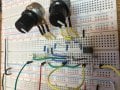
Active Baxandall Tone Control Not Responding on Bread Board

KeithWalker

Joined Jul 10, 2017
3,608
The op-amp is an LM358. I don’t understand the second part of your question. Pin4 is the ground pin Pin 5 is 9.5 volts. Forgive my ignorance are you saying that all of the pins have DC voltages? What exactly should I be checking?
Pin 8 is is the positive supply input on an LM358, NOT pin 5 !
 

Thread Starter

aneves1

Joined Feb 7, 2025
33
Sorry about that, that was a bad pic. The cap was in the wrong position it needed to be moved two rows down. Thats been taken care of. Still having the same issue.
 

MrChips

Joined Oct 2, 2009
34,866
Big mistake. Don’t rewire the circuit.
Try and find what is wrong with what you have. Take this opportunity to advance your trouble shooting skills. You learn more from your mistakes than from first time successful builds.

Use your function generator and oscilloscope and trace where your signal is going.
Remove the capacitors and trace the signal at low frequency control pot.
 

MisterBill2

Joined Jan 23, 2018
27,639
I suggest looking at the wiper connection of each control while feeding the inputs with an appropriate frequency. My issue is that somehow the circuit does not match my recollection of the BAXANDALL circuit. Of course, that could be an error on my part.
One more thought: There might be a connection issue causing the signal to bypass the tone control portion completely. That sort of hing happened for a researcher working on a project that I was involved with. Unfortunately he published his results in a hurry. I discovered the flaw when I attempted to reproduce his results. Rather embarrassing for him when others discovered the same thing. One open ground connection was all it took.
 

crutschow

Joined Mar 14, 2008
38,539
My issue is that somehow the circuit does not match my recollection of the BAXANDALL circuit.
There may be different variations of that circuit, since it was originally designed for tubes.

It matches the circuit I have and works as shown in post #12.
 
Last edited:

schmitt trigger

Joined Jul 12, 2010
2,106
. One open ground connection was all it took.
Something similar happened to me. One of the breadboard’s connections wasn’t making contact.
The way I discovered was testing for continuity every single node.
When I did discover the fault, all I did was to remove the wire and re-inserted it. The circuit started working right away!!
I would not have believed it, if it hadn’t happened to me personally.

What I would recommend, is to do a similar check. Or simply dismantle the whole circuit and re-assemble it again.
 

MrChips

Joined Oct 2, 2009
34,866
Something similar happened to me. One of the breadboard’s connections wasn’t making contact.
The way I discovered was testing for continuity every single node.
When I did discover the fault, all I did was to remove the wire and re-inserted it. The circuit started working right away!!
I would not have believed it, if it hadn’t happened to me personally.

What I would recommend, is to do a similar check. Or simply dismantle the whole circuit and re-assemble it again.
No, bad idea.
If you did that you would never know where was the fault.
Let us say that there was a faulty contact on the breadboard.

You would want to find it and mark it for next time. Or, you would want to extract the contact and repair it.

I had a situation where multiple breadboards were piercing through the bottom plastic and shorting out on the metal chassis whenever one put too much pressure on the breadboards. I ended up taking all the breadboards (more than 30 with four strips on each of them) and putting a thick sheet of plastic between the boards and the chassis.
 

MisterBill2

Joined Jan 23, 2018
27,639
IF the breadboard strip is mounted so that the adhesive attached back can't fall off, a few shots of contact cleaner might help.

OR, assemble the same circuit on a solder proto board. Like one of the stripe boards. Then the connections are simple to verify.
 

MisterBill2

Joined Jan 23, 2018
27,639
"Working perfectly" in simulation does suggest that either connections or components are not "perfect"!! And certainly those plug-in development panels have earned a reputation for not always being perfect. Thus there are quite a few things to check.
The complete circuit is simple enough that probing the nodes with a scope should reveal any points having signals different from what would be expected.
 

crutschow

Joined Mar 14, 2008
38,539
Do you have your circuit breadboarded and working properly?
No, I have not built it.
I meant your circuit matches the Baxandall circuit I already had in my collection.
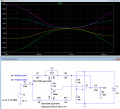
Edit: Simulation of the circuit I have with pot models, added below:

1760997881720.png

Your circuit likely has a miswire or a bad connection, as the circuit configuration is the standard Baxandall design.
 
Last edited:

MisterBill2

Joined Jan 23, 2018
27,639
Certainly if the simulation actually works correctly with no unreasonable currents or voltages, then the performance of a physical version should come close in performance, Three things can prevent this: 1. A faulty component, 2. An open connection in the physical version, 3. An incorrect connection in the physical version.
A logical diagnostic process would show the voltage at each node of the simulation model, and then compare the voltages at those nodes on the physical model. Not much analysis required.
 

MrChips

Joined Oct 2, 2009
34,866
There is nothing in that circuit to change the frequency. The sole purpose is to adjust the gin versus frequency relationship. THAT is why the controls are tagged "Bass boost" and "Bass cut," "Trebles Boost" and "Treble cut."
cruts said nothing about “change the frequency”.
He said “frequency response change”.
You are posting and coming across like a troll.
 
Top