to filter results and shorten the list type something ... like "uno"
at the moment i the only Arduino Uno i have at hand is the R4 Minima (which has different chip) but you will select your board version and click Ok: View attachment 328402
6. Congratulation, you just programmed first microcontroller... now lets start playing...
7. change value in line 34 (first delay instruction) to something smaller... such as 300... then send program again. you should see that blinks are shorter.
8. increase value and send the program again...
9. well that is blinking LED on board... but how about some external LED? no problem, you can check documentation and see that on board LED is on pin 13 - at least on Arduino Uno (this is why the example used variable name instead of hardcoded number. this value is changes according to board you selected in step 4). so connect another LED with resistor to pin 13 and GND. resistor can be 220-470 Ohm. if you do this right, the external LED will flash since it is connected to same pin (pin 13)
10. lets try to use different pin, such as pin 10. go to program and replace all instances of LED_BUILTIN by value 10. there are three places to change it lines 28, 33, and 35).. and of course send the program to Arduino and connect your external LED and resistor from pin 10 to GND.
11. but changing things in three places is annoying... and this was just three places. imagine if the LED_BUILTIN was used in 50 or more places.... that would be nightmare to maintain and modify. it is much more practical to define own name for the pin and use it in program. then if you need to move to another pin, you just change it in one place - in the definition. all other 50 places can stay as is.
12. what if you want more than one LED? add declarations and initialization for each, then use them any way you like... perhaps
Code:
const int LED_RED = 10;  // this LED is on pin 10
const int LED_GREEN = 11;   // this LED is on pin 11
const int LED_BLUE = 12;   //  this LED is on pin 12

// the setup function runs once when you press reset or power the board
void setup() {
  // specify how pins are used (input or output...)
  // for driving LEDs they need to be an output
  pinMode(LED_BUILTIN, OUTPUT);
  pinMode(LED_RED, OUTPUT);
  pinMode(LED_GREEN, OUTPUT);
  pinMode(LED_BLUE, OUTPUT);

}

// the loop function runs over and over again forever
void loop() {

  // turn  all LEDs off
  digitalWrite(LED_BUILTIN, LOW);
  digitalWrite(LED_RED, LOW);
  digitalWrite(LED_GREEN, LOW);
  digitalWrite(LED_BLUE, LOW);

  delay(200);    // wait a bit

// then turn them on one by one
  digitalWrite(LED_RED, HIGH);
  delay(1000);

   digitalWrite(LED_GREEN, HIGH);
  delay(1000);

    digitalWrite(LED_BLUE, HIGH);
  delay(1000);

  digitalWrite(LED_BUILTIN, HIGH);
  delay(1000);

// and turn them off ... in reverse
  digitalWrite(LED_BUILTIN, LOW);
  delay(1000);

  digitalWrite(LED_BLUE, LOW);
  delay(1000);

  digitalWrite(LED_GREEN, LOW);
  delay(1000);

  digitalWrite(LED_RED, LOW);
  delay(1000);

}
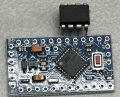
Got the Arduino in, still waiting for ttiny85 chip BUT will start playing with Arduino in the meantime i am going to start a new thread for the programming
Play with this code it works you set timer with a button on pin 2 you have to change led on 13 to 1 for attiny
Code:
const int ledPin = 13;             // Pin connected to the LED
const int buttonPin = 2;           // Replace with your button pin
unsigned long previousMillis = 0;  // Variable to store the last time LED was updated
//const long interval = 1000; // Interval at which to blink (milliseconds)
//const long timerInterval = 15 * 1000; // 15 minutes in milliseconds
int buttonState = 0;
int lastButtonState = 0;
int buttonPushCounter = 0;
int time = 0;
bool ledState = LOW;  // Initialize LED state
void setup() {
  pinMode(buttonPin, INPUT);  // Assuming a pull-up resistor
  attachInterrupt(digitalPinToInterrupt(2), ISR_Routine, CHANGE);
  pinMode(ledPin, OUTPUT);  // Initialize the LED pin as an output
  Serial.begin(9600);
}

void ISR_Routine() {
  buttonState = digitalRead(buttonPin);

  if (buttonState != lastButtonState) {
  }
  if (buttonState == LOW && lastButtonState == HIGH) {
    buttonPushCounter++;
    time++;
  }
  lastButtonState = buttonState;
  if (buttonPushCounter == 16) {
    buttonPushCounter = 0;
  }
  if (time == 16) {
    time = 0;
  }
  Serial.println(buttonPushCounter);  // Print the counter value
}
void loop() {
  const long timerInterval = time * 1000;  // 15 seconds in milliseconds it sets seconds for now commit this one out
  //const long timerInterval = time *60*1000; //uncommit this for minutes
  unsigned long currentMillis = millis();  // Get the current time
  if (currentMillis - previousMillis >= timerInterval) {
    // It's time to toggle the LED
    previousMillis = currentMillis;
    // Serial.println(ledState);
    if (ledState == LOW) {
      ledState = HIGH;
    } else {
      ledState = LOW;
    }
    // Serial.println(ledState);
    digitalWrite(ledPin, ledState);  // Toggle the LED
    delay(1000);                     // Wait for 1 second
    digitalWrite(ledPin, LOW);

    //Serial.println(Time); // Print the counter value
  }
}
to filter results and shorten the list type something ... like "uno"
at the moment i the only Arduino Uno i have at hand is the R4 Minima (which has different chip) but you will select your board version and click Ok: View attachment 328402
6. Congratulation, you just programmed first microcontroller... now lets start playing...
7. change value in line 34 (first delay instruction) to something smaller... such as 300... then send program again. you should see that blinks are shorter.
8. increase value and send the program again...
9. well that is blinking LED on board... but how about some external LED? no problem, you can check documentation and see that on board LED is on pin 13 - at least on Arduino Uno (this is why the example used variable name instead of hardcoded number. this value is changes according to board you selected in step 4). so connect another LED with resistor to pin 13 and GND. resistor can be 220-470 Ohm. if you do this right, the external LED will flash since it is connected to same pin (pin 13)
10. lets try to use different pin, such as pin 10. go to program and replace all instances of LED_BUILTIN by value 10. there are three places to change it lines 28, 33, and 35).. and of course send the program to Arduino and connect your external LED and resistor from pin 10 to GND.
11. but changing things in three places is annoying... and this was just three places. imagine if the LED_BUILTIN was used in 50 or more places.... that would be nightmare to maintain and modify. it is much more practical to define own name for the pin and use it in program. then if you need to move to another pin, you just change it in one place - in the definition. all other 50 places can stay as is.
12. what if you want more than one LED? add declarations and initialization for each, then use them any way you like... perhaps
Code:
const int LED_RED = 10;  // this LED is on pin 10
const int LED_GREEN = 11;   // this LED is on pin 11
const int LED_BLUE = 12;   //  this LED is on pin 12

// the setup function runs once when you press reset or power the board
void setup() {
  // specify how pins are used (input or output...)
  // for driving LEDs they need to be an output
  pinMode(LED_BUILTIN, OUTPUT);
  pinMode(LED_RED, OUTPUT);
  pinMode(LED_GREEN, OUTPUT);
  pinMode(LED_BLUE, OUTPUT);

}

// the loop function runs over and over again forever
void loop() {

  // turn  all LEDs off
  digitalWrite(LED_BUILTIN, LOW);
  digitalWrite(LED_RED, LOW);
  digitalWrite(LED_GREEN, LOW);
  digitalWrite(LED_BLUE, LOW);

  delay(200);    // wait a bit

// then turn them on one by one
  digitalWrite(LED_RED, HIGH);
  delay(1000);

   digitalWrite(LED_GREEN, HIGH);
  delay(1000);

    digitalWrite(LED_BLUE, HIGH);
  delay(1000);

  digitalWrite(LED_BUILTIN, HIGH);
  delay(1000);

// and turn them off ... in reverse
  digitalWrite(LED_BUILTIN, LOW);
  delay(1000);

  digitalWrite(LED_BLUE, LOW);
  delay(1000);

  digitalWrite(LED_GREEN, LOW);
  delay(1000);

  digitalWrite(LED_RED, LOW);
  delay(1000);

}
Play with this code it works you set timer with a button on pin 2 you have to change led on 13 to 1 for attiny
Code:
const int ledPin = 13;             // Pin connected to the LED
const int buttonPin = 2;           // Replace with your button pin
unsigned long previousMillis = 0;  // Variable to store the last time LED was updated
//const long interval = 1000; // Interval at which to blink (milliseconds)
//const long timerInterval = 15 * 1000; // 15 minutes in milliseconds
int buttonState = 0;
int lastButtonState = 0;
int buttonPushCounter = 0;
int time = 0;
bool ledState = LOW;  // Initialize LED state
void setup() {
  pinMode(buttonPin, INPUT);  // Assuming a pull-up resistor
  attachInterrupt(digitalPinToInterrupt(2), ISR_Routine, CHANGE);
  pinMode(ledPin, OUTPUT);  // Initialize the LED pin as an output
  Serial.begin(9600);
}

void ISR_Routine() {
  buttonState = digitalRead(buttonPin);

  if (buttonState != lastButtonState) {
  }
  if (buttonState == LOW && lastButtonState == HIGH) {
    buttonPushCounter++;
    time++;
  }
  lastButtonState = buttonState;
  if (buttonPushCounter == 16) {
    buttonPushCounter = 0;
  }
  if (time == 16) {
    time = 0;
  }
  Serial.println(buttonPushCounter);  // Print the counter value
}
void loop() {
  const long timerInterval = time * 1000;  // 15 seconds in milliseconds it sets seconds for now commit this one out
  //const long timerInterval = time *60*1000; //uncommit this for minutes
  unsigned long currentMillis = millis();  // Get the current time
  if (currentMillis - previousMillis >= timerInterval) {
    // It's time to toggle the LED
    previousMillis = currentMillis;
    // Serial.println(ledState);
    if (ledState == LOW) {
      ledState = HIGH;
    } else {
      ledState = LOW;
    }
    // Serial.println(ledState);
    digitalWrite(ledPin, ledState);  // Toggle the LED
    delay(1000);                     // Wait for 1 second
    digitalWrite(ledPin, LOW);

    //Serial.println(Time); // Print the counter value
  }
}
one thing i was thinking of that i said in another post is to add a trigger pin ( logic high) once that is triggered that would start the timer? And has this function to be on a switch? Meaning if this switch is on only work with a trigger pin. if switch is off then timer every 15 mins? For that matter, have another pin monitor if it's logic high, no timer would start ( trigger or standard timer) in till that pin is a logic low. not sure if this make sense..lol
adjustable time would be good maybe with a potentiometer that way it read the resistance so when it loose power it won't matter
Having followed this thread since the beginning I applaud your decision to embrace the flexibility of using a processor, and the ATtiny85 programmed with the Arduino IDE will certainly do the job.
Have the necessary hardware components you ordered arrived yet? I’m looking forward to seeing your post with the results, either details of a working device, or questions if/when you meet a stumbling block
I applaud your decision to embrace the flexibility of using a processor <---- thanks but well see how wells this goes..lol i am waiting for my ttiny85 chip but i do have my Arduino now
just a FYI for everyone that wants to follow along and help I started a new thread on programming to try to keep things in order per se for timer programming please use this thread
What I mean is with a chip, more feature could be added. The project specification did not change. Just more doors open due to possibly of features being programmed in chip. The circuit will be used to turn on other circuit.

 Facebook
 Google
 GitHub
 Linkedin