a timer that goes logic high or low every 15mins ( using tiny85 chip)

Thread Starter

timtim1234

Joined Nov 30, 2023
246
Hi every one, :) as someone said best to start a new thread how as to use a TTiny85 to make a timer that goes logic high or low every 15 mins.

I got my Arduino, but I am still waiting for the ttiny85 chip to come in. but I am going to play around with the Arduino while I'm waiting for my chip to come in.


So if anyone wants to follow and play along with me as I learn this! you must start here first:

this is copied from the user panic mode:

as stated before... do NOT bother with ATTINY... for now.... just use Arduino as is...

1. connect it to your computer using USB cable. power LED on Arduino should light up.

2. start Arduino software

3. start with Blink example (File>Examples>01.Basics>Blink). This will flash another LED that is already on the board.


4. Make sure correct board is selected. if not click on pull down menu to make selection

View attachment 328401

to filter results and shorten the list type something ... like "uno"
at the moment i the only Arduino Uno i have at hand is the R4 Minima (which has different chip) but you will select your board version and click Ok:
View attachment 328402

5. click on transfer and wait couple of seconds.
View attachment 328404

6. Congratulation, you just programmed first microcontroller... now lets start playing...

7. change value in line 34 (first delay instruction) to something smaller... such as 300... then send program again. you should see that blinks are shorter.

8. increase value and send the program again...

9. well that is blinking LED on board... but how about some external LED? no problem, you can check documentation and see that on board LED is on pin 13 - at least on Arduino Uno (this is why the example used variable name instead of hardcoded number. this value is changes according to board you selected in step 4). so connect another LED with resistor to pin 13 and GND. resistor can be 220-470 Ohm. if you do this right, the external LED will flash since it is connected to same pin (pin 13)

10. lets try to use different pin, such as pin 10. go to program and replace all instances of LED_BUILTIN by value 10. there are three places to change it lines 28, 33, and 35).. and of course send the program to Arduino and connect your external LED and resistor from pin 10 to GND.

11. but changing things in three places is annoying... and this was just three places. imagine if the LED_BUILTIN was used in 50 or more places.... that would be nightmare to maintain and modify. it is much more practical to define own name for the pin and use it in program. then if you need to move to another pin, you just change it in one place - in the definition. all other 50 places can stay as is.

12. what if you want more than one LED? add declarations and initialization for each, then use them any way you like... perhaps

Code:
const int LED_RED = 10;  // this LED is on pin 10
const int LED_GREEN = 11;   // this LED is on pin 11
const int LED_BLUE = 12;   //  this LED is on pin 12

// the setup function runs once when you press reset or power the board
void setup() {
  // specify how pins are used (input or output...)
  // for driving LEDs they need to be an output
  pinMode(LED_BUILTIN, OUTPUT);
  pinMode(LED_RED, OUTPUT);
  pinMode(LED_GREEN, OUTPUT);
  pinMode(LED_BLUE, OUTPUT);

}

// the loop function runs over and over again forever
void loop() {

  // turn  all LEDs off
  digitalWrite(LED_BUILTIN, LOW);
  digitalWrite(LED_RED, LOW);
  digitalWrite(LED_GREEN, LOW);
  digitalWrite(LED_BLUE, LOW);

  delay(200);    // wait a bit

// then turn them on one by one
  digitalWrite(LED_RED, HIGH);
  delay(1000);

   digitalWrite(LED_GREEN, HIGH);
  delay(1000);

    digitalWrite(LED_BLUE, HIGH);
  delay(1000);

  digitalWrite(LED_BUILTIN, HIGH);
  delay(1000);

// and turn them off ... in reverse
  digitalWrite(LED_BUILTIN, LOW);
  delay(1000);

  digitalWrite(LED_BLUE, LOW);
  delay(1000);

  digitalWrite(LED_GREEN, LOW);
  delay(1000);

  digitalWrite(LED_RED, LOW);
  delay(1000);

}
then look at other examples (input, analog etc.)
 

MrChips

Joined Oct 2, 2009
34,694
If you want to learn how to program an ATtiny85 MCU and other Atmel AVR MCUs, here is how I would approach it.

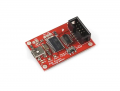
1) Get an AVR Pocket Programmer

1722804362647.png

2) Download Atmel Studio 7 to your PC. The newer version is called Microchip Studio which I have not yet used.

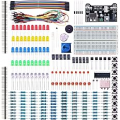
3) You will need a prototyping board and a ribbon cable to fit on the AVR Pocket Programmer. While you're at it, you will need LEDs, resistors, jumper cables, etc. If you are new to electronics as a hobby, it might be less costly in the long run to purchase an electronics kit that has the most commonly used components.

1722805262808.png


1722804859959.png


4) When your Atmel chip arrives I will step you through the process.
 

Thread Starter

timtim1234

Joined Nov 30, 2023
246
If you want to learn how to program an ATtiny85 MCU and other Atmel AVR MCUs, here is how I would approach it.

1) Get an AVR Pocket Programmer

View attachment 328573

2) Download Atmel Studio 7 to your PC. The newer version is called Microchip Studio which I have not yet used.

3) You will need a prototyping board and a ribbon cable to fit on the AVR Pocket Programmer. While you're at it, you will need LEDs, resistors, jumper cables, etc. If you are new to electronics as a hobby, it might be less costly in the long run to purchase an electronics kit that has the most commonly used components.

View attachment 328577


View attachment 328575


4) When your Atmel chip arrives I will step you through the process.

cool thanks but i bought this one which i was told should program ttiny85 https://www.ebay.com/itm/266878053737

and i already have the prototyping board :)
 

Jerry-Hat-Trick

Joined Aug 31, 2022
803
I bought this one which i was told should program ttiny85 https://www.ebay.com/itm/266878053737
Since you have the Arduino UNO already, maybe have a go at using it to build a working device using the code posted on your previous thread - a good way to check you are comfortable with programming using the Arduino IDE.

Using the UNO as a programmer for the ATtiny is another step and, as also previously discussed, one step at a time!
 

Thread Starter

timtim1234

Joined Nov 30, 2023
246
Since you have the Arduino UNO already, maybe have a go at using it to build a working device using the code posted on your previous thread - a good way to check you are comfortable with programming using the Arduino IDE.

Using the UNO as a programmer for the ATtiny is another step and, as also previously discussed, one step at a time!
ohh yes, I am going to mess around with it this weekend or maybe sooner if time permits
 

Thread Starter

timtim1234

Joined Nov 30, 2023
246
here is some code that was posted in other thread so I thought to add it here:

Play with this code it works you set timer with a button on pin 2 you have to change led on 13 to 1 for attiny

Code:
const int ledPin = 13;             // Pin connected to the LED
const int buttonPin = 2;           // Replace with your button pin
unsigned long previousMillis = 0;  // Variable to store the last time LED was updated
//const long interval = 1000; // Interval at which to blink (milliseconds)
//const long timerInterval = 15 * 1000; // 15 minutes in milliseconds
int buttonState = 0;
int lastButtonState = 0;
int buttonPushCounter = 0;
int time = 0;
bool ledState = LOW;  // Initialize LED state
void setup() {
  pinMode(buttonPin, INPUT);  // Assuming a pull-up resistor
  attachInterrupt(digitalPinToInterrupt(2), ISR_Routine, CHANGE);
  pinMode(ledPin, OUTPUT);  // Initialize the LED pin as an output
  Serial.begin(9600);
}

void ISR_Routine() {
  buttonState = digitalRead(buttonPin);

  if (buttonState != lastButtonState) {
  }
  if (buttonState == LOW && lastButtonState == HIGH) {
    buttonPushCounter++;
    time++;
  }
  lastButtonState = buttonState;
  if (buttonPushCounter == 16) {
    buttonPushCounter = 0;
  }
  if (time == 16) {
    time = 0;
  }
  Serial.println(buttonPushCounter);  // Print the counter value
}
void loop() {
  const long timerInterval = time * 1000;  // 15 seconds in milliseconds it sets seconds for now commit this one out
  //const long timerInterval = time *60*1000; //uncommit this for minutes
  unsigned long currentMillis = millis();  // Get the current time
  if (currentMillis - previousMillis >= timerInterval) {
    // It's time to toggle the LED
    previousMillis = currentMillis;
    // Serial.println(ledState);
    if (ledState == LOW) {
      ledState = HIGH;
    } else {
      ledState = LOW;
    }
    // Serial.println(ledState);
    digitalWrite(ledPin, ledState);  // Toggle the LED
    delay(1000);                     // Wait for 1 second
    digitalWrite(ledPin, LOW);

    //Serial.println(Time); // Print the counter value
  }
}
 

Thread Starter

timtim1234

Joined Nov 30, 2023
246
More code without the switch to set timer time:


You are not getting it you can pull the chip and program a attiny leave the chip in and burn bootloader
the UNO as a programmer. there dirt cheap or get one of these
https://www.amazon.com/dp/B09921SC7...&s=pc&sp_csd=d2lkZ2V0TmFtZT1zcF9kZXRhaWw&th=1

20 dollar programmer
Or the UNO less then 10 dollars

Code:
#define ledPin 13  // Pin connected to the LED

unsigned long previousMillis = 0; // Variable to store the last time LED was updated
const long interval = 1000; // Interval at which to blink (milliseconds)
const long timerInterval = 1 * 60 * 1000; // 15 minutes in milliseconds 1 * 60 *

//bool ledState = LOW; // Initialize LED state

void setup() {
  pinMode(ledPin, OUTPUT); // Initialize the LED pin as an output
}

void loop() {
   digitalWrite(ledPin,LOW );
  unsigned long currentMillis = millis(); // Get the current time

  if (currentMillis - previousMillis >= timerInterval) {
    // It's time to toggle the LED
    previousMillis = currentMillis;
    digitalWrite(ledPin,HIGH);
    delay(interval); // Wait for 1 second
    digitalWrite(ledPin,LOW ); // Toggle the LED
   
  }
}

That code works I just tried it out
 

Thread Starter

timtim1234

Joined Nov 30, 2023
246
I think this is the last of the code that was on the other thread.

use one pin as an enable input. read it and when input has desired state run the code that makes pulses, else reset the output.

something like:

Code:
void loop() {
  if (digitalRead(0)){            // check input switch
    // run the 15 min blink code
  }
  else {
    digitalWrite(1, LOW);          // reset an output
  }
}
 

Jerry-Hat-Trick

Joined Aug 31, 2022
803
For selecting the number of minutes there are a number of ways you could do it with a potentiometer but maybe it would be good for the reading of the pot to be in the “setup” code so that the number of minutes is selected only on startup. So moving the pot would make no difference once the timer is in action. If you want to change the number of minutes you’d change the potentiometer position and then reset, or just turn off the power and on again.

As long as the processor is not doing anything else then the delay(); function is by far the simplest way.
 

Thread Starter

timtim1234

Joined Nov 30, 2023
246
For selecting the number of minutes there are a number of ways you could do it with a potentiometer but maybe it would be good for the reading of the pot to be in the “setup” code so that the number of minutes is selected only on startup. So moving the pot would make no difference once the timer is in action. If you want to change the number of minutes you’d change the potentiometer position and then reset, or just turn off the power and on again.

As long as the processor is not doing anything else then the delay(); function is by far the simplest way.
i see what you mean, i am not sure what code for that but i was reading the downside of using delay other code can't run at the same time? If i am understand that right.
 

be80be

Joined Jul 5, 2008
2,394
Using a pot would be ok if you didn't care about being a little off but the sky is the limit with a uC.
You could use one button power up count your presses and load that to a counter for your timer when you power on.
Then let it run the time you set and use the same button to stop the timer or reset the chip with second button so you can start the code up running
your setup agin.
 

Thread Starter

timtim1234

Joined Nov 30, 2023
246
Using a pot would be ok if you didn't care about being a little off but the sky is the limit with a uC.
You could use one button power up count your presses and load that to a counter for your timer when you power on.
Then let it run the time you set and use the same button to stop the timer or reset the chip with second button so you can start the code up running
your setup agin.
So I think you are saying have it "save" the count? So if the circuit loose power and power comes back on, it would just "read" the saved count? That would be neat!! Cause like you said, a pot would be a little off. I have been reading this, I hope this is what I need to be reading??? Meaning it will work with the ttiny85 too.

https://docs.arduino.cc/language-reference/
 
Last edited:

Jerry-Hat-Trick

Joined Aug 31, 2022
803
The problem with starting a new thread is that we are already seeing repeated suggestions from the previous thread.

If you are only looking for a small number of different times, let’s say 1 minute to 16 minutes then you simply need to get the A/D value from the pot wiper, divide it by 64 and add 1. This would allow the pot knob to be in roughly the right position to ensure the desired time as you are using integer arithmetic. As also previously mentioned, if you use a push button to alter the time it’s simpler, confirming that time could be with a corresponding number of LED blinks, but remembering that time on new power up would require the value to be stored in EEPROM
 

Thread Starter

timtim1234

Joined Nov 30, 2023
246
yes, starting a new thread may not have worked the way I was thinking. And yes, I see what you mean. i did read about the eeprom but thats getting ahead for me..lol
 

Thread Starter

timtim1234

Joined Nov 30, 2023
246
maybe this is possible to have a pin read resistance? meaning if its 1k then run this code, if its 2k run this code. The code would be timer code 1k= 1 min, 2k = 2mins. however it would need an error factor so said 900-1000 resistance it would still run the 1k code.
 

Jerry-Hat-Trick

Joined Aug 31, 2022
803
maybe this is possible to have a pin read resistance? meaning if its 1k then run this code, if its 2k run this code. The code would be timer code 1k= 1 min, 2k = 2mins. however it would need an error factor so said 900-1000 resistance it would still run the 1k code.
If you are thinking a fixed resistor which is easily changeable that would certainly be more compact. To read the resistance you'd need two resistors in series as a potential divider between +ve and ground. For easy changes a pot is simpler and more compact, or a 4 way dip switch with five resistors for binary selection would be neat as it's more concise than a pot and not easily changed by accident.
 

Thread Starter

timtim1234

Joined Nov 30, 2023
246
If you are thinking a fixed resistor which is easily changeable that would certainly be more compact. To read the resistance you'd need two resistors in series as a potential divider between +ve and ground. For easy changes a pot is simpler and more compact, or a 4 way dip switch with five resistors for binary selection would be neat as it's more concise than a pot and not easily changed by accident.
i was thinking a trimmer pot that would be on the board. To keep it so it's not a weird value, maybe a 10k pot? of course would have to do something like every 500-600 ohms would be a 1 min or something like that.

i am also thinking max() and min() could be use here???
 

BobTPH

Joined Jun 5, 2013
11,482
maybe this is possible to have a pin read resistance? meaning if its 1k then run this code, if its 2k run this code. The code would be timer code 1k= 1 min, 2k = 2mins. however it would need an error factor so said 900-1000 resistance it would still run the 1k code.
That is what a pot would do. Pins cannot read resistance directly, though there are ways to do it. The pot outputs a voltage to the pin, and a pin can read a voltage (some pins, look at the datasheet to know which ones.)

A pot would preserve the setting across reboots without the complexity of storing it in non-volatile memory.

If you want to change it infrequently, the pot could be a trimpot.
 
Last edited:
Top