a timer that goes logic high or low every 15mins (hardware version)

Status
Not open for further replies.

crutschow

Joined Mar 14, 2008
38,535
is it possible to have it be adjustable 1-15mins?
so with that being said when doing the removal of diodes what times would be available?
OK. So at the risk of driving panic mode bonkers, here's an approach for that:

Decoded one minute pulses from the CD4060 could be used to clock two cascaded CD4017 decade counters, with each having 10 sequential outputs.
Then you just select an output for the desired 1 to 20 minute time in one minute increments, which triggers the 1s 555 one-shot and resets the CD4017s.
The selection could be done with a rotary or dip switch(s).
 

sarahMCML

Joined May 11, 2019
698
If I'm getting this right, with the CD4040 substituted for the CD4020, any count from 1 second to just over 34 minutes with all diodes connected!
 

Thread Starter

timtim1234

Joined Nov 30, 2023
246
OK. So at the risk of driving @panic mode bonkers <--- LOL nahhh he don't mind he likes it!!! LOL

This is assuming that means in 1 minute increments. <------ yes 1 min or 5,10,15? i was just wondering if it could be done with the circuirt that was post without to many mods to it.
 

panic mode

Joined Oct 10, 2011
5,008
to get 1 minute clock from 2Hz we need to divide by 2 (to get 1Hz) and by 60 (seconds).
total divider is therefore 120 or 0b01111000. there are four set bits but we already have gate with four inputs...
this 1min clock is fed into one or more of 4017 which are decade counters. using dip switch or jumper or selector switch one can pick time in 1min increments. if using selector switch that does not have enough of positions, one can cascade them. if using dip switches or something one should prevent setting more than one to not short the 4017 outputs. this can be done by using diodes. btw one can connect LEDs and resistors to 4017 outputs to make a bar-graph display as a progress indicator... oh well... and if space is at premium, adding two 4017 may be a big deal. so unused pair of NAND gates could be used to create monostable in place of 555 timer.... (not that 555 takes much space).
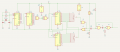
perhaps something more or less like this
1722452178635.png
 

Thread Starter

timtim1234

Joined Nov 30, 2023
246
I was just thinking I can run the timer code in the debugger WITHOUT the hardware while I wait for my hardware to show up? Right?, I thought there was a post saying that?
 

panic mode

Joined Oct 10, 2011
5,008
what hardware you are waiting for? what debugger? you can try compiling code in the in the Arduino IDE. if there is an error it will let you know. but it does not simulate so without hardware you will be more or less blind.

some products do have simulation, an example of free one for 8051 series is https://sourceforge.net/projects/mcu8051ide/
there is a simulator for Arduino as well but it is separate download. have not tried it: https://sourceforge.net/projects/arduino-simulator-io/
 

Thread Starter

timtim1234

Joined Nov 30, 2023
246
Simplest might be to add a tact switch to increment the number of minutes and have an LED blink that number of times to confirm?

humm yes that is an idea how would that be wiring up? Also, if it's the type of switch that i am thinking of ,then when power goes out/remove one would have to reset the number of mins? compare to a normal switch which would already be set.
 
humm yes that is an idea how would that be wiring up? Also, if it's the type of switch that i am thinking of ,then when power goes out/remove one would have to reset the number of mins? compare to a normal switch which would already be set.
The ATtiny85 has 2096 bytes of Flash memory and 512 bytes of EEPROM so I'm pretty sure you can write to the EEPROM to store the selected minutes. There will be a limited number of cycles so maybe consider an alternative if you plan to change the minutes a lot. For example, use an A/D pin to read the wiper pin of a 10K potentiometer. If you do this once in the "setup" rather than the main loop it will do it once when you power up.

For the single LED display, use an output pin in series with an LED and a resistor to limit the current - 1K should be fine if you use a red LED. If using a tact switch to change (increment) the minutes, use another I/O pin pulled high with a 10K resistor which you can pull low by shorting the pin to ground with the switch.

Or with the potentiometer the "setup" read the 10 bit A/D pin, divide by 64 and add 1 to get a number of minutes from 1 to 16. If the value is 16 ignore it and use the value in EEPROM. Blink the LED that number of times and write the value to if it's changed. If the value. There will be other ways but this should work.

Just seen, I was beaten to the suggestion to use a potentiometer, posted whilst I was typing! Great minds.....

I recommend doing everthing step by step to check you are getting the result you expect. Start with using pin 1 for the LED - it will flicker when yo

By the way, someone mentioned you don't need loops for the delay as delay(); can handle long integers, so for 15 minutes the single instruction delay(900000); will work.
 

Thread Starter

timtim1234

Joined Nov 30, 2023
246
I recommend doing everthing step by step to check you are getting the result you expect. Start with using pin 1 for the LED - it will flicker <--- yes i agree with that


Bottom terminal to ground. Top terminal to V+. Middle terminal to an analog input pin. The micro reads the voltage via its analog to digital converter. <--- yes i know what you are talking about hardware wise. but for programming part i don't know...lol
 

panic mode

Joined Oct 10, 2011
5,008
as stated before... do NOT bother with ATTINY... for now.... just use Arduino as is...

1. connect it to your computer using USB cable. power LED on Arduino should light up.

2. start Arduino software

3. start with Blink example (File>Examples>01.Basics>Blink). This will flash another LED that is already on the board.


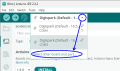
4. Make sure correct board is selected. if not click on pull down menu to make selection

1722542838168.png

to filter results and shorten the list type something ... like "uno"
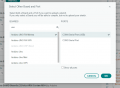
at the moment i the only Arduino Uno i have at hand is the R4 Minima (which has different chip) but you will select your board version and click Ok:
1722543011154.png

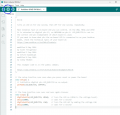
5. click on transfer and wait couple of seconds.
1722543315427.png

6. Congratulation, you just programmed first microcontroller... now lets start playing...

7. change value in line 34 (first delay instruction) to something smaller... such as 300... then send program again. you should see that blinks are shorter.

8. increase value and send the program again...

9. well that is blinking LED on board... but how about some external LED? no problem, you can check documentation and see that on board LED is on pin 13 - at least on Arduino Uno (this is why the example used variable name instead of hardcoded number. this value is changes according to board you selected in step 4). so connect another LED with resistor to pin 13 and GND. resistor can be 220-470 Ohm. if you do this right, the external LED will flash since it is connected to same pin (pin 13)

10. lets try to use different pin, such as pin 10. go to program and replace all instances of LED_BUILTIN by value 10. there are three places to change it lines 28, 33, and 35).. and of course send the program to Arduino and connect your external LED and resistor from pin 10 to GND.

11. but changing things in three places is annoying... and this was just three places. imagine if the LED_BUILTIN was used in 50 or more places.... that would be nightmare to maintain and modify. it is much more practical to define own name for the pin and use it in program. then if you need to move to another pin, you just change it in one place - in the definition. all other 50 places can stay as is.

12. what if you want more than one LED? add declarations and initialization for each, then use them any way you like... perhaps

Code:
const int LED_RED = 10;  // this LED is on pin 10
const int LED_GREEN = 11;   // this LED is on pin 11
const int LED_BLUE = 12;   //  this LED is on pin 12

// the setup function runs once when you press reset or power the board
void setup() {
  // specify how pins are used (input or output...)
  // for driving LEDs they need to be an output
  pinMode(LED_BUILTIN, OUTPUT);
  pinMode(LED_RED, OUTPUT);
  pinMode(LED_GREEN, OUTPUT);
  pinMode(LED_BLUE, OUTPUT);

}

// the loop function runs over and over again forever
void loop() {

  // turn  all LEDs off
  digitalWrite(LED_BUILTIN, LOW);
  digitalWrite(LED_RED, LOW);
  digitalWrite(LED_GREEN, LOW);
  digitalWrite(LED_BLUE, LOW);

  delay(200);    // wait a bit

// then turn them on one by one
  digitalWrite(LED_RED, HIGH);
  delay(1000);   

   digitalWrite(LED_GREEN, HIGH);
  delay(1000);   

    digitalWrite(LED_BLUE, HIGH);
  delay(1000);   

  digitalWrite(LED_BUILTIN, HIGH);
  delay(1000); 

// and turn them off ... in reverse
  digitalWrite(LED_BUILTIN, LOW);
  delay(1000);

  digitalWrite(LED_BLUE, LOW);
  delay(1000); 

  digitalWrite(LED_GREEN, LOW);
  delay(1000);   

  digitalWrite(LED_RED, LOW);
  delay(1000);   

}
then look at other examples (input, analog etc.)
 
Last edited:

Thread Starter

timtim1234

Joined Nov 30, 2023
246
as stated before... do NOT bother with ATTINY... for now.... just use Arduino as is...

1. connect it to your computer using USB cable. power LED on Arduino should light up.

2. start Arduino software

3. start with Blink example (File>Examples>01.Basics>Blink). This will flash another LED that is already on the board.

View attachment 328400

4. Make sure correct board is selected. if not click on pull down menu to make selection

View attachment 328401

to filter results and shorten the list type something ... like "uno"
at the moment i the only Arduino Uno i have at hand is the R4 Minima (which has different chip) but you will select your board version and click Ok:
View attachment 328402

5. click on transfer and wait couple of seconds.
View attachment 328404

6. Congratulation, you just programmed first microcontroller... now lets start playing...

7. change value in line 34 (first delay instruction) to something smaller... such as 300... then send program again. you should see that blinks are shorter.

8. increase value and send the program again...

9. well that is blinking LED on board... but how about some external LED? no problem, you can check documentation and see that on board LED is on pin 13 - at least on Arduino Uno (this is why the example used variable name instead of hardcoded number. this value is changes according to board you selected in step 4). so connect another LED with resistor to pin 13 and GND. resistor can be 220-470 Ohm. if you do this right, the external LED will flash since it is connected to same pin (pin 13)

10. lets try to use different pin, such as pin 10. go to program and replace all instances of LED_BUILTIN by value 10. there are three places to change it lines 28, 33, and 35).. and of course send the program to Arduino and connect your external LED and resistor from pin 10 to GND.

11. but changing things in three places is annoying... and this was just three places. imagine if the LED_BUILTIN was used in 50 or more places.... that would be nightmare to maintain and modify. it is much more practical to define own name for the pin and use it in program. then if you need to move to another pin, you just change it in one place - in the definition. all other 50 places can stay as is.

12. what if you want more than one LED? add declarations and initialization for each, then use them any way you like..

View attachment 328404
as stated before... do NOT bother with ATTINY... for now.... just use Arduino as is... <-------------- awwww :( :( but yes i see why you are saying that.
 

panic mode

Joined Oct 10, 2011
5,008
you need to learn to walk before you can run or do backflips....
you need to get to know the process on something that is stupidly simple before you are ready to kick it up a notch. i am not talking about 10 years in Tibet... couple of hours/days of playing with Arduino will make you learn a lot and save tons of frustration. and as noted in the previous posts, that is the way one develops. once you work the kinks out using Arduino, THEN move onto attiny...

if you paid attention, you would know by now that working with attiny is less comfortable. so practice and do the development in comfort before you go to something where every mistake will torment you 10x more.
 
Last edited:
Status
Not open for further replies.
Top