A $20 Logging DMM?

Thread Starter

Ya’akov

Joined Jan 27, 2019
10,235
@schmitt trigger @dl324

UPDATE: Today I returned to working out how to get the logged data from the meter since the app wouldn’t save. To my surprise, it was now working. I have no idea what changed, but I can have it write the file out now without trouble. So long as it doesn’t revert, this is now a very good $20 meter as a quick logging solution. A reminder that the meter itself doesn’t log, it depends on the smartphone or tablet because the app does the logging. If you have an older Android phone (many people do) pairing it with this meter would allow long term logging easily and cheaply.


NOTE: I may have encountered a deal breaker but it will require more research to be sure. See UPDATE, above. The export (”save“) function for the tabular data claims to successfully save the data but I can’t locate any files written by the app. The chart’s “save” (as photo) causes the app to crash—this doesn’t matter to me at all. But not being able to export the data really changes the value of the logging—if not completely eliminating it. This is on iOS so I still need to test Android and an older version of iOS on an older phone. More news as it happens!

(I think, really, that this meter is well worth the $20 even if the app doesn’t save the data, based on the other functions, the build quality and the remote viewing via BT, so I would probably still recommend it as a cheap meter for general use.)

This post arose from a question in a different thread. I‘ve put it hear to avoid driving way off topic in that thread. This is a logging DMM for a startlingly low price—the question is, is it even worth the 20 bucks. Spoiler alert: so far it seems the answer is ”yes maybe!”.

Concerning the DMM. I received it today. First impressions: it seems to be a really good deal. I would encourage anyone who can purchase from the US Amazon site, can risk 20 bucks (an even lower risk now, since I have received one and tested the basic functionality), and could use a logging DMM that also has some nice features for the price of some dirt.

Stay tuned to my Mailbag Blog for a proper review, but in the mean time a very early first impression:

Build Quality

  • The YF-90EPD comes with a blue protective jacket—possibly TPU—that is extremely well fitted. The quality of the plastic seems only adequate but I suspect it will hold up reasonably well.

  • The housing is solid and has no perceptible flex (ABS?). I think the jacket will protect it well from bumps and drops so even with the high stiffness it should be fairly rugged.

  • The legends are silkscreened and may be subject to abrasive decay (they might get rubbed off). This would depend on handling and just how good the silkscreening is—time will tell.

  • The selector switch is not bad. I wouldn‘t say it’s great but I‘ve seen (much) worse. The buttons are actually pretty good with a rubber keys (silkscreened—these almost certainly will rub off, keep a fine Sharpie on hand) and a positive, tactile action.

  • The probes are mid-quality claiming 20A and CAT III (I don’t believe either one). They are very generic but not junky. The handles are double molded (grey over black and red) of something durometer of ~95A or so.

    The insulation is PVC and they are reasonably flexible. The probes ends are very typical with a retaining groove to accomodate slide on accessories (like alligator clips). I am thankful they aren’t the needle sharp, threaded, gold flashed variety I have seen so much lately. The banana plugs are shielded and use a cruciform split, not a spring overlay.

    Of course a good set of probes would cost a multiple of this entire meter.

  • The kickstand is made of whatever the case is made of and seems solid enough.

  • The battery compartment is held in place with two M2 screws. These are not captive so be careful. The battery compartment door fits closely over a complementary box with a recess all around so it fits like a lid. While there is no gasketing I expect the close fit to prevent dust and moisture infiltration. I am confident it is splash proof and it might even survive immersion—just not too deep or for too long.

  • The display is readable but not brilliant. It has a backlight though oddly it gets turned on by a typical CDS photoresistor behind a little window on the face. Covering this will turn on the backlight, which is green and nicely bright. Since the meter (disappointingly) uses a 9V battery for power, the backlight could be problematic for long term operation in the dark. We’ll see.
Functions

  • The meter is only 4000 count, but hey—20 bucks. Given the expected use as a logger and an ancillary meter I don‘t expect this to be too disappointing in practice.

  • The meter is autoranging and has a good set of measurement options.

    It can do V
    (AC/DC with a nice auto function selecting between the two or you can force it with the select button) It is hard to tell if this is a true RMS meter. You’d think it would be plastered on there somewhere, but the specs say, “response: average, calibrated in RMS of sine wave. It also claims 40 to 400Hz which is nice.

    There is an Ω/diode/continuity range. The Ω function is good for ~1.0-1.5% and 40MΩ. I haven’t checked the diode test voltage yet but the specs seem to imply it is current limited to 4mA.

    Continuity is pretty fast, but not latching. The specs say it is triggered at <100Ω and has an open circuit voltage of ~.5V. Testing it shows the probe tips are… kind of icky with the plating really not making it easy to get a decent electrical contact. I have not yet tried cleaning them, nor have I put good probes on the meter to check continuity performance.

  • It can do capacitance with a max of 100μF with 100nF resolution, and in the lowest range you can do 51.2nF with 10pF resolution.

  • It can do frequency and duty cycle. The specs claim 5.12Hz to 5.12MHz—<projectfarm>we’re gonna test that!</projectfarm> The duty cycle range is good for .1% to 99.9% up to 10kHz.

  • It can do temperature, and comes with a very basic thermocouple with a stainless steel probe and a coiled cord. It claims -20 to 1000℃ and only reads out in ℃. I don’t consider this last part a problem.

  • It has a battery test range, which provides a 25mA load. This is a nice little function.

  • It can do AC/DC current, with both ranges (by spec) covering .1μA to 20A over six ranges. The 400μA to 400mA ranges are protected by a 400mA 250V PolySwitch and the 20A range has a 20A 250V fuse good for 10s at full current. I have not yet opened the meter to see what sort of fuse they’ve included.

Logging

The logging ”works”. I haven’t had the chance, yet, to fully test it but here are some observations:

  • The app is basic but effective. I installed the iOS version (I haven’t had a chance to check the Android version yet) by scanning the QR code in the “manual” (read: sheet of paper, but English only and written by competent speaker) and getting redirected to the Apple App Store. I didn’t read any instructions and got it running in a few moments. The connection to the is so transparent (completely automatic) that I spent a few moments puzzling over how to connect—expecting the typical add device, etc. I haven’t checked yet but it must be using BLE and it—just worked.

  • Logging depends on the App—it is not done by the meter. This could be a problem for some if there is a desire to do long term logging. But remember, this is a $20 meter. I have a couple of old phones and a couple of old Android tablets so if I want to do long term logging I can use one of those. I have never tried to buy an old Android device but I am guessing you can get one with BLE for very small dollars.

  • The app has the minimum of functions but enough to be very usable. I was pleasantly surprised by the competent layout. It’s not work of art but it will do what I could want from it. The home screen provides a current value and function display as well buttons to start and stop logging. You can select the sampling rate with a slider in the settings screen, from 1S/m to .5S/h (the top would be one sample every 2 hours, the meter doesn’t manage to take half-samples.


    IMG_0844.pngIMG_E8FD080AE143-1.jpeg

    The data can be viewed as a table or a basic graph (nice to see trends). The table view also allows export (save) as an Excel document (I don‘t know which version) or “text”.

    UNFORTUNATELY this function appears broken on the latest iOS/iPadOS at least. But I haven’t really determined this exhaustively and I will be investigating further and posting the results. It would be a shame, but I am not ready to thrown in the towel.
 
Last edited:

MrAl

Joined Jun 17, 2014
13,704
That looks pretty interesting I'll have to check that out.

Too bad this wasn't for the Windows platform. Several years ago I had created an 8 pin DIP chip that could log 4 channels at the same time using the software I provided with it. It was very versatile because it was a chip where you could add your own scaling resistors or thermistors or current sense resistors or whatever, meaning you could easily measure voltage, current, or even temperature, and depending on the sensor you use, just about any quantity could be measured. Because you supply your own 'sensors' you could measure voltage from 0 to 1v, 0 to 10v, 0 to 1000v, whatever was needed. Current just about any range also. Temperature depends on the sensor you choose from a cheap thermistor to thermocouple or whatever.
I sold these chips for $5 USD and that included the software and detailed schematics.
The interface was galvanically isolated RS232, but you could use an RS232 to USB adapter if your computer did not have an RS232 port.

The software was for the Windows platform 32/64 bit any version from XP up, but since the RS232 protocol is not that complicated you could write your own software for any platform as long as the hardware supports RS232 in some form.

The logging format was in pure text stored in a text file, so it could be transported to any device that could read a regular pure text file. The output would look something like this:
12/07/23 05:30:23 1.234 2.345 3.456 4.567
12/07/23 05:30:24 1.254 2.315 3.456 4.569
and 'deltas' could also be logged, the difference between successive readings.
The graphical user interface had multiple columns for the date, time, and four channel outputs, which also included scaling factors you could change depending on what sensors you were using.
You could also take differential readings.
 
Last edited:

MrAl

Joined Jun 17, 2014
13,704
Hello again,

I just checked out that meter. Yes it looks pretty interesting. I wonder what you get for $20 though, and along with that, what 'permissions' do you have to allow on your phone.
I have found that recently some apps are being too invasive for phones, they want you to sign your life away to them just so you could use their app. I hope this is not one of them.
Maybe you could update once you start using it.
 

Thread Starter

Ya’akov

Joined Jan 27, 2019
10,235
Hello again,

I just checked out that meter. Yes it looks pretty interesting. I wonder what you get for $20 though, and along with that, what 'permissions' do you have to allow on your phone.
I have found that recently some apps are being too invasive for phones, they want you to sign your life away to them just so you could use their app. I hope this is not one of them.
Maybe you could update once you start using it.
Only Bluetooth.
 

schmitt trigger

Joined Jul 12, 2010
2,089
Thanks Y for the mini-review.
From your and other reviews, this appears to be a typical of Chinese electronic products: Clever and ingenious devices, at an unbeatable price, full of promise, but which never seem to be completely debugged/ tested/ finalized.

It appears to me that the original designer, once that the basic functionality is achieved, no longer bothers with finalizing the design (the hardest part of any project) because there is no monetary incentive to do so.
 

Thread Starter

Ya’akov

Joined Jan 27, 2019
10,235
Thanks Y for the mini-review.
From your and other reviews, this appears to be a typical of Chinese electronic products: Clever and ingenious devices, at an unbeatable price, full of promise, but which never seem to be completely debugged/ tested/ finalized.

It appears to me that the original designer, once that the basic functionality is achieved, no longer bothers with finalizing the design (the hardest part of any project) because there is no monetary incentive to do so.
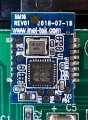
The app seems to be the problem. I opened the meter and found it uses a BT module called the BM16 which I found a little about. It seems to be a BT UART adapter, which suggests the data is simply serial data. I saw references to “serial data” in the specs of the meter and they make more sense now.

The problem is, I can’t see the meter’s BT signal with a BT scanner. The app is able to connect with no problem, but I don’t see the meter itself. I am going to try sniffing it a different way, but if I can figure out what’s up with it, it might be trivial to make a small datalogger using a BT-capable MCU dev board, which would be pretty cool.

But, I want to get the data saving, I am also pursuing communication with company that wrote the app. This meter seems to be available with a number of brand names and the app is general with no branding and is free.
 

MrAl

Joined Jun 17, 2014
13,704
The app seems to be the problem. I opened the meter and found it uses a BT module called the BM16 which I found a little about. It seems to be a BT UART adapter, which suggests the data is simply serial data. I saw references to “serial data” in the specs of the meter and they make more sense now.

The problem is, I can’t see the meter’s BT signal with a BT scanner. The app is able to connect with no problem, but I don’t see the meter itself. I am going to try sniffing it a different way, but if I can figure out what’s up with it, it might be trivial to make a small datalogger using a BT-capable MCU dev board, which would be pretty cool.

But, I want to get the data saving, I am also pursuing communication with company that wrote the app. This meter seems to be available with a number of brand names and the app is general with no branding and is free.
Hi,

Oh that's interesting too. Wonder what is going on.

I can't help but think that if you are that familiar with BT and any MCU dev board, you could design your own voltmeter that blows that one away, and also include at least two channels. Once you do that, you can store the data in any form you like.

The case does not have to be a nice as the one being sold either. The case I used was just a small black box with an RS232 cable and four connectors for the input channels. I was able to use it for a lot of stuff and since the display was on the computer I never needed an actual physical display. Since I wrote all the software for both the microcontroller and Windows, I was able to incorporate over sampling with the ADC and get higher resolution. These days though you can get external ADC chips that do 16 bits, which if I had to do it all over again, i would use that.
I am sure you can do this too and add whatever features you like. It's amazing what you can do these days with the chips out there.

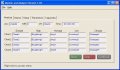
Here's a screen shot of the initial user interface. As you can see, you can add all kinds of functionality, and as a bonus, if you think of anything later you can add that too! :)
 

Attachments

dl324

Joined Mar 30, 2015
18,328
Received my meter this evening. Confronted with flakey leads right off the bat. Tried a spare set I had and they were only marginally better. Ended up using a screwdriver to spread out the tines on the provided leads so they'd make better contact.

Do not like the autoranging at all and turned it off right away. Even without autoranging, it takes too long to settle on a value (only tried resistance so far).

Like the fact that they included a screwdriver to remove the battery cover. Don't know why they didn't go for something where you don't need one. Had to bang the meter on my palm (more than several times) to dislodge the battery compartment cover. That seems over-designed and poorly thought out to me.
 
Last edited:

Thread Starter

Ya’akov

Joined Jan 27, 2019
10,235
Received my meter this evening. Confronted with flakey leads right off the bat. Tried a spare set I had and they were only marginally better. Ended up using a screwdriver to spread out the tines on the provided leads so they'd make better contact.

Do not like the autoranging at all and turned it off right away. Even without autoranging, it takes too long to settle on a value (only tried resistance so far).

Like the fact that they included a screwdriver to remove the battery cover. Don't know why they didn't go for something where you don't need one. Had to bang the meter on my palm (more than several times) to dislodge the battery compartment cover. That seems over-designed and poorly thought out to me.
I used a spudger on the battery. While I would like to have an easier time, I made a tab from polyimide tape that works fine—i’m more unhappy with non-captive hardware than the removal troubles. I do like that it is a relatively dust/water tight compartment thanks to the design, I also noted but didn’t mention that it uses brass inserts rather than self-tappers which shows some attention to product life. (The main housing, disappointingly, uses self tappers—but it is not intended to be opened and closed repeatedly.

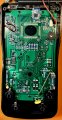
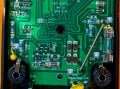
Here are some internal photos while I work on research to write a proper review…. (click on the photo for full size)

IMG_0849.jpeg
complete view of top clamshell

IMG_0849.jpeg

closeup of bottom half of top clamshell
1. Cheap fuse—only not disappointing because it is totally expected.
2. PolySwitch—a good choice for the 400mA range, and another reason to recommend this meter to the uncommitted neophyte (the number of functions and 20 bucks are some others).
3. PTC—the main input (V/Ω/&c) is protected by a PTC, this is nice.
4. Cheap jacks—no surprise here, but there you go.

Overall, there is a distinct lack of antitracking slots and trace separation. So, while it is fairly well protected from overcurrent is is clearly not CAT III 600V. I wouldn’t use this meter past domestic mains troubleshooting but this should have been obvious without opening it. I really wish it wasn’t labeled this way.

IMG_0847.jpeg

bluetooth module
I’ve spent some time researching this module without too much luck yet. I am going to probe for the UART I expect is connected from the encapsulated ASIC to the module. One thing I want to try is connecting a USB → UART module. There is a removable panel at the top of the case (mirrored in appearance by the protective boot) that looks intended to receive connectors. It might be the case this meter sometimes includes USB connectivity. If my surmise is correct, the app sampling rate is not an instruction to the module but sets the polling rate of the app. If things are as I am suspecting, this may be very easy to make connections to and control.

I should note that even in the absence of a functioning save feature, the app displays all received data and includes some stats about it on the home page (min, max, &c.) which makes the logging feature still valuable. Once again, I include the context: 20 bucks.

I will continue to research the bluetooth and serial alternatives—this has become a new project. At this point would I recommend buying this meter? Depending on the intended application: yes.

Currently recommended applications for this meter:

  • Uncommitted neophyte—by this I mean the beginner who has become interested in “electronics“ and has no DMM. The advantage of this one is the diversity of functions, the relatively wide measurement range, and the ability to log (or at least monitor*)​
  • Remote probing—Because of the monitoring/logging function, this can be used as a remote probe in cases where something is hard to get to but is in BT range. Inside a closet/cabinet, in the next room, &c. I have used my Fluke‘s BT this way many times. In the case of the Fluke, it is also a great safety feature since it is actually CAT III, &c. and so can be placed in an arc flash danger location and read at a safe distance. There is a bit of this for our present meter, such as where there might be a danger due to a running machine and the like.​
  • Nth meter—test setups often need several meters (V and C watching, V at different nodes, &c) for the 20 bucks, this would make a pretty good nth meter, and the temperature probe also has some utility here. Remember that if you run the app, you get min/max information as well as samples documented in a table and graph.​
  • Serious, very young kids—at the low price and with the big range of measurement options this would be a great meter for the youngster who wants to learn about using a meter but isn’t quite at an age where putting a more expensive one in their hands is the best idea. The only thing militating against this idea is the (stupid) PP3 power source. Still… 20 bucks to provide a lot of fun and autodidactic opportunities is a good thing.​
*remember I haven’t been able to test Android or old iOS yet, they may be fine. I also still hold out a reasonable hope I will be able to get help from the developer to make it or on current iOS/iPadOS versions.
 
Last edited:

MrAl

Joined Jun 17, 2014
13,704
I used a spudger on the battery. While I would like to have an easier time, I made a tab from polyimide tape that works fine—i’m more unhappy with non-captive hardware than the removal troubles. I do like that it is a relatively dust/water tight compartment thanks to the design, I also noted but didn’t mention that it uses brass inserts rather than self-tappers which shows some attention to product life. (The main housing, disappointingly, uses self tappers—but it is not intended to be opened and closed repeatedly.

Here are some internal photos while I work on research to write a proper review…. (click on the photo for full size)

View attachment 309470 complete view of top clamshell

View attachment 309471closeup of bottom half of top clamshell
1. Cheap fuse—only not disappointing because it is totally expected.
2. PolySwitch—a good choice for the 400mA range, and another reason to recommend this meter to the uncommitted neophyte (the number of functions and 20 bucks are some others).
3. PTC—the main input (V/Ω/&c) is protected by a PTC, this is nice.
4. Cheap jacks—no surprise here, but there you go.

Overall, there is a distinct lack of antitracking slots and trace separation. So, while it is fairly well protected from overcurrent is is clearly not CAT III 600V. I wouldn’t use this meter past domestic mains troubleshooting but this should have been obvious without opening it. I really wish it wasn’t labeled this way.

View attachment 309472bluetooth module
I’ve spent some time researching this module without too much luck yet. I am going to probe for the UART I expect is connected from the encapsulated ASIC to the module. One thing I want to try is connecting a USB → UART module. There is a removable panel at the top of the case (mirrored in appearance by the protective boot) that looks intended to receive connectors. It might be the case this meter sometimes includes USB connectivity. If my surmise is correct, the app sampling rate is not an instruction to the module but sets the polling rate of the app. If things are as I am suspecting, this may be very easy to make connections to and control.

I should note that even in the absence of a functioning save feature, the app displays all received data and includes some stats about it on the home page (min, max, &c.) which makes the logging feature still valuable. Once again, I include the context: 20 bucks.

I will continue to research the bluetooth and serial alternatives—this has become a new project. At this point would I recommend buying this meter? Depending on the intended application: yes.

Currently recommended applications for this meter:

  • Uncommitted neophyte—by this I mean the beginner who has become interested in “electronics“ and has no DMM. The advantage of this one is the diversity of functions, the relatively wide measurement range, and the ability to log (or at least monitor*)​
  • Remote probing—Because of the monitoring/logging function, this can be used as a remote probe in cases where something is hard to get to but is in BT range. Inside a closet/cabinet, in the next room, &c. I have used my Fluke‘s BT this way many times. In the case of the Fluke, it is also a great safety feature since it is actually CAT III, &c. and so can be placed in an arc flash danger location and read at a safe distance. There is a bit of this for our present meter, such as where there might be a danger due to a running machine and the like.​
  • Nth meter—test setups often need several meters (V and C watching, V at different nodes, &c) for the 20 bucks, this would make a pretty good nth meter, and the temperature probe also has some utility here. Remember that if you run the app, you get min/max information as well as samples documented in a table and graph.​
  • Serious, very young kids—at the low price and with the big range of measurement options this would be a great meter for the youngster who wants to learn about using a meter but isn’t quite at an age where putting a more expensive one in their hands is the best idea. The only thing militating against this idea is the (stupid) PP3 power source. Still… 20 bucks to provide a lot of fun and autodidactic opportunities is a good thing.​
*remember I haven’t been able to test Android or old iOS yet, they may be fine. I also still hold out a reasonable hope I will be able to get help from the developer to make it or on current iOS/iPadOS versions.
Hi,

Do you have any data on battery life while using BT to monitor a voltage 24/7 ?
I ask because this would be a cheap way to monitor a remote voltage as long as the BT working range was decent enough.

It doesn't look too bad, and we can't forget it's only $20 USD.
There could be better ones for more money I would think.
 

MrAl

Joined Jun 17, 2014
13,704
Received my meter this evening. Confronted with flakey leads right off the bat. Tried a spare set I had and they were only marginally better. Ended up using a screwdriver to spread out the tines on the provided leads so they'd make better contact.

Do not like the autoranging at all and turned it off right away. Even without autoranging, it takes too long to settle on a value (only tried resistance so far).

Like the fact that they included a screwdriver to remove the battery cover. Don't know why they didn't go for something where you don't need one. Had to bang the meter on my palm (more than several times) to dislodge the battery compartment cover. That seems over-designed and poorly thought out to me.
Hi,

Yeah they usually supply cheap leads on cheap voltmeters.

The screw for the battery compartment is kind of standard though. That's because they consider the battery terminals to be part of the internal circuit where you could get a bad shock if the battery compartment door falls open during use and you accidentally touch a battery terminal while holding the meter and making a measurement. Some meters even have a small plastic liner that fits snuggly over the entire 9v battery that insulates the entire battery so touching the metal battery case (being covered in plastic) does not subject you to any shock either, which could happen due to the small dimensions of the battery terminals-to-case spacings. Using a screw this is not likely to happen, while using a snap action door it is likely to fall off at some point and maybe even become lost. I find I have to use a small piece of tape on TV remotes because the doors can fall off at unexpected times.

As Ya'akov mentioned, the screw is not captive, and that's a drawback because you can lose the screw. It's not the end of the world though. If you have a tiny magnet and the screw happens to have enough iron content, you can keep the magnet stuck near the end of the screwdriver and the screwdriver will hold the screw nicely. You can even tape a rare earth magnet close to the screw so that when it comes off the magnet sucks the screw right to it and holds it there.
If the screw is high grade stainless steel or brass (some are) then this magnet trick doesn't work obviously :)
 
Last edited:

Thread Starter

Ya’akov

Joined Jan 27, 2019
10,235
Hi,

Do you have any data on battery life while using BT to monitor a voltage 24/7 ?
I ask because this would be a cheap way to monitor a remote voltage as long as the BT working range was decent enough.

It doesn't look too bad, and we can't forget it's only $20 USD.
There could be better ones for more money I would think.
No, I don’t—but I wouldn’t expect much from a PP3 battery. I would probably rig up a Type-C power bank with a 9V trigger board and a PP3 stamp connector for long term operation. (Or, something plugged into the mains)
 

sarahMCML

Joined May 11, 2019
697
I used a spudger on the battery. While I would like to have an easier time, I made a tab from polyimide tape that works fine—i’m more unhappy with non-captive hardware than the removal troubles. I do like that it is a relatively dust/water tight compartment thanks to the design, I also noted but didn’t mention that it uses brass inserts rather than self-tappers which shows some attention to product life. (The main housing, disappointingly, uses self tappers—but it is not intended to be opened and closed repeatedly.

Here are some internal photos while I work on research to write a proper review…. (click on the photo for full size)

View attachment 309470
complete view of top clamshell

View attachment 309471

closeup of bottom half of top clamshell
1. Cheap fuse—only not disappointing because it is totally expected.
2. PolySwitch—a good choice for the 400mA range, and another reason to recommend this meter to the uncommitted neophyte (the number of functions and 20 bucks are some others).
3. PTC—the main input (V/Ω/&c) is protected by a PTC, this is nice.
4. Cheap jacks—no surprise here, but there you go.

Overall, there is a distinct lack of antitracking slots and trace separation. So, while it is fairly well protected from overcurrent is is clearly not CAT III 600V. I wouldn’t use this meter past domestic mains troubleshooting but this should have been obvious without opening it. I really wish it wasn’t labeled this way.

View attachment 309472

bluetooth module
I’ve spent some time researching this module without too much luck yet. I am going to probe for the UART I expect is connected from the encapsulated ASIC to the module. One thing I want to try is connecting a USB → UART module. There is a removable panel at the top of the case (mirrored in appearance by the protective boot) that looks intended to receive connectors. It might be the case this meter sometimes includes USB connectivity. If my surmise is correct, the app sampling rate is not an instruction to the module but sets the polling rate of the app. If things are as I am suspecting, this may be very easy to make connections to and control.

I should note that even in the absence of a functioning save feature, the app displays all received data and includes some stats about it on the home page (min, max, &c.) which makes the logging feature still valuable. Once again, I include the context: 20 bucks.

I will continue to research the bluetooth and serial alternatives—this has become a new project. At this point would I recommend buying this meter? Depending on the intended application: yes.

Currently recommended applications for this meter:

  • Uncommitted neophyte—by this I mean the beginner who has become interested in “electronics“ and has no DMM. The advantage of this one is the diversity of functions, the relatively wide measurement range, and the ability to log (or at least monitor*)​
  • Remote probing—Because of the monitoring/logging function, this can be used as a remote probe in cases where something is hard to get to but is in BT range. Inside a closet/cabinet, in the next room, &c. I have used my Fluke‘s BT this way many times. In the case of the Fluke, it is also a great safety feature since it is actually CAT III, &c. and so can be placed in an arc flash danger location and read at a safe distance. There is a bit of this for our present meter, such as where there might be a danger due to a running machine and the like.​
  • Nth meter—test setups often need several meters (V and C watching, V at different nodes, &c) for the 20 bucks, this would make a pretty good nth meter, and the temperature probe also has some utility here. Remember that if you run the app, you get min/max information as well as samples documented in a table and graph.​
  • Serious, very young kids—at the low price and with the big range of measurement options this would be a great meter for the youngster who wants to learn about using a meter but isn’t quite at an age where putting a more expensive one in their hands is the best idea. The only thing militating against this idea is the (stupid) PP3 power source. Still… 20 bucks to provide a lot of fun and autodidactic opportunities is a good thing.​
*remember I haven’t been able to test Android or old iOS yet, they may be fine. I also still hold out a reasonable hope I will be able to get help from the developer to make it or on current iOS/iPadOS versions.
There's a USB to PC version called the Model 90EPC on Amazon UK, but it's £33.99 as against £22.99 for the BT one.
 

Thread Starter

Ya’akov

Joined Jan 27, 2019
10,235
I expected better. Even the $7.99 (all of mine were free) meter from Harbor Freight doesn't have that problem.
OK, so I tried to clean the tips with IPA—no difference. However, a quick going over with 7000 grit abrasive paper eliminated the problem entirely. The question is, will it return?
 

Thread Starter

Ya’akov

Joined Jan 27, 2019
10,235
UPDATE: Today I returned to working out how to get the logged data from the meter since the app wouldn’t save. To my surprise, it was now working. I have no idea what changed, but I can have it write the file out now without trouble. So long as it doesn’t revert, this is now a very good $20 meter as a quick logging solution. A reminder that the meter itself doesn’t log, it depends on the smartphone or tablet because the app does the logging. If you have an older Android phone (many people do) pairing it with this meter would allow long term logging easily and cheaply.
 
Top