4060 ic simulation in proteus

Thread Starter

imani9009

Joined Nov 8, 2013
56
Hi,
I have created a simulation of 4060 ic in proteus for timing applications. where can i set its manual oscillator frequency. when i put some figure say 20 in the oscillator frequency in the properties of the ic it works. but when i leave it default, it does not work. 4060.png
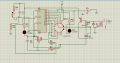
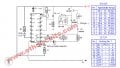
THIS THE CIRCUIT I HAVE MADE FROM THIS ONE
link for the whole circuit
Simple-Timer-Circuit-With-IC-4060.jpg
this is the link for MY simulation file.
https://1drv.ms/u/s!ApyeSstiSCdBhp9eJTgdeL2v_E38UA?e=Cq7zIG
 

ScottWang

Joined Aug 23, 2012
7,500
Please upload your file to our forum, that is to avoid when the link is disconnected then the file will disappear, the extension file (24hr timer.pdsprj) can't upload to the forum directly, so I compressed it to a zip file.
 

Attachments

Alec_t

Joined Sep 17, 2013
15,116
The lack of response to date may be because most members here use the free LTspice simulator rather than Proteus.
I don't use Proteus, but have you set the correct supply voltage parameter for the 4060?
Your circuit is torture to decipher because of all the jig-jag lines! Doesn't Proteus allow easy amendment of the layout to eliminate the jig-jags?
 

Wolframore

Joined Jan 21, 2019
2,619
I have had numerous problems simulating the 4060 in Proteus. For some reason, it will start quickly then slow down and sometimes just get hung up. I like to breadboard my 4060 projects.
 

eetech00

Joined Jun 8, 2013
4,705
Hi,
I have created a simulation of 4060 ic in proteus for timing applications. where can i set its manual oscillator frequency. when i put some figure say 20 in the oscillator frequency in the properties of the ic it works. but when i leave it default, it does not work.
Try this one (attached).

Your schematic had a few errors and properties were not assigned.
You have press the reset button to start the oscillator, although you shouldn't have to.
I didn't check or redraw the whole circuit, just corrected enough to simulate.

You really need to learn how to draw schematics.:eek:
 

Attachments

Top