4 layer pcb and smt

Thread Starter

noiseimpression

Joined Apr 15, 2026
2
Hi.

I would have a quick newbee question. I am using surface mount components for the first time on a 4layer pcb. Just from the logical understanding, the surface mount probably wont be able to go through all layers like the "through hole" components does?
From what I read is that I have to just place a via right next to each smd? Is this the correct workflow? Is there anything else I need to be aware of?
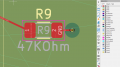
Does this looks correct?
1776275247305.png
 

dl324

Joined Mar 30, 2015
18,239
Welcome to AAC!
Just from the logical understanding, the surface mount probably wont be able to go through all layers like the "through hole" components does?
Surface mount components won't connect to layers other than the one they're mounted on without using vias.
From what I read is that I have to just place a via right next to each smd? Is this the correct workflow?
No. Vias don't need to be placed right next to each SMD lead.
Is there anything else I need to be aware of?
Vias don't have to go through all layers. You can have buried vias that can go from layer 2 to layer 3, but not be exposed on layers 1 or 4.

Are you certain that you need more than a 2 layer board?

Don't have wires connecting to pads at angles other than a multiple of 45 degrees. Unless you have a really good reason, all wire angles should be multiples of 45 degrees. The wires in your example seem to be narrower than they need to be.
 

MrChips

Joined Oct 2, 2009
34,674
You don't need vias if the connection is to another component or trace on the same layer.

I prefer to use 45° or 90° trace angles.

I am more conservative with regards to track width. In other words, I go with larger widths where space allows, especially with POWER and GND.

I have never had a reason to do a 4 layer board.
 

panic mode

Joined Oct 10, 2011
4,902
No. Vias don't need to be placed right next to each SMD lead.
correct. you can place where convenient... sometimes there is quite a distance from the component.
you can also place via on the component pad... but... beware of that.... because some of solder will be getting into via. that in itself is not an issue (if anything that is an improvement). if you are manually soldering this is still not an issue.
but it can be an issue with using stencil or PCBA service. that is because amount of dispensed solder is small here, so if some of it goes down the drain, there may not be enough of solder on the surface to connect to component.
then you get a weak joint that easily breaks.

1776431278274.png

the other thing to beware of is that traces on both sides of the part should be more or less similar in width. this means during soldering both sides are heating up and cooling evenly and not stressing the part. one of the really bad examples is where one pad connects to thin trace while the other connects to copper zone (copper pour) that is set as solid (no thermal reliefs).
personally i try to use wider traces for number of reasons:
lower resistance/higher ampacity
easier for manufacturers (less scrap)
easier for repair or modifications
better cooling, for many parts traces are the only heatsink available.
 
Last edited:

cmartinez

Joined Jan 17, 2007
8,731
Vias don't have to go through all layers. You can have buried vias that can go from layer 2 to layer 3, but not be exposed on layers 1 or 4.
That is true. But the PCB will be much more expensive if you use even a single via that does not go through all the layers. That type of vias are called "buried vias", and they complicate PCB manufacturing exponentially. So unless it's absolutely necessary, try to design your PCB exclusively with vias that go through all the layers.
 
Top