Sure, will do. As soon as I figure how to get back to that I may have to undelete it to get back to the option.
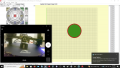
This is the computer display I a at the moment:
on that screen, you will see the Printer section where the current printer and nozzle are shown:
Click the gear icon, and you will see the printers:
Select the nozzle size (only 0.4mm is show, as in the red circle), and click Confirm. This will add the Ender 3 Pro with a 0.4mm nozzle to the printer dropdown so you can select and use it:
I saw the ender 3 pro in the configuration but it would not let me select it. This computer that I use for slicing is not connected to the printer directly instead I used the network to move the sliced file to my proto print computer which is connected to the Ender 3 printer.
Yes, just use the Import option at the bottom on the dropdown. The native format of the program is 3MF, and you should save the projects in that format, but it happily imports a number of formats including STL.
I just had to buy another magnetic mat, while I am very religious about applying Hairspray to the mat before I do a print eventually peeling prints off of the mat causes part of the mat to tear up it is bonding in spite of the Hairspray to the mat. I view this as a consumable item I will just have to replace occasionally just on these printers alone I have gone through 5 or so. https://www.amazon.com/dp/B07X3WBNPX?psc=1&ref=ppx_yo2ov_dt_b_product_details
I just had to buy another magnetic mat, while I am very religious about applying Hairspray to the mat before I do a print eventually peeling prints off of the mat causes part of the mat to tear up it is bonding in spite of the Hairspray to the mat. I view this as a consumable item I will just have to replace occasionally just on these printers alone I have gone through 5 or so. https://www.amazon.com/dp/B07X3WBNPX?psc=1&ref=ppx_yo2ov_dt_b_product_details
What kind of material are you using?
Are you sure your Z-offset is good?
Are you letting the build plate cool down before removing prints?
The rate at which you're going through build plates is not normal in my experience. The only times I have had to replace them is when z-offset was too low, nozzle too hot, and polycarbonate filament got welded to the PEI plate. The problem might be the Hairspray. Are you sure you need it? Most filament sticks to a PEI plate without any magic sauce but when it doesn't I use nanopolymer adhesive. No issues with it.
As a general rule of thumb I like the prints to cool for 10 minutes, but not always. I don't know what causes the extreme stickiness but it can be a problem which is why I use the hairspray.
PEI has a particular property that makes it ideal for FDM build plates. Its surface energy increases dramatically when heated, then reduces again when it cools. That‘s why the cooling is critical.
For me PLA, PA, PETG, and usually TPU all release easily with a range of effort from falling off on their own to needing a slight tug so long as the build plate is cooled off. The only exception among them is the TPU which can occasionally be a little hard to get off but never to the point of damage to print or plate.
I used to Team Viewer for RA (remote access) on my printer, the company tagged me as a commercial user (I'm not), I've found a new RA software for my printing hobby. It's [url='https://ndi.video/'NDI[/url] (Network Devise Interface, unlike Team Viewer it is limited to my LAN which IMO isn't a bad thing. It is a bit slow om the mouse/keyboard interface, but the video is top notch.
The Bowden tube is considered a consumable, albeit one that lasts a long time. Friction and heat can take a toll and sometimes you just have to replace it. You can get much better quality PTFE tubing than what comes stock on the Ender, and it can help with reliability and even print quality in some cases.
A direct extruder is a very nice thing. It lets you print faster and use flexible filaments like TPU with much less risk of clogging. Unfortunately, the very inexpensive kits that let you convert an Ender 3’s Bowden extruder to a direct one suffer from some problems.
The biggest is the huge stepper that the stock extruder uses. When you mount that up on the toolhead carriage it adds a lot of weight which is not good for print quality or print speed. You would be much better off buying Creality Sprite direct extruder and hot end kit, like the one in the post above.
This is a photo of it on our Ender 3 V2 Neo. It’s really nice, and the ceramic heater on the new hot end is super fast and capable eating you use a larger nozzle and/or print faster. It’s not hard to install, but it can be somewhat involved running the new wiring. You can see the (great) filament feeding right into the extruder with no Bowden tube.
The Sprite is an excellent hot end. It has to the potential to make your printer much faster and will allow you to print TPU (which is a fantastic polymer for applications that require flexible plastic and/or high toughness.

 Facebook
 Google
 GitHub
 Linkedin