2-Wire Serial Temperature Sensor

Thread Starter

aspirea5745

Joined Apr 17, 2019
106
@aspirea5745

so as I and @LesJones have suggested, take the code in post #11 and get it to work. If you have trouble understanding that, you’ll have an almost impossible time writing your own code.

As I’ve mentioned, I can help you with that step. I have a strong programming background, including Arduino C.

Just type @djsfantasi in your post and I’ll be notified. Kinda like the Bat Signal.
@djsfantasi Sorry for being late. I understand I2C communication But my problem is that I am having a problem to understand the working of the sensor for I2c protocol. the sensor has multiple registers. I do not understand which register to use after sending slave register

My attempt is that I selected a sensor that works on I2C. After that, I also downloaded the datasheet of that sensor Even after that, I did not understand, so I searched the source code Most of the code I get is for Arduino only, that
are going over my head

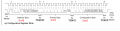
I have shown the sequence that I have understood from post #39. I hope these sequences are correct according to the given code.

My request is please confirm the following sequences I will ask all other doubts later
1586718324379.png

Updated: 0x48 is salve address with write mode bit I think it should be 0x90 or 0x9E post # 4
 
Last edited:

LesJones

Joined Jan 8, 2017
4,511
You are correct about sending 0x90 when you have connected A0, A1, A2 to ground. (Logical zero) or 0x9E with A0,A1, A2 to VDD (All logical ones ) But I'm not sure you realise that there are 6 other addresses you can set it to. This means you could have up to 8 TCN75s on the I2C bus and you could chose which one were talking to.
In the example in post #41 you write 0x01 to the pointer byte. If you look at table 5.1 in the data sheet you will see that with D0 = 1 and D1 = 0 it selects the config register. As a result the next byte sent is written to the config register. There seems to be an error in the part of the drawing for the config byte. It show bits 0 to 4 set which is 0x1F but below is shows 0x60. Table 5.2 shows the function of the bits in the config register. If you are using an Arduino then I think in the examples I've seen all the I2C communications is done by including the file wire.h. (I have never managed to understand how .h files work which is one of the reasons I can't write code in "C") Which microcontroller are you planning to use with the TCN76 ?

Les.
 

djsfantasi

Joined Apr 11, 2010
9,237
You are correct about sending 0x90 when you have connected A0, A1, A2 to ground. (Logical zero) or 0x9E with A0,A1, A2 to VDD (All logical ones ) But I'm not sure you realise that there are 6 other addresses you can set it to. This means you could have up to 8 TCN75s on the I2C bus and you could chose which one were talking to.
In the example in post #41 you write 0x01 to the pointer byte. If you look at table 5.1 in the data sheet you will see that with D0 = 1 and D1 = 0 it selects the config register. As a result the next byte sent is written to the config register. There seems to be an error in the part of the drawing for the config byte. It show bits 0 to 4 set which is 0x1F but below is shows 0x60. Table 5.2 shows the function of the bits in the config register. If you are using an Arduino then I think in the examples I've seen all the I2C communications is done by including the file wire.h. (I have never managed to understand how .h files work which is one of the reasons I can't write code in "C") Which microcontroller are you planning to use with the TCN76 ?

Les.
.h files contain code to interface a sketch to the underlying hardware. The interface is presented as a set of functions that provide a common access to the hardware. As such, each .h file is a library of functions.

Some examples are as follows. Servo.h includes a function that allows the programmer to move a servo just by specifying the angle. The calculation and generation of an RC servo PWM Control signal is done without the programmer getting involved. SoftwareSerial.h allows user-defined data pins on the Arduino to function (with some limitations) as additional serial comm ports. The internals of the serial protocol is hidden, and receiving data, performing the timing and parsing the digital stream into ASCII characters don’t involve the programmer. LCD.h is a library of routines to initialize and display on an LCD Screen. All hide the low level hardware manipulation by a set of functions. Like the others, timing of data, tracking character position and interpreting color commands are done by the library and not the programmer.

So, .h files aren’t really mysterious. When using a new shield, it usually comes with a library or one is readily available online. The first documentation I go to is the library documentation.
 

Thread Starter

aspirea5745

Joined Apr 17, 2019
106
If you are using an Arduino then I think in the examples I've seen all the I2C communications is done by including the file wire.h. (I have never managed to understand how .h files work which is one of the reasons I can't write code in "C") Which microcontroller are you planning to use with the TCN76 ?

Les.
I do not have any plans to use TCN7575 with a any micro right now. I'm just studying its datasheet. If I understand this completely, then maybe I can use it with micro. The most important is to understand the datasheet, in which I am struggling very hard

I2C Write [ Start + Slave Address + W + Register Address + Write data to address at register + Stop]

TABLE 5-7: TCN75’S REGISTER SET SUMMARY

TEMP -Ambient Temperature 16
TSET -Temperature Setpoint 16
THYST -Temperature Hysteresis 16
POINT -Register Pointer 8
CONFIG-Configuration Register 8

After sending slave address We have send Register address, I only have the problem to select the register address,
Slave devices have multiple internal register addresses.

How do you know from datasheet which address to send the register?

What is the reason you send address of Configuration Register why you did not send address of some other registers ?
 

LesJones

Joined Jan 8, 2017
4,511
You chose the register to send data to by what you are trying to achieve. For example is you the TCN75 to go to sleep in between readings there are bits to set or clear in the configuration register. You get the address of the register for the TCN75 from table 5.1 of the data sheet. If you want to change the temperature at which the output pin changes from high to low you write that temperature value to the Temperature Setpoint register. Just think about it like setting a digital thermostat for your central heating. The registers in devices normally have names that give a good idea of their function. I think where the TCN75 data sheet puts the point register in the table with the other registers is very confusing (It confused me when I first looked at the data sheet.) In my understanding of I2C protocol the next think sent after the slave address is the address of the register within the device that you want to select. This seems to be called Point by the TCN75 data sheet.
Thanks for pointing out the basic function of .h files. I sort of understood that much but expected the file would come with documentation that told you how to get it to do things. For example when I was writing the code for the BMP280 I had problems and I could not decide if it was the reading of the registers in the BMP280 or the calculation part of my program that was causing the problem. I decides to try to cheat by trying to looks at data read by one of the many Arduino programs. I could not find out how to modify it to display the raw data read from the registers. There was also another include file with a .cpp extension which made it more complicated. I did eventually find a "C" program for the Raspberry Pi that I understood enough to change it to display the raw data. (And also allowed me to insert values read by my code into the program.) That proved that the calculation part of my program was working correctly. It turned out the problem was I had missed out one line of code writing to one of the registers in the BMP280. I only noticed it by chance when copying the few instructions to write to another register I noticed the line that gave the data to be written was missing.

Les.
 

djsfantasi

Joined Apr 11, 2010
9,237
Thanks for pointing out the basic function of .h files. I sort of understood that much but expected the file would come with documentation that told you how to get it to do things. For example when I was writing the code for the BMP280 I had problems and I could not decide if it was the reading of the registers in the BMP280 or the calculation part of my program that was causing the problem. I decides to try to cheat by trying to looks at data read by one of the many Arduino programs. I could not find out how to modify it to display the raw data read from the registers. There was also another include file with a .cpp extension which made it more complicated. I did eventually find a "C" program for the Raspberry Pi that I understood enough to change it to display the raw data. (And also allowed me to insert values read by my code into the program.) That proved that the calculation part of my program was working correctly. It turned out the problem was I had missed out one line of code writing to one of the registers in the BMP280. I only noticed it by chance when copying the few instructions to write to another register I noticed the line that gave the data to be written was missing.

Les.
Thanks for your comments. My experience is that after installing a library, you get the .h file, documentation and a sample program. The sample is either a .ino file (Arduino sketch) or .cpp file (C main program).

I have experienced a library without some of the above components. However, I’ve always been able find documentation et.al. with a Google search.

As a side note, it seems that Arduino uses sample sketches as a standard part of their documentation. One can use the samples to learn usage and experiment with a library, peripherals and shields.
 

Thread Starter

aspirea5745

Joined Apr 17, 2019
106
@djsfantasi @LesJones look at painted diagram in post #14 Can you draw a diagram like i tried to make for I2C write ?

I have tried my best, I think some things can be cleared looking at your diagram. I don't see anything wrong in this approach
 

djsfantasi

Joined Apr 11, 2010
9,237
@djsfantasi @LesJones look at painted diagram in post #14 Can you draw a diagram like i tried to make for I2C write ?

I have tried my best, I think some things can be cleared looking at your diagram. I don't see anything wrong in this approach
No, I can’t draw a diagram you showed in post #14.

I use the wire.h library functions which are not concerned with the low level of detail in your diagram.

At the hardware level, I short the I2C address jumpers to set a device address.

I initialize the device identified by the I2C address with a function call.

If necessary (and it’s not in your case), I configure the options I need with several function calls. the first call, I tell the device that I’m going to set options. I do this with a function call that selects the options/ configuration register. Then a couple more function calls writes the desired options to the device.

Finally, I select the temperature register and subsequently read the temperature from the device. This latter step is repeated.

Note I didn’t worry about sending individual bits, processing ACKs. I did have to know what registers are available and how to select them. But again, no bit by bit communication; only writing a complete byte. And reading returns byte values without bit by bit processing.

This high level description is based on the Arduino code or C library that I posted.

Don’t overthink things.
 

LesJones

Joined Jan 8, 2017
4,511
I agree with djsfantasi that if you only write in "C" you do not need to understand the details of I2C protocol. (Unless you want to write your own .h files.)

This picture from the data sheet shows a single byte write and a double byte write.
Screen Shot 04-14-20 at 12.47 PM.PNGThe first line shows setting the pointer followed by a single byte read of the configuration byte.
The second line shows a single byte write to the configuration register.
The third line shows a two byte write to the Tset register.

Les.
 

Thread Starter

aspirea5745

Joined Apr 17, 2019
106
I agree with djsfantasi that if you only write in "C" you do not need to understand the details of I2C protocol. .
Les.
I understand I2C protocol

For example

START
Slave address 7 bits + WRITE bit
ACK from slave
Address register,
ACK from Slave
REPEATED START
Slave address 7 bits + READ bit
ACK from Slave
first data byte
ACK from Mater
second data byte,
NACK from Slave
STOP

It just one example. it is very important to read datasheet
 

jpanhalt

Joined Jan 18, 2008
11,087
My question, Do I have to write the config register to read the temp register ?
So far as I can tell, you do not need to write to the configuration register in order to read a temperature. The only writable bit is SHDN, which by default is off (not in shutdown).

You may want to read the data ready bit, though. It is read only. A more thorough review of the DS should answer what happens if you read when it is not ready. Some devices reset if that is attempted, which could lead to many lost readings.
 

Thread Starter

aspirea5745

Joined Apr 17, 2019
106
So far as I can tell, you do not need to write to the configuration register in order to read a temperature. The only writable bit is SHDN, which by default is off (not in shutdown).

You may want to read the data ready bit, though. It is read only. A more thorough review of the DS should answer what happens if you read when it is not ready. Some devices reset if that is attempted, which could lead to many lost readings.
It means that we don´t need to write a CONFIG register before to read a TEMP register. we need to send the slave address with read/write =1 then we can read one byte (temperature value).
 

jpanhalt

Joined Jan 18, 2008
11,087
I just reviewed the datasheet. It does not say what happens if you read data before the data_rdy bit is set. You can find out by testing or maybe others know. Some devices may return garbage, the older value, or null when that happens and reset the conversion process. It is the resetting process that would worry me. If the conversion is not reset, then it is probably not a big issue and null or garbage can be dealt with if that is what is reported.

If it were me, I would read the data_rdy bit, which is what I do with the Maxim MAX31856 chip. However, the datasheet for that chip is explicit about waiting for the data_rdy ("drdy") bit to set.
 
Top