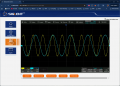
@tautech My SDS1204X HD, has a web server built in, must I connect the scope to my Windows PC with a network cable in order to use this? My PC is connected to my house ADSL modem via WiFi, no routers or anything in my workshop.
Well thanks for that. That model (the scope I used previously) supports a WiFi adapter, but even the reference manual for the SDS1204X HD, doesn't contain the term "wifi", so I wonder if that's an option still...
On the SDS1204X-E it seems wifi requires a license fee too...
@tautech My SDS1204X HD, has a web server built in, must I connect the scope to my Windows PC with a network cable in order to use this? My PC is connected to my house ADSL modem via WiFi, no routers or anything in my workshop.
Not sure but try it.....I have a MiniPC at home that connects to our WiFi and has 2 LAN sockets and I need try that too.
Unfortunately none of the new HD series directly support WiFi or the USB dongle the X-E range used.
You'll have to go into the scopes I/O settings and engage DHCP then close and reopen the box which should return the scope a unique IP address to enter into a PC browser that will give access to the scopes webserver.
It's very similar to driving the scope entirely with a mouse but also provides some extra features like a SCPI command panel.
To provide WiFi I got a TP Link TL-WR802N and set it up in Bridge mode where it becomes invisible to your network and it can provide access to your WiFi for anything that has a LAN port and only requires some USB power.
Not sure but try it.....I have a MiniPC at home that connects to our WiFi and has 2 LAN sockets and I need try that too.
Unfortunately none of the new HD series directly support WiFi or the USB dongle the X-E range used.
You'll have to go into the scopes I/O settings and engage DHCP then close and reopen the box which should return the scope a unique IP address to enter into a PC browser that will give access to the scopes webserver.
It's very similar to driving the scope entirely with a mouse but also provides some extra features like a SCPI command panel.
To provide WiFi I got a TP Link TL-WR802N and set it up in Bridge mode where it becomes invisible to your network and it can provide access to your WiFi for anything that has a LAN port and only requires some USB power.
Not sure but try it.....I have a MiniPC at home that connects to our WiFi and has 2 LAN sockets and I need try that too.
Unfortunately none of the new HD series directly support WiFi or the USB dongle the X-E range used.
You'll have to go into the scopes I/O settings and engage DHCP then close and reopen the box which should return the scope a unique IP address to enter into a PC browser that will give access to the scopes webserver.
It's very similar to driving the scope entirely with a mouse but also provides some extra features like a SCPI command panel.
To provide WiFi I got a TP Link TL-WR802N and set it up in Bridge mode where it becomes invisible to your network and it can provide access to your WiFi for anything that has a LAN port and only requires some USB power.
Good
Sure, use the mouse to click on the timebase tab or one of the channel tabs to make adjustments.
This process is identical to using a mouse connected to the scope.
And BTW the Screenshot webserver virtual button sends the screenshot directly to your PC browser's Download folder.
They also have the MHO 1GHz scope for just a few dollars more.
I would buy the 1Ghz item right now if it had an integrated 10GHz spectrum analyzer, something like a TinySA-ultra that's good to about 7GHz.
Would the hobby market ever need more than a 1GHz 12 or 14bit scope with integrated 10GHz SA? That would be like a buy once and not need to buy again for another 10yrs. Heck, if Rigol was smart they would build a modular chassis in a scope, then you could buy add-on's later, and then upgrade the add-on's later. Think of it like having a 1GHz scope that had some NMVe slots inside the rear of case, then you just pop in an add-on card. Not sure how physical ports work with a high freq SA module, maybe it cannot be done due to insertion issues?

 Facebook
 Google
 GitHub
 Linkedin