Wiring push to a timer.

Thread Starter

Tsume

Joined Sep 2, 2024
9
I have this ion party ball fogger https://a.co/d/3O29YPE I got from Costco a while back that I absolutely love and picked up a second one on amazon. I have a remote that comes with them that will trigger both of them at the same time. I would like to connect one of them up to a timer to work independently but I was going to use the switches on the back however there's only two cords coming off of two switches and that has me very confused on how it works. I also know where the antenna is and can disconnect it so the remote only works for one.


Any help on connecting this switch up would be great! https://a.co/d/1WBnwP
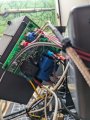
1000010297.jpg1000010294.jpg1000010295.jpg1000010296.jpg
 

Thread Starter

Tsume

Joined Sep 2, 2024
9
Not sure what you mean by using the switches. Can't the unit simply be plugged into the timer receptacle.
So when a fogger is turned on the heater will activate. It will start to get extremely hot. After a while the user has to trigger the pump to activate and send the fogger juice through the heater. Simple plugging it into a timer would just trigger the heater. I need to unit to be plugged in for a couple hours while the fog is triggered on a timer. There is a manual button on the back to trigger the fog and there is one on the remote. Normal you can click it on and off but if you fail to click it off it has an internal timer to click it off so the heating element can heat back up.
 

sghioto

Joined Dec 31, 2017
8,634
Then you will need a timer with a dry contact relay wired across the fog switch.
Is the fog switch a push on push off?
 

Thread Starter

Tsume

Joined Sep 2, 2024
9
Trouble is I have no idea where to slide the timer in.
https://a.co/d/ebHEIkp
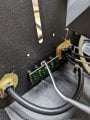
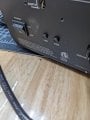
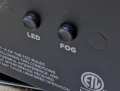
I have this controller I want to use. The switch is a click. Depressing the button makes a single click and it returns to the start position. The second picture shows the back side with the white and black wire coming off the "Fog"& "LED" buttons.
 

sghioto

Joined Dec 31, 2017
8,634
Trouble is I have no idea where to slide the timer in.
https://a.co/d/ebHEIkp
I have this controller I want to use. The switch is a click. Depressing the button makes a single click and it returns to the start position. The second picture shows the back side with the white and black wire coming off the "Fog"& "LED" buttons.
What is the LED button for?
I would figure the fog button is low voltage.
 

Ya’akov

Joined Jan 27, 2019
10,235
Welcome to AAC.

I find it hard to follow your description of either the problem or your proposed solution.

Here’s what I am (mis)understanding so far:

You have two fog machines which you want to operate together—sometimes(?).

You want to put one of the machines on a timer that (starts or stops) it at (clock time(s) or intervals).

You can’t use a timer on the mains input because that won’t, by itself, cause fog output which requires operating either a button on a wireless remote control or a momentary switch on the rear panel.

Your proposed solution is two timers, one that controls the mains power and one that electrically simulates the operation of the rear panel fog switch. Or, possibly you don’t care about the mains power only hands off fogging at intervals.

You want independent control using the remote so one produces a baseline fog an the other offers manual control to enhance it when desired.

You wouldn’t need the timer(?) of you could adapt a wired remote control pendant from the same company but intended for a different model.

Your simple idea of using the back panel switch connection to the main board seems to be thwarted by only two wires connecting the PCB for two switches—so how that works is mysterious.

Assuming some of that is correct

Though your photo is extremely out of focus it is possible to read R25 on the PCB’s silkscreen. This suggests the switches are attached to a single ADC (analog to digital converter) pin on an MCU (microcontroller unit). There will be two resistors of different enough values that when one or the other (or both) switch(es) are pressed the voltage on this pin can be read by the controlling program and so it can distinguish which of the buttons is being closed.

Even if this surmise is incorrect, the simplest solution is to make your connection parallel to the existing switch in the PCB, then whatever the original switch is doing your “virtual” switch will do the same thing. Or, you can figure out the resistor value for the desired switch and duplicate that in parallel with the entire rear panel control.

As far as the wireless remote is concerned, depending on the frequency of operation the antenna might be a trace on the PCB which would be be simple to disconnect. There is a further problem that the receiver might get enough signal even without the antenna connected to operate.

It is very likely the remote control uses a module separately attached to the PCB. It would be a small circuit board soldered to the main board or a daughter board. It that’s the case, you could try to cut the trace to the \(\mathtt{V_{cc}}\) (power input) on the module which would disable it. It is unlikely this would interfere with the rest of the operation.

However, there is a chance that this device uses an Espresso f ESP32 or ESP8266 module (or something similar) to provide both the MCU and RF (radio frequency) functions in one. If this is the case, cutting the power will mean disabling everything.

If you can tell me what I have wrong—or right—or better yet describe the goal of this project without reference to any solution—that is present what you want to do, why it doesn’t work now, and the constraints—before describing how you have imagined it could be solved, I or others might be able to help better.

It doesn’t sound very difficult and with sharp, well lit, and more complete photos we have a good shot and helping you come up with a solution that very well might not be the one you came here to get help making work.

One last thing: this is a mains operated device of dubious quality and safety is a genuine concern. This is exacerbated by the fact that the device is intended to get hot and so may well pose a fire hazard should there be poorly implemented protection or if your solution somehow bypasses it. You need to make risk assessment primary in working on this because you could literally burn down your house with it which I didn’t see as part of your solution, above.

Good luck, be extra careful.
 

sghioto

Joined Dec 31, 2017
8,634
The switch is a click. Depressing the button makes a single click and it returns to the start position.
Still not sure if that fog button is momentary or continuous.
From the description it appears to be a push ON- push OFF.
Need to know for sure as this will dictate the type of operation required on the relay in the timer.
Do you have a multi meter to do a test on the fog switch?
 

Tonyr1084

Joined Sep 24, 2015
9,744
Screenshot 2024-09-03 at 9.45.03 AM.png
On one hand it would seem that simply jumping the FOG button should do the triggering you want. BUT: The back side shows only two wires, which might suggest these two wires are sending some sort of signal to a microcontroller.
For some reason it's not loading properly. Click the screen shot below.

Because I'm seeing two wires coming from the FOG and LED button board, I'm going to assume there's probably some sort of resistor network that dictates some change in levels for a µC to decide what action to take.

They sell wireless remotes that can operate from a single fob and can operate up to four different devices. OR you could find a timer (or build one) that jumps the FOG button at regular intervals. I have to agree with Ya’akov on a clearer description of what you're wanting to do.
 

Attachments

Thread Starter

Tsume

Joined Sep 2, 2024
9
Welcome to AAC.

I find it hard to follow your description of either the problem or your proposed solution.

Here’s what I am (mis)understanding so far:...

Good luck, be extra careful.
Thank you so much for the input and I read every bit of it.

Operation: The fog machine is manual. It only dispensers fog when you click the "FOG" button on the back or the fog button on the remote.

Problem: The fog machine is manual. I want to hook the machine up so it will dispense fog at given intervals making it automatic.

Reply: you are correct the main power on a timer would not dispense fog, only turn the machine on and have it waiting for manual input.

I can definitely take more pictures I had no idea which pictures would be useful.
 

Thread Starter

Tsume

Joined Sep 2, 2024
9
View attachment 330832
On one hand it would seem that simply jumping the FOG button should do the triggering you want. BUT: The back side shows only two wires, which might suggest these two wires are sending some sort of signal to a microcontroller.
For some reason it's not loading properly. Click the screen shot below.

Because I'm seeing two wires coming from the FOG and LED button board, I'm going to assume there's probably some sort of resistor network that dictates some change in levels for a µC to decide what action to take.

They sell wireless remotes that can operate from a single fob and can operate up to four different devices. OR you could find a timer (or build one) that jumps the FOG button at regular intervals. I have to agree with Ya’akov on a clearer description of what you're wanting to do.
I am sure it is going to a controller. That is what is making this rather difficult since I am unsure if I can just jump the white or black wire with a timer. It plugs into a board that the antenna also plugs into.
 

Ya’akov

Joined Jan 27, 2019
10,235
Thank you so much for the input and I read every bit of it.

Operation: The fog machine is manual. It only dispensers fog when you click the "FOG" button on the back or the fog button on the remote.

Problem: The fog machine is manual. I want to hook the machine up so it will dispense fog at given intervals making it automatic.

Reply: you are correct the main power on a timer would not dispense fog, only turn the machine on and have it waiting for manual input.

I can definitely take more pictures I had no idea which pictures would be useful.
Based on this, the easiest way appears to be connecting a time delay relay of the sort that does intervals, wired across the existing switch. You could add a jack to the back and make the timer external to avoid the trouble of fitting it internally. Like the pendant remote, you could add manual buttons on it for convenience.

Thinking a bit more, I would put secondary relays inside the fog machine to avoid extending the (probably) MCU connected lines outside the case and for a long distance. The internal relay would use the switch closure of the remote timer to close the internal relay which would be powered by the machine’s power supply.

Ideally, the DIY remote would also be powered by the fog machine’s power supply—if not, then using a USB charger that is plugged into a jack on the fog machine and then feeding down the DIY remote‘s cable. A good source of a multiconductor cable for the remote is a USB Type-C cable with the ends cut off.

First, write down a scenario or two about the fog machines in use. That is, try to come up with realistic “stories” about how the machines would behave including interacting with the remote and exactly what sort of on-off fogging is happening.

Then, we can work out what sort of timer module(s) would work best. WIth a good idea of what it is supposed to do we can easily locate the parts and how they should be connected.

Concerning the radio remote, it will require much better views of the PCBs inside the machine to know if there seems to be any easy (or even possible) way to disable the receiver.
 

Thread Starter

Tsume

Joined Sep 2, 2024
9
View attachment 330832
On one hand it would seem that simply jumping the FOG button should do the triggering you want. BUT: The back side shows only two wires, which might suggest these two wires are sending some sort of signal to a microcontroller.
For some reason it's not loading properly. Click the screen shot below.

Because I'm seeing two wires coming from the FOG and LED button board, I'm going to assume there's probably some sort of resistor network that dictates some change in levels for a µC to decide what action to take.

They sell wireless remotes that can operate from a single fob and can operate up to four different devices. OR you could find a timer (or build one) that jumps the FOG button at regular intervals. I have to agree with Ya’akov on a clearer description of what you're wanting to do.
 
Top