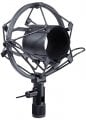
Yes, it's mainly for vibration 'Shock' (mechanically transmitted noise from acceleration detected by the microphone) isolation. The series of zigzag Suspension (spring and damper) supports create equal and opposite forces at low frequencies that provide damping (energy dissipation) and redirection in the inner holder mass motion away from the direction of the microphone pickup sensitivity to acceleration.
Some of the new passive isolation systems for instrumentation mounts are really slick.
When we mounted new computer systems in the old BB-62 class ships in the 80's we used wire rope top and bottom systems for isolation from gun blast vibrations.
When you're trying to record very quiet sounds in an imperfect environment, these can make a huge difference. It's not snake oil, as some might think.
Having said that, I've also seen, terrible, noisy mics that would never be used to capture those kinds of quiet sounds, and they sometimes include a shock mount. I'm sure in this cases it is just for appearances and the potential to charge more.
I am focusing on home recording from months but with scrap stuffs. Experimented some basic thing about electret mic and found few are pretty clean and flat in frequency response. Borrowed preamp circuit. Used an USB sound card which costs just $1.8 though. I am getting improvements.
Now my desktop is on a table and it's fans make horriable noise. The mic attached in a lazy stand on the same table. As science solid is a good medium to travel sound. So noise from desktop going through the table to lazy stand and finally to the mic. What about DIY or quick way to isolate in this case. I cannot pay that more. Can I use rubber/silicone and delicate foams to isolate stand and mic?
I am focusing on home recording from months but with scrap stuffs. Experimented some basic thing about electret mic and found few are pretty clean and flat in frequency response. Borrowed preamp circuit. Used an USB sound card which costs just $1.8 though. I am getting improvements.
Now my desktop is on a table and it's fans make horriable noise. The mic attached in a lazy stand on the same table. As science solid is a good medium to travel sound. So noise from desktop going through the table to lazy stand and finally to the mic. What about DIY or quick way to isolate in this case. I cannot pay that more. Can I use rubber/silicone and delicate foams to isolate stand and mic?
Are you sure the fan noise in the mic is travelling through the table, not the air? Have you tried holding the mic stand in the air (just briefly as an experiment) off of the table to see how much that reduces fan noise in your recording?
I'm not saying that isolation is a bad idea, but if you're trying to keep the budget low, you want to invest where it will do the most good. If the fan noise is reaching the mic through the air, shock mounting won't do any good.
Could you possibly move the desktop below the table? That would eliminate the vibration path and also made the acoustic air path longer and less direct. I suspect it would be a bigger improvement no matter what the root problem is.
Are you sure the fan noise in the mic is travelling through the table, not the air? Have you tried holding the mic stand in the air (just briefly as an experiment) off of the table to see how much that reduces fan noise in your recording?
I'm not saying that isolation is a bad idea, but if you're trying to keep the budget low, you want to invest where it will do the most good. If the fan noise is reaching the mic through the air, shock mounting won't do any good.
Could you possibly move the desktop below the table? That would eliminate the vibration path and also made the acoustic air path longer and less direct. I suspect it would be a bigger improvement no matter what the root problem is.
With same thing same position some time I get pretty less hum hiss noise and another time with same thing same position as before I get hum hiss back again. It's making me confuse. Maybe because of the scrap DIY.
Yes, maybe if I hide the system under the table, possibly I can cut off the fan noise. I will try this one too.

 Facebook
 Google
 GitHub
 Linkedin

 21.1 KB Views: 19