Why many people are telling that's impossible to assemble a Laptop?

Ya’akov

Joined Jan 27, 2019
10,355
Looks to me like that adheres very much to what I stated, namely that the components fit like a puzzle and you are limited to the options available from that manufacturer for that make and model.

The prices on their pre-built machines aren't cheap, but don't look too outrageous, but I didn't see any of them that will ship before the 4th quarter.
This is not far different from a lot of the early machines I had. They were very modular and offered upgrades. Despite calling it "DIY" it's really just about a configuration, not about "building" anything.

That said, I think the general idea of this is very good. I wish that cars, for example, had a standard interface for the infotainment system components. Displays and other UI parts, data transceivers, location tracking components, and of course media players are examples of things that can make an otherwise perfectly good car obsolete. This seems nearly insane to me.

I am suffering from it right now—my car could last for decades more, I don't want a new one—but with the decommissioning of the 3G networks, and the lack of a touch screen, I can expect the technology aspect of my car to get less and less useful, and there is no upgrade path. There should be.

Similarly, laptops are often chained to older processors, older GPUS, limited RAM, and outdated displays because they aren't even designed to be serviced, never mind upgraded!
 

MrAl

Joined Jun 17, 2014
13,859
Hi,

Laptops are cool but they become outdated too easily. I have two such laptops that are almost not usable anymore. Both were fairly top notch in their time, now they are below bottom notch.

If you want to build your own laptop that is fully upgradeable and fully expandable, abandon the concept of a standard laptop and go with a few discrete components, and assemble them in a way that mimics an actual laptop. All for under $250 complete with operating system, and you can easily pick your own screen size unlike most laptops. I'll quote here what i think is the cheapest solution, part by part.

1. Purchase one of the modern "mini" computers. You can get these as small as 3 x 3 x 2 inches. Yes, those are the right dimensions, and don't think you don't get much for that at about $130 USD. You get a 2.9GHz 4-core CPU, 128GB SSD, 8GB ram, Windows 11 Pro pre-installed. These things are powerful yet so small you can fit them into a small suitcase or even handbag or small laptop bag made for actual laptops. Without anything else you can fit them into a pocket.
2. Purchase a LED monitor. You can get ANY size you want, but i recommend getting one that has resolution at least 1920x1080 unless you can get away with less resolution, and as for size, you can go with damn near anything you need from 7 inch up to 27 inch, but obviously something around 15.6 inch is more reasonable and still small enough to fit into a small suitcase. Cost from about $50 up to about $150 USD, with about $80 for a 15.6 inch screen.
3. You'll need a keyboard. You can really pick anything you want here, cost around $10 and up.
4. You'll need a mouse. Again, anything. Cost around $7 and up for a mouse with forward, backward, scroll wheel, variable dpi.
5. Optional. Get a portable SSD for large backups. This could run from about $40 and up depending on size. A 1TB you can get for less than $100 USD, and if you go with a non-portable SSD and adapter, you can get even lower than that.
6. Suitcase. This will hold everything. You don't really need a suitcase, but if you want to set it up like an actual laptop you would need to mount the screen inside the lid so when you open it the screen sits up like an actual laptop screen would. Make sure you make some air holes or something to keep the screen cool enough.

How about an upgrade. When you get tired of that, you can upgrade the mini computer component to anything from a 3.5GHz CPU to a nearly 5GHz CPU, depending on what you want to spend, roughly $200 to $400 USD, and with a 1TB M2 NVMe super fast SSD.

With the cheapest solution above you can do anything you want online using a LAN line or wifi, and also bluetooth. wifi means you don't need a LAN line but you do need a wifi router and internet service. You may or may not be able to play the most recent computer games that come out, but you can do just about anything else.'

Things have changed a lot since the first laptops, and you don't even need a full computer case with motherboard and separate CPU and graphics card and all that anymore.

Let us know what you find out there. Amazon has all this stuff, of course. Check out the Nucbox5 mini computer. I think that's the smallest one so far but their could be smaller ones now too. There are the 5x5x3 inch sizes too that have a few more options. I quoted that one because the company that makes them has excellent customer service.
 

MisterBill2

Joined Jan 23, 2018
28,502
Mr AL neglected the power supply and battery portion, one of the more expensive segments.

For an education about laptop computers, I really suggest getting one non-repairable dead one and carefully disassembling it, payng attention to how things fit. That will provide a cheap education that will provide some valuable insights.
AND, for an exercise in frustration, try to put it back together. Not making it work, just re-assembling it. That is a pain all in itself.
 

MrAl

Joined Jun 17, 2014
13,859
Mr AL neglected the power supply and battery portion, one of the more expensive segments.

For an education about laptop computers, I really suggest getting one non-repairable dead one and carefully disassembling it, payng attention to how things fit. That will provide a cheap education that will provide some valuable insights.
AND, for an exercise in frustration, try to put it back together. Not making it work, just re-assembling it. That is a pain all in itself.
Hi,

The power supply comes with these mini computers. The power consumption, even with a 4 core CPU, can be as low as 6 watts.
The battery would be optional of course, but the good news is then you are not nailed down to one battery make and model, and one battery capacity. If you need 2 AHrs, that's fine, but if you need 20AHrs, that's fine too, just buy a different battery.
If you want it to fit in the suitcase, i would say probably 8AHr or less, but try and find a laptop with that size. You can also choose your chemistry, lead acid, li-ion, LiFePO4, etc. One additional recommendation then is that you buy a mini computer with a 12vdc input not one of the 19vdc input models.

One thing you made me think about here.
Can you use the screen from an old laptop for a different computer. That would allow changing the entire guts of the laptop to something more modern.
 

MisterBill2

Joined Jan 23, 2018
28,502
That is an interesting question: "One thing you made me think about here.
Can you use the screen from an old laptop for a different computer. That would allow changing the entire guts of the laptop to something more modern."
Every laptop computer that I have touched has the display integrated into the open-able part of the case, and the connection ismost often a flexible printed ribbon cable. Of course all of the displays are some form of dot-matrix, with mostly a similar aspect ratio.
So probably the display data format is similar for the majority of screens. But I doubt very much that the actual circuit details will be available, nor the specific data format information.
So there will be another challenge that I had not considered.
 

MrChips

Joined Oct 2, 2009
35,278
The screen on my laptop died. Maybe it is just the backlight.
I plugged in an external LCD monitor and I'm good to go. Still running some old apps on Win XP.
 

MisterBill2

Joined Jan 23, 2018
28,502
The screen on my laptop died. Maybe it is just the backlight.
I plugged in an external LCD monitor and I'm good to go. Still running some old apps on Win XP.
Certainly theexternal screen option is quite valuable. I was given a very nice laptop with a cracked LCD screen and I am hoping to be able to get a similar model that has died so that I can swap the lid with the screen. Exchanging sections will still be a major effort but not nearly as much as replacing the display. At least that is what I am hoping for.
 

MrAl

Joined Jun 17, 2014
13,859
That is an interesting question: "One thing you made me think about here.
Can you use the screen from an old laptop for a different computer. That would allow changing the entire guts of the laptop to something more modern."
Every laptop computer that I have touched has the display integrated into the open-able part of the case, and the connection ismost often a flexible printed ribbon cable. Of course all of the displays are some form of dot-matrix, with mostly a similar aspect ratio.
So probably the display data format is similar for the majority of screens. But I doubt very much that the actual circuit details will be available, nor the specific data format information.
So there will be another challenge that I had not considered.
Hi,

Oh yes, some unobtainable protocol I guess. That's too bad it would have been fun to rebuild one completely. An interesting point about this is that many of the older ones use a lot more power than the modern mini computers so the battery would last longer too. That could be very nice.
 

MrAl

Joined Jun 17, 2014
13,859
The screen on my laptop died. Maybe it is just the backlight.
I plugged in an external LCD monitor and I'm good to go. Still running some old apps on Win XP
Hi,

Oh that's interesting, maybe you can get it apart and see if the LEDs and driver can be replaced, if that's really the only problem.

So I guess you are using a mini-HDMI cable or something to connect to a regular monitor.
 

MisterBill2

Joined Jan 23, 2018
28,502
Many of the older laptop computer used a florescent tube backlight, and that tube would fail, with the result of no image visible. The simple and easy diagnostic trick is to have the laptop on and powered and then shine a bright flashlight into the screen from very close. If a bit of image can be seen, then it is a failed backlight problem. Either the tube or the inverter driving it. Most often it is the tube.
 

MrChips

Joined Oct 2, 2009
35,278
Many of the older laptop computer used a florescent tube backlight, and that tube would fail, with the result of no image visible. The simple and easy diagnostic trick is to have the laptop on and powered and then shine a bright flashlight into the screen from very close. If a bit of image can be seen, then it is a failed backlight problem. Either the tube or the inverter driving it. Most often it is the tube.
I already did that test. I can see color pixels but no image.
The laptop is Toshiba Satellite 2400 bought in 2002. It has external video out to standard 15-pin VGA monitor.
 

MaxHeadRoom

Joined Jul 18, 2013
30,873
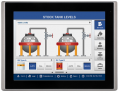
When I was involved in making up my own one-off/stand-alone motion control systems, I used to put together my own HMI, kiosk style operator units.
This using single processor on a board-in-a slot PC's, such as AdvanTech PC system in a slot boards.
These I mounted to the back of a 10'-14" display screen that also included a touch screen,
Included in a slot was a Galil Motion card.
The whole assembly was not much bigger than a large lap top, just a bit deeper.
Now of course there is the likes of Maple Systems that make some really fancy ones! But $$$ ! :eek:
e.g. 12.1' screen.
1691605644605.png
 
Last edited:
Top