Facebook
 Google
 GitHub
 Linkedin
I recently bought a new intercom system for my business. I wanted a hands free intercom and this intercom was the only one I could find. One of the intercoms I want to put in the receptionist area of my work place. The one problem with this intercom is that it only has a speaker and it doesn’t have the option to add an external earpiece to it (no aux input). The reason I want to add an external earpiece is because I don’t want my clients to hear what the receptionists are hearing. Not that what’s being said is bad, but it’s unprofessional and it gets rather loud in the lobby. I had an idea of buying a telephone-like handset and splicing it into the speaker and microphone wires in my intercom. The telephone handset has an aux cord, so I striped the wires and spliced them into the speaker wire on my intercom. The yellow wire from my aux cord is the left channel and the green wire from my aux cord is the right channel. The aux is TRRS. According to multimeter, the red wire is the second ring and the white wire is the very bottom of the aux cord. According to some pinouts, the second ring can either be the mic or the ground and the same with the very bottom of the aux cord under the second ring I haven’t messed with the microphone within my intercom yet because I’m scared to do so. I connected the red wire from my aux cord to the yellow speaker wire in my intercom and the green wire from my aux cord to the white speaker wire in my intercom. When I tested my handset, I could hear what the other person was saying ok, but not very well. I have a lot of static. It’s definitely not the handset because I tested it with my computer and both the speaker and mic sound great. I’m fairly certain I got the wires in my aux cord correct. What am I doing wrong here and how do I get good speaker clarity in the handset? Also, if I were to connect the microphone how would I do that since the intercom has two wires (black and red) and the aux cord only has one (yellow)? This problem is rather urgent and will need to be fixed ASAP. I’ve provided a picture with my current setup. I unconnected all the wires.
Thanks!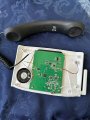
Thanks!