Visualizing remote data

Thread Starter

cmartinez

Joined Jan 17, 2007
8,722
I've been working on a telemetry project for a while now, and now I'd like to write some software that will allow the user to visualize the collected data. It's nothing fancy really, it's just the report over time of three different sensors. And I'd like to visualize said reports on a simple line chart graphic.

I have my computer set up as an FTP server where said reports are stored, and while the data is easily accessible through the internet, I would like to avoid the need to copy or upload the data to the computer that will be used to visualize it. The obvious solution would be to make some sort of webpage that would in my computer and that would interact with the user to generate and visualize said charts.

The thing is, I'm quite skilled at writing computer code (.NET is my specialty), but I have never worked or set up a web page of any kind.

Any suggestions as how to approach this project?

@MrSoftware , @Ya’akov
 

Thread Starter

cmartinez

Joined Jan 17, 2007
8,722
Yes, that's exactly how I want the info to be displayed. I'll have a look at your suggestion and get back to you.

Many thanks!
 

wayneh

Joined Sep 9, 2010
18,088
You need a static IP address. Your ISP can usually provide that for you although there will likely be a fee. Once you have that, anyone on the internet can be directed to your DIY website. A commercial website goes farther by having a domain name that's registered, thereby appearing on the world's DNS servers. All that does is connect a name to the IP address of the server. It's not expensive to register a domain name, or even to have it hosted on a third party server, but all that may be overkill for what you want.

The pages that a user sees and interacts with are html. These days there can also be all sorts of xml, scripting and other complications that control the user experience. Depending on what you want as a final product, you might want an application designed for website creation. I use one on my Mac called RapidWeaver but of course there are many other options. An application like that will save a huge amount of time in formatting pages for multiple displays (phone vs desktop). They provide nice templates and easy control over visual elements. It will also serve as an ftp client to easily control the files on your server. You could do it all manually but there's really no point to learning html, java, php, etc. just to host a page. That said, I have used html and php to customize a few things beyond what the canned software can produce. But I would never start a project outside of the software. It's just too handy.
 

Ya’akov

Joined Jan 27, 2019
10,226
I've been working on a telemetry project for a while now, and now I'd like to write some software that will allow the user to visualize the collected data. It's nothing fancy really, it's just the report over time of three different sensors. And I'd like to visualize said reports on a simple line chart graphic.

I have my computer set up as an FTP server where said reports are stored, and while the data is easily accessible through the internet, I would like to avoid the need to copy or upload the data to the computer that will be used to visualize it. The obvious solution would be to make some sort of webpage that would in my computer and that would interact with the user to generate and visualize said charts.

The thing is, I'm quite skilled at writing computer code (.NET is my specialty), but I have never worked or set up a web page of any kind.

Any suggestions as how to approach this project?

@MrSoftware , @Ya’akov
My first suggestion is that you don't they to use the computer to act as a web server. Instead I would suggest you use industry standard software components which you could run on something as simple as a Raspberry Pi, or, as would be my preference on a $5USD/MO VPS instance.

I recommend NGINX for the web server, Code-RED for building the dashboard, and Grafana for visualization.

While making a web server for a single page is "easy", the combination of security concerns and the difficulty in making something that works well for most browsers and doesn't look vert low effort is not easy.

All these things are open source, very well supported, and can scale very well.
 

SamR

Joined Mar 19, 2019
5,470
For standard distributed control graphics there are 3 basic models. Graphical where the process is replicated with a representative graphical model on the screen. The elements of the model may have color fills to indicate what is being measured and text blocks next to the element to show digital data corresponding to the element. Control interfaces for pressure, flow, temp, level, etc. where each collected data element has a thermometer like display showing set point and the current measured 4-20mA value or Hand/Off/Auto blocks for on/off equipment status. And Linear Chart where measured values are drawn onto a multi-pen chart. To get "fancy" the chart can be a "rolling" display of say 8 hours where 7 hours of values are always shown. With data logging and a bit of programming the chart can roll back to display previous "windows" of collected data. I've been out of the game for nearly 30 years now but there were some small scale graphical distributed control packages out there for a reasonable price that were already programmed to do this and only needed a data interface to collect the values from the field and send control signals back. Data was typically for 4-20mA instrumentation and low voltage contact open/close status. The nice thing about windows is all of the above can be done on a single terminal although I always specified redundant terminals for critical operations areas. What used to take up multiple panels of controllers, switches, strip chart recorders, etc. I would replicate on a single monitor terminal. And then there is alarm annunciation...
 
Last edited:

Ya’akov

Joined Jan 27, 2019
10,226
my same perspective, exactly :(
Please see the "Getting Started" section, below, for action items—I encourage you to give it a try, you might not like it but there is a good chance it will surprise you in a pleasant way. It's not problem free, and you will have to learn things, but you will come away with a powerful tool set that will make new opportunities and leverage some excellent open source software.

If you use the modern frameworks and components, this is greatly simplified. I strongly encourage you to investigate what I mentioned above.

Nginx¹
A lightweight, fast standards-compliant web server that can be used for just about anything needed HTTP delivery. It is a very widely used highly active open source project that is easily integrated and enjoys a high about of documentation—both the official docs and third-party how-tos.

It uses simple, text based configuration and while there will be a learning curve it will mostly be general web server things, not things special to Nginx. I would suggest you run it under Linux and install it with the native package manager. If you have or get a Raspberry Pi, you can use DietPi, my favorite RPi-focused Linux distro based on Debian, it makes using Linux on an RPi easy. I would use Debian directly for other hardware platforms.

However, if you really want to use Windows, Nginx has a Windows distribution.

Node-RED
A system that uses a combination of visual programming and Node.js based code to create dashboards from simple to complicated. It is Javascript-based, and while Node.js is not the cleanest thing in the world, it is extremely popular and so has a huge library of modules that can do just about anything you would, practically, want to do—including interaction with serial ports and the network.

(1) In fact, it is about the easiest way to stand up and http server that will actually act like a web server all on its own. and Node-RED uses it for it's own front-end. When dealing with Node-RED Nginx will be used as a proxy. You can leave it out to start, or, if you make an informed decision, completely.

Node-RED is so powerful it is great fun building with it. You can make highly functional, nice-looking dashboards that include authentication and other important features as a matter of course.

Grafana
Grafana is a combination of easy to use and enormous overkill. Grafana has been widely adopted and, though it is open source it also has a paid support and cloud component that you can ignore for your purposes (or, when you are ready, you might find their very generous free tier cloud hosted service very attractive).

Grafana has generally replaced RRDTool in the roll of visualizing time series data because of its additional abilities, but in your case you will use if because someone else has already integrated it into something you want to do. You will have to download and install it, but you will probably not do too much touching of it.

RRDTool is worth looking into on its own if you don't embrace the Node-RED/Grafana ecosystem option.

Getting Started
If you would like to get an idea of the utility of these recommendations I would take the following steps:

1. Download and Install Node-RED for Windows

While I believe you are better off using Linux and a separate platform for delivery, Node-Red will run on Windows (and many other platforms). Download the Windows installer from the Node-RED GitHub repository and look over the documentation.

Since Node-RED is the organizing principle of this approach, go through some tutorials, and play around to see what it does. Then look for tutorials matching both your requirements and learning style and build a disposable prototype. Don't expect to, or actually put, your first attempt(s) into production, expect to green field the actual operational version removing the mistakes you made earning instead of casting them in stone.

2. Look into the Idea of Adding a Separate Delivery Platform
Whether it is local but isolated (RPi, different desktop, &c) or cloud-based, the advantages of a separate delivery platform are several, including but not limited to:

  1. Security
  2. Performance
  3. Cost (free tier options can work perfectly for your low volume needs)
  4. Scalability
  5. Future Functionality

This approach is future-facing, using these components isn't just a solution to your current need, it's an investment in a platform that will allow you to rapidly offer modern, secure, authenticated delivery of custom visualization, and command and control dashboards for anything you build.

It will make a lot of your work reusable in a way that doesn't suffer them cut-and-paste reuse's compounded errors and far exceed your own resources of time and knowledge by leveraging the work of others through open source.

I believe that once to get past the steep part of the learning curve, you will have fun and impress yourself with what you build and how easily you can build it.

I hope you decide to give it a try, it will open a new world.
 

wayneh

Joined Sep 9, 2010
18,088
FWIW, the industry standard web server is Apache, and it's built into MacOS. Lots of people will stick an otherwise-obsolete (free) old Mac in a closet as a web server. On the other hand, I've seen analyses showing that a modern CPU uses so much less power that it can pay for itself compared to that old CPU in the closet. Depends on your electricity rate.
 

Futurist

Joined Apr 8, 2025
721
I've been working on a telemetry project for a while now, and now I'd like to write some software that will allow the user to visualize the collected data. It's nothing fancy really, it's just the report over time of three different sensors. And I'd like to visualize said reports on a simple line chart graphic.

I have my computer set up as an FTP server where said reports are stored, and while the data is easily accessible through the internet, I would like to avoid the need to copy or upload the data to the computer that will be used to visualize it. The obvious solution would be to make some sort of webpage that would in my computer and that would interact with the user to generate and visualize said charts.

The thing is, I'm quite skilled at writing computer code (.NET is my specialty), but I have never worked or set up a web page of any kind.

Any suggestions as how to approach this project?

@MrSoftware , @Ya’akov
When you say "user" do you mean anyone or only you or people connected to your own network?

Where will the potential site be hosted? a cloud account or on a machine you own? If public will users need to be authenticated?

If the latter you'll have to mess around getting a fixed IP (or some paid service that emulates one) unless it's a private site just for your home network.

By far the best way to create such a site is to leverage Blazor, as a .Net developer you're well positioned for that too.

Blazor is based on a real-time (hidden from you and your code) channel that allows you to code as if the UI were local so you although your UI code runs on the server it looks like its running close to the user's device so it can respond to mouse clicks and button presses just like a desktop or mobile app would.

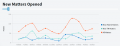
Blazor enables very rich UI's with minor effort., e.g.

1754667278491.png

https://forum.radzen.com/t/blazor-line-chart-dynamic-step-for-x-axis/10906

No need for any JavaScript either, its perfect for a need such as yours, I did a detailed feasibility study two years ago for using it in our large online systems UI and it was a very impressive technology, you can almost forget this is a website, from a code perspective it's a desktop app with event handlers and all coded in the same language - C#.

Here's a 20,000 ft view


I've used it quite a lot so can assist with any questions etc, you can build the entire site with Visual Studio, no need for other tools or stufff.
 
Last edited:

nsaspook

Joined Aug 27, 2009
16,251
Please see the "Getting Started" section, below, for action items—I encourage you to give it a try, you might not like it but there is a good chance it will surprise you in a pleasant way. It's not problem free, and you will have to learn things, but you will come away with a powerful tool set that will make new opportunities and leverage some excellent open source software.

If you use the modern frameworks and components, this is greatly simplified. I strongly encourage you to investigate what I mentioned above.

Nginx¹
A lightweight, fast standards-compliant web server that can be used for just about anything needed HTTP delivery. It is a very widely used highly active open source project that is easily integrated and enjoys a high about of documentation—both the official docs and third-party how-tos.

It uses simple, text based configuration and while there will be a learning curve it will mostly be general web server things, not things special to Nginx. I would suggest you run it under Linux and install it with the native package manager. If you have or get a Raspberry Pi, you can use DietPi, my favorite RPi-focused Linux distro based on Debian, it makes using Linux on an RPi easy. I would use Debian directly for other hardware platforms.

However, if you really want to use Windows, Nginx has a Windows distribution.

Node-RED
A system that uses a combination of visual programming and Node.js based code to create dashboards from simple to complicated. It is Javascript-based, and while Node.js is not the cleanest thing in the world, it is extremely popular and so has a huge library of modules that can do just about anything you would, practically, want to do—including interaction with serial ports and the network.

(1) In fact, it is about the easiest way to stand up and http server that will actually act like a web server all on its own. and Node-RED uses it for it's own front-end. When dealing with Node-RED Nginx will be used as a proxy. You can leave it out to start, or, if you make an informed decision, completely.

Node-RED is so powerful it is great fun building with it. You can make highly functional, nice-looking dashboards that include authentication and other important features as a matter of course.

Grafana
Grafana is a combination of easy to use and enormous overkill. Grafana has been widely adopted and, though it is open source it also has a paid support and cloud component that you can ignore for your purposes (or, when you are ready, you might find their very generous free tier cloud hosted service very attractive).

Grafana has generally replaced RRDTool in the roll of visualizing time series data because of its additional abilities, but in your case you will use if because someone else has already integrated it into something you want to do. You will have to download and install it, but you will probably not do too much touching of it.

RRDTool is worth looking into on its own if you don't embrace the Node-RED/Grafana ecosystem option.

Getting Started
If you would like to get an idea of the utility of these recommendations I would take the following steps:

1. Download and Install Node-RED for Windows

While I believe you are better off using Linux and a separate platform for delivery, Node-Red will run on Windows (and many other platforms). Download the Windows installer from the Node-RED GitHub repository and look over the documentation.

Since Node-RED is the organizing principle of this approach, go through some tutorials, and play around to see what it does. Then look for tutorials matching both your requirements and learning style and build a disposable prototype. Don't expect to, or actually put, your first attempt(s) into production, expect to green field the actual operational version removing the mistakes you made earning instead of casting them in stone.

2. Look into the Idea of Adding a Separate Delivery Platform
Whether it is local but isolated (RPi, different desktop, &c) or cloud-based, the advantages of a separate delivery platform are several, including but not limited to:

  1. Security
  2. Performance
  3. Cost (free tier options can work perfectly for your low volume needs)
  4. Scalability
  5. Future Functionality

This approach is future-facing, using these components isn't just a solution to your current need, it's an investment in a platform that will allow you to rapidly offer modern, secure, authenticated delivery of custom visualization, and command and control dashboards for anything you build.

It will make a lot of your work reusable in a way that doesn't suffer them cut-and-paste reuse's compounded errors and far exceed your own resources of time and knowledge by leveraging the work of others through open source.

I believe that once to get past the steep part of the learning curve, you will have fun and impress yourself with what you build and how easily you can build it.

I hope you decide to give it a try, it will open a new world.
+1
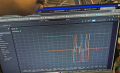
Grafana is great.
https://forum.allaboutcircuits.com/...tion-sensor-nodes-project.202400/post-1930457

1754669960925.png
1754670049933.png
1754670009090.png
 

Ya’akov

Joined Jan 27, 2019
10,226
FWIW, the industry standard web server is Apache
This depends on what industry you are referring to. Nginx is the most used web server on the net. Apache is used when its various super powers are needed, or because of inertia.

Apache has a lot of powerful plugins and if you need them, it's great. But more and more people are moving away from the heavyweight Apache ecosystem if all they need is an httpd. I use both Apache and Nginx.

I mostly use Apache to support legacy configurations, and because I have used it for nearly 30 years. But, unless you need Apache's ecosystem, I advise avoiding it and using Nginx which can easily be installed on any major OS.
 
Top