vibration sensor use as a switch help!

djsfantasi

Joined Apr 11, 2010
9,237
Ok, we’re getting into the details of mikroC. In your scaling statement, you are mixing int and float values. Sometimes the compiler will make this work. Other times, it doesn’t and you see unusual results.

I’d try the following statement:

Vinp=((float)volt*5.0)/1024.0

The (float) says convert the value of volt from an integer to a float before calculating anything.

You might print out the values after each step to confirm your calculations are working as designed.
 

Thread Starter

gatoulisss

Joined Jan 23, 2015
69
Ok, we’re getting into the details of mikroC. In your scaling statement, you are mixing int and float values. Sometimes the compiler will make this work. Other times, it doesn’t and you see unusual results.

I’d try the following statement:

Vinp=((float)volt*5.0)/1024.0

The (float) says convert the value of volt from an integer to a float before calculating anything.

You might print out the values after each step to confirm your calculations are working as designed.
I did and these
Again nothing
Even if I connect the pin to +5v it still keep while correct
 

djsfantasi

Joined Apr 11, 2010
9,237
Again, did you try printing out the intermediate steps?

And you never answered my question, what pin are you connecting the +5V to? Are you sure that your pic maps that pin to channel 2 of the ADC? Documentation suggests that channel 2 is not the same as pin 2. There is a page on the mikroC site that describes the pin/channel mapping for various Pics. I didn’t look it up at the time, feeling that you should know your hardware.

Printing out the intermediate results may confirm my suspicion
 

djsfantasi

Joined Apr 11, 2010
9,237
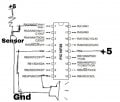
It looks by the pic labeling, that pin 1 is analog channel 2. And that is what you’ve connected your sensor to.

Ok, what I mean by printing out intermediate results is after reading volt, you do something to verify you are getting the signal you expect from the sensor. I’m still thinking Arduino, which has serial output to a console built in. Perhaps you can drive an LED by an unused pin and use that as your output. More later...

The concept remains the same however. For each link in your design, output something to verify that it is working.

I’d start with your sensor. Connect it outside the pic environment. That is connect ground and 5V to the sensor. With a multimeter measuring volts connected to the sensor output and ground, activate the sensor. You should see 5V on the meter. It may just be a flicker, but make sure it’s there. If you don’t get 5V, that could be your problem.

Then go on. Add a line to test if volt is greater than 800, and illuminate the LED if it is. That confirms that the ADC is working. If the LED doesn’t light, then I’d research further the ADC_Read function.

Same with your calculation of vinp. Check that vinp is greater than 0. If it is, light the LED. if it doesn’t illuminate, then the problem is in your calculation.

Once you find a problem, there is no sense checking further until you have resolved the problem.

Good luck.
 

Thread Starter

gatoulisss

Joined Jan 23, 2015
69
It looks by the pic labeling, that pin 1 is analog channel 2. And that is what you’ve connected your sensor to.

Ok, what I mean by printing out intermediate results is after reading volt, you do something to verify you are getting the signal you expect from the sensor. I’m still thinking Arduino, which has serial output to a console built in. Perhaps you can drive an LED by an unused pin and use that as your output. More later...

The concept remains the same however. For each link in your design, output something to verify that it is working.

I’d start with your sensor. Connect it outside the pic environment. That is connect ground and 5V to the sensor. With a multimeter measuring volts connected to the sensor output and ground, activate the sensor. You should see 5V on the meter. It may just be a flicker, but make sure it’s there. If you don’t get 5V, that could be your problem.

Then go on. Add a line to test if volt is greater than 800, and illuminate the LED if it is. That confirms that the ADC is working. If the LED doesn’t light, then I’d research further the ADC_Read function.

Same with your calculation of vinp. Check that vinp is greater than 0. If it is, light the LED. if it doesn’t illuminate, then the problem is in your calculation.

Once you find a problem, there is no sense checking further until you have resolved the problem.

Good luck.
Ok after experimenting on different project using potentiometer instead of the vibration sensor and leds to indicate voltage from 0v to 5v I realize that the problem was inside the while command
I had to put again adc_read and vinp inside while so that the value of vinp could change and break from the loop

I will test it also on my main project and I will post results
 

djsfantasi

Joined Apr 11, 2010
9,237
Ok after experimenting on different project using potentiometer instead of the vibration sensor and leds to indicate voltage from 0v to 5v I realize that the problem was inside the while command
I had to put again adc_read and vinp inside while so that the value of vinp could change and break from the loop

I will test it also on my main project and I will post results
D’oh! Good catch.
 
Top