OK, it's tomorrow and I did get a few things setup. Got a few pictures to work in and a few thoughts. I used an old household fan as a source of vibration. Unfortunately had a few unplanned things come up today but I will get back to you on this.
OK, there are things you need to decide and among them is budget. Vibration analyzing and data recording can get expensive depending on exactly what results you expect. The following images were the result of the type of accelerometers I pictured earlier. The actual accelerometer used was a Bruel and Kjaer Model 4371. I ran the output of the accelerometer into a "charge Amplifier so the input to my charge amplifier of 1.0 pC/ms^-2 from the accelerometer was converted to 100 mV/G output into my AD converter.
If you do not understand vibration I suggest you read up on vibration analysis in detail. This is especially true when measuring vibration to determine possible motor or engine failure. Accelerometer placement must always be the same for a given project.
So here is a few examples.
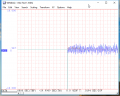
Here is a baseline without the fan running:
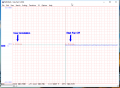
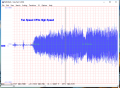
In the above image I used user annotation to scale the software in G Force. The sample rate was 2,000 samples per second. The next image shows Fan Start and the fan going from zero to low speed.
This is fan off going to high speed:
The idea behind all of this is that we need to establish known base lines of vibration of a known good signal. Only once we know what it should look like can we ascertain any deviations from normal. The big merit to data logging like this is that we can actually look at a signal and if need be expand that signal to look at any abnormalities in detail.
There are also hand held vibration recording devices available, I know Fluke markets a few. Finally keeping things inexpensive a micro controller like an Arduino coupled with a cheap three axis accelerometer can also be used. Expensive to inexpensive is a matter of application.
Ron thank you for the invaluable information. Would the information shown through the fan vibration be shown in 'real time as the aim of the project is to replicate the helicopter vibration of a gearbox/drive shaft so the information would need to be stored until the helicopter landed back on the deck and then transferred the information to a ground station (PC)
I had originally looked at using an Arduino board along with a 3 axis accelerometer but there was no one able to provide the required programming information it would take for the project to be successful
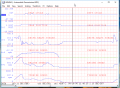
You view and store in real time so after a test you can go back and review the vibrations during different steps of a test. The idea is that a chart or plot actually can show what is going on at any given time during a test. You can also use multi channels, for example here is a mock example of an automotive transmission.
I can move the cursor over any points on the chart and read my numbers. This screen shot only represents a small section of the data file, I can horizontally scroll to see more data. I can move the black vertical cursor to any point on the chart. It is not unusual to use multiple channels of data. I may have several vibration channels and also I may have a few temperature and RPM channels.
Back to Arduino. I am not a programmer type. I can do light programming. I did see several tutorials using Arduino with a three axis accelerometer. Here is one such example of using an Arduino with a 3 axis board. If you look at enough code samples you will begin to understand how the code works and what the code is doing.
Something you need to do is sketch out exactly what your goals are and how much data you want to collect and where you want to store it. Also, define the accuracy and resolution requirements.
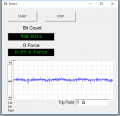
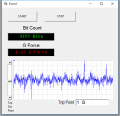
I made the following up this morning. I used the same sensor on a fan as earlier shown. I created a form and added a few text boxes. Don't pay attention to the bit count text as it is just something I use to see my actual Analog to Digital conversion. I added what is a real time chart to the form. In an actual test cell configuration the data could shut down an entire test cell if the vibration exceeded a pre-set limit. There is a little vertical scroll bar on the left of the display. Note in the first image the G display is green but the second image it is red.
The G force is set for 1 G and we are reading below the set point at 0.29 G. Now look at the second image...
The spikes are me tapping the sensor and notice the font color went from Green to Red. When a limit is exceeded we can do anything we want from changing a color to shutting down a system. Keep in mind this is just a simple form to illustrate some of what can be done.
Years ago I designed part of a Generator Test Panel for the testing of Generators used on the F15 Eagle fighter aircraft. The shaft speed was about 15,000 RPM so monitoring vibration was paramount as when a generator is out of dynamic balance at 15,000 RPM things get real ugly real fast. Much like a single nick in a jet turbine blade can cause an imbalance and trash an entire engine.
I made the following up this morning. I used the same sensor on a fan as earlier shown. I created a form and added a few text boxes. Don't pay attention to the bit count text as it is just something I use to see my actual Analog to Digital conversion. I added what is a real time chart to the form. In an actual test cell configuration the data could shut down an entire test cell if the vibration exceeded a pre-set limit. There is a little vertical scroll bar on the left of the display. Note in the first image the G display is green but the second image it is red.
The spikes are me tapping the sensor and notice the font color went from Green to Red. When a limit is exceeded we can do anything we want from changing a color to shutting down a system. Keep in mind this is just a simple form to illustrate some of what can be done.
Years ago I designed part of a Generator Test Panel for the testing of Generators used on the F15 Eagle fighter aircraft. The shaft speed was about 15,000 RPM so monitoring vibration was paramount as when a generator is out of dynamic balance at 15,000 RPM things get real ugly real fast. Much like a single nick in a jet turbine blade can cause an imbalance and trash an entire engine.
The mock up example of an automotive transmission would be perfect for me to display vibration data from a couple of sensors.
The Goal of the project is to prove that the transfer of vibration data via bluetooth to a PC is achievable.
The period of storage of data would only need to be minimal as i just need to provide proof the concept works so minutes as opposed to hours.
The requirement to provide storage is so it can be shown that it is possible to store data (aircraft in flight) until it can be transferred to a pc so a SD card or equivalent would suffice.
Once I receive the data from the vibration source (Fan,DC motor) I can use this as the base data.
The whole concept resolves around whether or not it is possible to transfer data from a source of vibration via bluetooth to a PC.
This would in turn prove there is an alternative to using a PCMCIA card that is currently in use in a Wildcat Helicopter.
So if I read it right the components required would be an accelerometer, charge amp, AD converter, program in which to view results (WINDAQ)
And then a way of transferring the data via Bluetooth to a PC.?
Thank you very much for your experience, knowledge and advice. It is very much appreciated.
Thinking about a simple proof of concept using blue tooth I really don't know. Collecting the data is certainly easy enough and has been done for decades, transferring the data wireless is also not an issue. A race car on a track is constantly streaming and recording a host of data to a pit crew and that data is available to be analyzed later. I know that using an Arduino along with with a wireless Ethernet shield to transmit and store data is easy enough and I have done it using WiFi. So with most of the variables already done the object becomes sending the data using Bluetooth. I have read a few articles but never actually used Bluetooth to get the data from one point to another. Bluetooth is generally associated with limited range but I have seen several articles pointing to various range extenders and longer range units such as this one. I have also read several articles as to using an Arduino with Bluetooth, such as this article.
Knowing now your project is a proof of concept I would just get a few simple accelerometer boards, I say board as using a board with on board accelerometer and amplifier makes for easy scaling of the output data into engineering terms. You also do not need a high level of calibrated uncertainty in your data making a device like an Arduino a good candidate for your A/D conversion from any sensors you use. Using a 3 Axis vibe sensor would require 3 analog channels of an Arduino leaving three additional channels for things like any pressure or temperature data.
Right now your biggest obstacle is your inability to write code. So here is what I will suggest. There are dozens or literally hundreds of code samples out there for Arduino including Arduino with various add on devices like Ethernet and Bluetooth. When looking at sections of code one can get an idea of what is going on leaving one with possibly editing or modifying the code samples. As I mentioned earlier I am not a programmer type and if I had to rely on my programming skills to eat I would have starved. I did get proficient enough to write enough code for my needs and was blessed to have some very good programmer types around me.My suggestion is to start with something very simple and get it to work. Then expand on what you have.
At this point I would sit down with a really sharp pencil, a good large eraser and a clean blank sheet of white paper. Layout what data you want to send such as vibration, temperature, pressure or any other engineering unit. Next choose your sensors which will send data to your analog to digital conversion process. Finally how you will interface your hardware so far to a Bluetooth device. This need not be pretty, you just need to store data and transfer data so at the same time your data is being streamed to on board storage it is view-able in real time. Similar to what we see streaming from a race car to pit crew. Keeping in mind this is only a proof of concept.
I'm obviously looking in the wrong areas as I havent been fortunate enough so far to find a code that roughly relates to what i am hoping to achieve.
Maybe naievly I never for one moment thought my idea was so exclusive or that people would be so reluctant to share their sketches/codes for what I am hoping to achieve. At the end of the day I am a student so the level of my idea has overwhelmed me as to what needs to be done for me to achieve what I thought would be a (relatively) straight forward concept to prove!!
This is off topic but let me share something having been around the block a few times and things never being my first rodeo as the saying goes. When I was a kid in the 10 to 12 year old bracket my school; would host a "science fair". Now keep in mind this was circa 1960, 1962 time frame. My father was an electrical engineer and I had aspirations of becoming the same. My dad was developing a project which used a stepping type counting relay as today's technology was only a dream at the time. I wanted to transmit pulses and have the relay count the received pulses and numerically display them using a then new technology NIXIE tube. I had no clue what I was doing or how to do it. My final project ended up being a simple two transistor photocell circuit. My original my original project literally overwhelmed me as to what needed to be done and how to do it, Sound familiar?
As my career advanced I eventually had young engineers in my charge and was responsible for interviewing and hiring new engineers. I worked in a very specialized field where a new hire would never understand the work scope so I sought people who I felt could learn the job as the saying goes. Doing data acquisition was unique. Over the years there were things that worked, almost worked and things which failed. I built all three. I was pleased with good results (beer after work) and learned from bad results. I learned from the mistakes which are a part of life. Mistakes are fine when we learn from them. I knowingly let my underlings learn from mistakes, I let them make mistakes,
What you want to do can be done, all you want is a proof of concept. Later today I will take an Arduino code sample and modify it to give you something to think about. We will look at a downloaded before and after. Give me a day or so.
A very humbling and honest piece Ron. Having only looked into ways of advancing current technology and not really understanding the specifics of how my concept would be achieved I feel that I will certainly look to broaden my knowledge in this area. I appreciate both your time and patience, I'm just grateful as the enormity of the Arduino coding would certainly take me longer to come to terms with than the allocated time i have for my module.
I only let them make small mistakes. Not expensive mistakes, it was after all on my budget. New hires were always enthusiastic which is a "good thing" but because the things we worked with were very unique often what seemed to look like it would work well simply would not work. So there was plenty of "been there and tried that". Learning from a small mistake seems to better reinforce the learning curve than being told it won't work and why from another. That was my thinking anyway and it seemed to work.
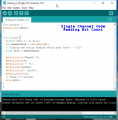
OK, I have some basic screen shots and basic code which was cobbled together. This first example is just reading a single channel and reading the incoming bit count.
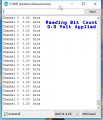
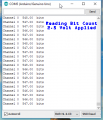
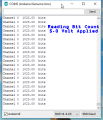
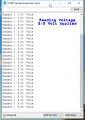
The Arduino uses a 10 bit A/D converter (2^10) resulting in 1024 quattization levels so with a full scale input of 5 Volts the count will be 1023. Here is what it looks like in the Arduino Serial Monitor with 0 Volts applied, 2.5 Volts applied and lastly 5.0 Volts applied.
0.0 Volts
2.5 Volts
Note while the expected bits should be 512 a basic 10 bit A/D is not the most accurate device. It is suitable for hobby use and small projects which do not require a high degree of accuracy. I suggest you read up on A/D conversion and A/D errors. That includes understanding A/D resolution.
5.0 Volts applied.
Here is the code used:
Code:
void setup() {
Serial.begin(9600);
}

void loop() {
  for(int I=0; I < 1; I++){
  int sensorValue = analogRead(I);
  // Display the analog reading (which goes from 0 - 1023)
  float bits = sensorValue;

  Serial.print("Channel ");
  Serial.print(I);
  Serial.print( "  ");
  Serial.print(bits);
  Serial.print("  bits");
  Serial.println();
  // Pause 0.5 seconds
  delay(500);
}
}
This is a very simple example of reading a single channel. We are only looking at the bits returned by the A/D conversion where a 0 to 5 Volt input is equal to 0 to 1023 bits (1024 quantization levels). Before going any further this is where it begins. A Google of Arduino Analog Inputs should yield some further examples. In my next post I will convert those bits to Volts and add a few more analog channels.
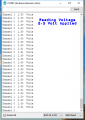
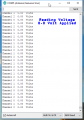
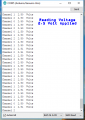
OK a trip to the market and one fresh turkey later let's look at three channels and some code to scale the bit count to an engineering term like volts as an example. We start out with the same look.I tied all 3 channels together as I only have a single voltage source.
Volts Input:
Notice the changes which should be apparent in the code sample I will post shortly.
0.0 Volts applied.
2.5 Volts applied:
5.0 Volts applied:
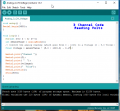
The actual code used:
Code:
void setup() {
Serial.begin(9600);
}

void loop() {
  for(int I=0; I < 3; I++){
  int sensorValue = analogRead(I);
  // Convert the analog reading (which goes from 0 - 1023) to a Voltage (0 - 5.0 Volts):
  float voltage = sensorValue * (5.0 / 1023.0) - 0.00 ;

  Serial.print("Channel ");
  Serial.print(I);
  Serial.print( "  ");
  Serial.print(voltage);
  Serial.print("  Volts");
  Serial.println();
  delay(500);
}
}
Take note of the changes from the previous code sample I posted. Since the input goes from 0 to 1023 bits which represents 0 to 5.0 volts if we look at this line:
// Convert the analog reading (which goes from 0 - 1023) to a Voltage (0 - 5.0 Volts):
float voltage = sensorValue * (5.0 / 1023.0) - 0.00 ;
We are saying that the "Float Voltage" is equal to The bit input * (5.0 / 1023) and eventually we will convert that to another engineering unit of force measured as G.
At this point I suggest you read this very good example of accelerometer breakouts used in conjunction with an Arduino board using three channels to measure vibration on three axis. The X, Y and Z axis. While the provided code in the link has a focus on calibrating the board take note of how the 512 figures into the code since with a 3.5 volt reference using a -16G to 16G accelerometer we get -16 to 16 is 0 to 3.5 Volts which is 0 to 1023 bits. We will be using a new A/D reference of 3.5 volts which is well covered in the link.

 Facebook
 Google
 GitHub
 Linkedin


 Much like a single nick in a jet turbine blade can cause an imbalance and trash an entire engine.