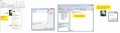
depending on version and configuration of your excel/spreadsheet you may build forms or drop controls directly on the spreadsheet. i simply placed image of mighty ant, right-clicked on it and selected "assign macro". you can change offered name or just click new....
It's very simple.
0. Have a macro attached to your workbook. Pull up your Visual Basic macro editor to see what's available, or to write one.
Or record one using Tools:Macro:Record New Macro...
1. Insert a floating object into your worksheet, such as a textbox, a rectangle, whatever.
2. Right-click or option-click on that object and choose "Assign Macro..." from the contextual menu that pops up.
3. Select which macro to assign to the graphic object.
These steps may vary with the version of Excel, but the basics haven't changed for a very long time.

 Facebook
 Google
 GitHub
 Linkedin