Facebook
 Google
 GitHub
 Linkedin

hi AAC community!!
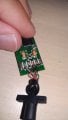
I own a pair of Philips headphones that have USB connectivity instead of a normal 3.5mm jack. I think the model is SHG7980 or something along those lines. my brother broke the USB connector and ripped the golden fingers off of the PCB. I don't have the money for a gold replating kit and where I live there are no shops that can replate them. I'd like to replace that PCB with a TRRS jack, but I do not know where to solder each wire. I have to point out that the headphones have a mic and that there are 6 wires in total. the solder joints connecting the wires to the PCB have little notes that say G, M, MG, R, L and SG, as shown in the photo. I know that the red, green and brown wires mean left channel, right channel and ground, respectively. but what do the other wires mean? and can I connect them to the jack? if so, how do I do it? please note, I am an absolute beginner and please do not be rude, I'm not a native speaker, I do know you care about grammar, I'm trying my best
cheers!
I own a pair of Philips headphones that have USB connectivity instead of a normal 3.5mm jack. I think the model is SHG7980 or something along those lines. my brother broke the USB connector and ripped the golden fingers off of the PCB. I don't have the money for a gold replating kit and where I live there are no shops that can replate them. I'd like to replace that PCB with a TRRS jack, but I do not know where to solder each wire. I have to point out that the headphones have a mic and that there are 6 wires in total. the solder joints connecting the wires to the PCB have little notes that say G, M, MG, R, L and SG, as shown in the photo. I know that the red, green and brown wires mean left channel, right channel and ground, respectively. but what do the other wires mean? and can I connect them to the jack? if so, how do I do it? please note, I am an absolute beginner and please do not be rude, I'm not a native speaker, I do know you care about grammar, I'm trying my best
cheers!
Attachments
-
 118.5 KB Views: 11