As a min you need pins 3 to 6 to be reliable.
They not only look bent ,but seriously tarnished , I suggest they got wet at some point.
I'd say beyond fixing and needs replacing.
Not an easy job though
How olds the laptop ? What's it worth ?
Certainly damage has been done, BUT it seems that a repair could probably be made to reposition the pins out of place, I have done that successfully. But given the degree of corrosion, even with the pins re-aligned, cleaning enough for an adequate connection may not be possible. Was this computer rescued from a scrap bin?? Or found in the weeds along a roadway?? OR???
Okay. Let's understand the reality and proceed with further options. What would the right PoweLAN adaptor for my laptop? As the entire pursuit is just to extend my home wifi to our next newly bought House. Is buying a WiFi repeater is enough? or is the Ethernet port always be needed for laptops? Please advise. Thanks
You want to use your home wifi in another house? If it's nearby, that should totally be possible. My neighbors use mine!
How far? Have you tried it yet without any upgrade? Some channels will work better than others. If you're "close" to acceptable service, you might experiment with different channels. If your laptop has wifi, you should never need that ethernet port.
As a min you need pins 3 to 6 to be reliable.
They not only look bent ,but seriously tarnished , I suggest they got wet at some point.
I'd say beyond fixing and needs replacing.
Not an easy job though
How olds the laptop ? What's it worth ?
5 years old
May be 10K INR
Lost 2 of it's key (Number 8 and right Ctrl rarely)
Working directly with the Main power. Battery needs to be replaced for more than an year.
Harddisk already replaced with an SSD (Just 128 GB). Not Enough.
You want to use your home wifi in another house? If it's nearby, that should totally be possible. My neighbors use mine!
How far? Have you tried it yet without any upgrade? Some channels will work better than others. If you're "close" to acceptable service, you might experiment with different channels. If your laptop has wifi, you should never need that ethernet port.
I am very confident that connector is repairable. I have fixed worse.
How did you get water into the connector?
In any case, it should be replaced but finding the part might be hard.
To repair is you will need to first carefully clean out the loose dirt (canned air would do well).
Next with a very soft brush, poke at the dirt that is stuck, push the brush straight in as if it was a bunch of little probes you were scraping with. Repeat the air, repeat this step until it is clean or you aren’t making progress.
Next you will need to move the pins back into place. This will be the hardest part and you need to go slow and take your time. You will need something to manipulate the pins with. A heavy sewing needle is a good possibility.
Start by getting pin 7 out from under pin 8 and back into its own slot. Lift pin 8 carefully and move it aside so you can get to pin 7. Move pin 7 to its slot and put pin 8 back. In all cases move the pins the least amount that gets the job done.
Next move pin 6 back to its slot.
Now comes the second hardest part. The green corrosion on the pins is copper oxide cause by the water that got in there and the power on those pins electrolyzing the copper content. Copper oxide is a lousy conductor. It will have to be removed to make things work again. It is also very hard, so removing it is not easy.
You have a few options on how to do it but I think the best for you will be to scrape it. You will need something hard and sharp. I think a hobby knife (Xacto) is your best easy to find option. Once again work carefully and slowly and take breaks if you are having trouble. Work with good light. Use magnification if you have it. At least take occasional photos so you can see your progress.
You only need to remove the oxide from the top of the pin because that’s what makes contact with the plug’s contacts.
If you do this carefully, the connector will work again, but I can’t guarantee that the water damage stopped there so it may not solve your problem. Good luck.
this started by trying to repair or use wired port. that means you have no problem bringing cable to vicinity of the laptop. and you. so why not simply connect that cable to a WiFi access point or router and continue using WiFi interface of the laptop assuming that it still works? not only you avoid messing with something old and fragile but this way you get stronger WiFi signal that could be used by other devices as well.

 Facebook
 Google
 GitHub
 Linkedin


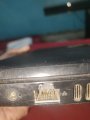

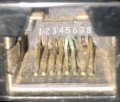
 Pins 5, 6, 7 and 8 looks like the are the main damaged leads. But this socket definitely needs replacing.