TFT-LCD-Touch-Screen information please

Thread Starter

camerart

Joined Feb 25, 2013
3,830
Hi R,

Thanks again for the links. As they say, some of us use PICs and BASIC instead of Arduino. I think they are the same but use a different method. Ihave PICKIT3 which I imagine is like the Arduino boards you buy. In each case, once the expense of the programmer has been made, the chips are cheap and versatile. The BASIC method needs to be completely written each time instead of Ardiuno's code libraries. I've simply never gotten into them, as the fashion wasn't around when I started.
So now I need BASIC to program these screens. I think they use SPI?
C.
 

radiohead

Joined May 28, 2009
514
I would have to point you to the Parallax website. There are people on that forum who are well-versed using BASIC and can probably answer your question better than me. Shoot,m it took me a few months to discover there is a connection bridge for the Raspberry Pi that allows the use of Arduino shields (cookinghacks.com).
 

ErnieM

Joined Apr 24, 2011
8,415
I think they use SPI?
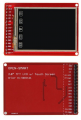
Nope, it is a parallel interface. That is why the pins are labeled DB0 thru DB7 with read, write, chip select and reset lines.

What is not clear is how the touchscreen lines connect. They seem to be common with some of the parallel data pins.

Without a full data sheet on this part I would not proceed. I've seen this around for many years now so someone should have that data.

I recognize the printed icons on one end. I imagine they are a hard sell due to that.
 

Thread Starter

camerart

Joined Feb 25, 2013
3,830
Nope, it is a parallel interface. That is why the pins are labeled DB0 thru DB7 with read, write, chip select and reset lines.

What is not clear is how the touchscreen lines connect. They seem to be common with some of the parallel data pins.

Without a full data sheet on this part I would not proceed. I've seen this around for many years now so someone should have that data.

I recognize the printed icons on one end. I imagine they are a hard sell due to that.
I would have to point you to the Parallax website. There are people on that forum who are well-versed using BASIC and can probably answer your question better than me. Shoot,m it took me a few months to discover there is a connection bridge for the Raspberry Pi that allows the use of Arduino shields (cookinghacks.com).
Hi E,
I'll have a look at the parallax suite, thanks.
C.
 

Thread Starter

camerart

Joined Feb 25, 2013
3,830
Nope, it is a parallel interface. That is why the pins are labeled DB0 thru DB7 with read, write, chip select and reset lines.

What is not clear is how the touchscreen lines connect. They seem to be common with some of the parallel data pins.

Without a full data sheet on this part I would not proceed. I've seen this around for many years now so someone should have that data.

I recognize the printed icons on one end. I imagine they are a hard sell due to that.
Hi E,
Here is an0other photo showing both sides, and what I imagine the 4x touchscreen parallel pins.

I'm sure I'll find someone with a data sheet or BASIC program, this is why I've posted here and other places.

I'm not in a hurry, as I'm working on PCB making plus other projects, but this will be handy, once we've got it going.

I'm yet to find out what the icons are!
C.
 

Attachments

Thread Starter

camerart

Joined Feb 25, 2013
3,830
Hi,

In the end I clicked on the link in the last post, and it was ok. There is some information, but no data sheet. I think I wasted my time buying them as they appear to need a lump like an Arduino or similar to drive them.

Now what I need is an alternative to this kind of screen: http://www.ebay.co.uk/itm/20x2-Char...632401?hash=item281dcc7cd1:g:BzMAAOSwZQRYXPX4 They are cumbersome, when trying to make smaller projects.

I had a quick look at the Nokia 5110 screens. Does anyone know if these are the smallest screens (for the price) that will give indications e,g, digits. Any other suggestions welcome.
C.
 

ErnieM

Joined Apr 24, 2011
8,415
Any graphic type of screen will need a "lump" to drive it as they only display the pixel information loaded into them.

The same is really true for the alphanumeric screen you link to in post #11. You need a lump, but the lump's task load is lesser as it only needs to send ASCII data and the display converts that into pixles. You will need 7 or 8 lines to control them (I forget how few you can get away with). I recommend them for most simple tasks when you do not absolutely need a graphic touch screen.

Coding is not hard, but everyone stumbles over the initiation process. You will find many examples to follow on the web, but most are in C so you will need to convert them over. That is not very hard to do. Do watch for the delay times, these things are slow at first to set up.

My favorite size is 4 lines of 20 characters. I combine them with 5 pushbuttons for up/down/left/right/enter which gives the user an easy way to walk thru menus, select and change values.
 

Thread Starter

camerart

Joined Feb 25, 2013
3,830
Any graphic type of screen will need a "lump" to drive it as they only display the pixel information loaded into them.

The same is really true for the alphanumeric screen you link to in post #11. You need a lump, but the lump's task load is lesser as it only needs to send ASCII data and the display converts that into pixles. You will need 7 or 8 lines to control them (I forget how few you can get away with). I recommend them for most simple tasks when you do not absolutely need a graphic touch screen.

Coding is not hard, but everyone stumbles over the initiation process. You will find many examples to follow on the web, but most are in C so you will need to convert them over. That is not very hard to do. Do watch for the delay times, these things are slow at first to set up.

My favorite size is 4 lines of 20 characters. I combine them with 5 pushbuttons for up/down/left/right/enter which gives the user an easy way to walk thru menus, select and change values.
Hi E,
I'll order a couple of 5110s and see how I get on.
Thanks for your detailed information.
C.
 

Thread Starter

camerart

Joined Feb 25, 2013
3,830
Hi,
As I only program in Oshonsoft BASIC, I have to search for programs, including other languages and pick the nearest to what I need.

Here are some of the programs I've found for the screen project: You may notice that I've posted on another forum too.

I need a dedicated SLAVE PIC for screen communications, which talks to the MASTER PIC that I will choose for any project.

If we can select the best program or sections from the selection, this would be appreciated.

Thanks to all of the program writers.
Cheers, Camerart
 

Attachments

Top