Text To Speech

Thread Starter

biferi

Joined Apr 14, 2017
516
I was on YouTube looking for a good Free Text To Speech WebSite.

I see you make an account then you can use it.

Then another video says you have to copy the code on the Page.

Another video says you have to get PlugIns for it.

Before I make an Account can anybody tell me if you can just make an Account Log In and Past Text and use it?

Or is there something better out there?

I do want it to be Free.
 

ronsimpson

Joined Oct 7, 2019
4,647
On my computer Ctrl Shift U will start the computer reading to me. (in most cases, but not all)
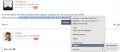
While at this forum I can select a block of text and right click, then "read aloud".
 

Ya’akov

Joined Jan 27, 2019
10,226
I was on YouTube looking for a good Free Text To Speech WebSite.

I see you make an account then you can use it.

Then another video says you have to copy the code on the Page.

Another video says you have to get PlugIns for it.

Before I make an Account can anybody tell me if you can just make an Account Log In and Past Text and use it?

Or is there something better out there?

I do want it to be Free.
Since you don't say what website you are taking about it is not possible to answer the question.
 

Ya’akov

Joined Jan 27, 2019
10,226
Text-to-speech is a feature built in to most modern operating systems. Why do you need a website to do it?
These websites offer AI driven voices that sound like realistic speech, It is far more sophisticated than the tesx-to-speech features in OSs.
 

tranzz4md

Joined Apr 10, 2015
315
Text-to-speech is a feature built in to most modern operating systems. Why do you need a website to do it?
On my fairly new Intel / Windows 11 system, the Ctrl-Shift-U key combination does nothing. I did enable / install / configure something a couple months back to get voice-to-text, and it works ok (not smoothly but OK)

So how does this modern operating system like me to designate some text and initiate the "voice" playback mode? I use a couple e-textbooks with their designated apps or websites, and can deal with the ridiculously poor audio simulation of a voice, but with Siri and Alexa out of puberty and approaching mid-life crisis, I'd expect far better text-to-speech performance on a system with the mflops mine and most others have.

(my memory is really declining, so I may well be just forgetting how I've done it in the past!)
 

tranzz4md

Joined Apr 10, 2015
315
I was on YouTube looking for a good Free Text To Speech WebSite.

I see you make an account then you can use it.

Then another video says you have to copy the code on the Page.

Another video says you have to get PlugIns for it.

Before I make an Account can anybody tell me if you can just make an Account Log In and Past Text and use it?

Or is there something better out there?

I do want it to be Free.
Balabolka has a good reputation, Panopreter might be good.

there have been conversion type apps for a long time, I want to be able to just hilight text onscreen and have it read to me.
 

Thread Starter

biferi

Joined Apr 14, 2017
516
I thought I did put the name of the WebSite.

The WebSite is Text To Speech Open AI.

One video on YouTube says you can just make an Account and Login and Past Text and have it Read.

Another WebSite says you have to get Plugins.

Before I make an Account can anybody tell me if you can just use it as is?

As for the Built in Text To Speech in Windows and most Programs is is very Basic and does not have that many Voices and settings.
 

Ya’akov

Joined Jan 27, 2019
10,226
I thought I did put the name of the WebSite.

The WebSite is Text To Speech Open AI.

One video on YouTube says you can just make an Account and Login and Past Text and have it Read.

Another WebSite says you have to get Plugins.

Before I make an Account can anybody tell me if you can just use it as is?

As for the Built in Text To Speech in Windows and most Programs is is very Basic and does not have that many Voices and settings.
A link would be the way to point us at the site.
 

wayneh

Joined Sep 9, 2010
18,088
Macs had rudimentary text-to-speech when they launched in 1984.

So is this discussion about "high quality" text-to-speech provided by an AI, as @Ya’akov speculates?
 

Wendy

Joined Mar 24, 2008
23,797
Speech to text comes free with every windows package, press the windows key + H and a little microphone icon appears above the browser bar. Make sure the microphone icon is lit karma then put your cursor on the text field you want to write in and start talking.
 

tranzz4md

Joined Apr 10, 2015
315
Speech to text comes free with every windows package, press the windows key + H and a little microphone icon appears above the browser bar. Make sure the microphone icon is lit karma then put your cursor on the text field you want to write in and start talking.
Speech to text is an entirely different function. The OP, like myself, was interested in Text-to-speech; a way for people with poor eyesight or other deficits /disabilities making it difficult to read at times, or for extended lengths of time. The TTS function I might also say, is a pleasant convenience at times for many computer users who don't have such issues.
 

tranzz4md

Joined Apr 10, 2015
315
I was on YouTube looking for a good Free Text To Speech WebSite.

...Or is there something better out there?

I do want it to be Free.
I'm assuming you looked at the "Similar threads" listings. I haven't worked clear through all of them,,, yet, but I'll contribute something that's current and pertains to the current versions of MS Word.

Word has had some "read" or Speak functions for some time. CURRENTLY (Q2 2025), the Alt-Ctrl-Space key combination will have Word read your Word document to you, and I must say it does quite nicely! It is US or North American colloquial speech, but quite clear, with good enunciation and timing, even the very slight accents within words that make the voices far more normal and "personal" than R2D2, Siri or Alexa! Older versions of word use different commands, and didn't work as well as, or sound as good as this version.

Word has been getting more cooperative and accepting of PDF files, so it may well be possible to use a current or relatively current version of Word to read you various PDFs you have.

I (too) certainly wish I could just hi-light something with a swipe of my mouse, or finger on a touchpad, and get a double right-click to have the selection spoken to me, but I'm not finding that yet on Windows systems.
 

MisterBill2

Joined Jan 23, 2018
27,186
Speech to text is an entirely different function. The OP, like myself, was interested in Text-to-speech; a way for people with poor eyesight or other deficits /disabilities making it difficult to read at times, or for extended lengths of time. The TTS function I might also say, is a pleasant convenience at times for many computer users who don't have such issues.
A while back a friend of mine had a similar request. They wanted to use their scanner to copy articles and then the text to speech software to read them out loud.
The fatal flaw is that a scanned document saves a file with the picture of the text, not the characters of the text.
Thus there still needs to be software to convert the images of the characters into the actual text. THAT may be a serious challenge.
 

bertus

Joined Apr 5, 2008
22,885
Hello,

To convert the image to text, you would need an OCR ( optical character recognition ) software.
My scanner software has a simple one included.
It can make failures during the process.

Bertus
 
Top