TDA9381PS/N2 -- I need help with an integrated circuit.

Thread Starter

spikespiegelbebop

Joined Nov 30, 2021
163
I'm trying to activate the analog rgb video signal from the IC TDA9381, but I don't know how to do that. When I checked the datasheet, this is what I found:
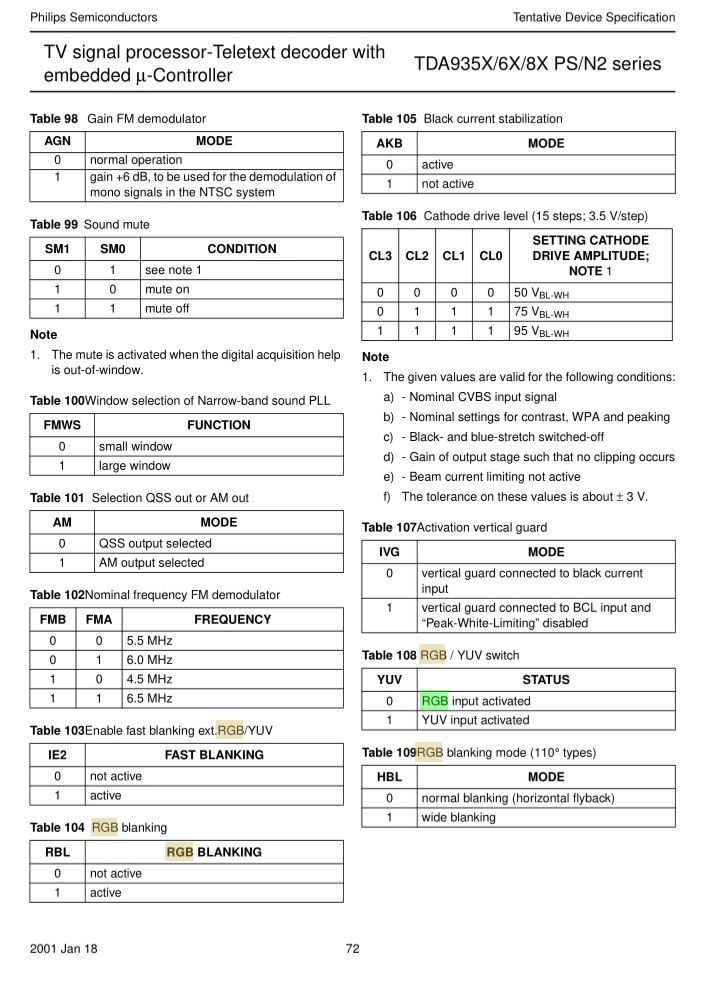

This looks like data from the microcontroller, but I don't how to edit this.

This is the TV IC's datasheet:
https://pdf1.alldatasheet.com/datasheet-pdf/download/1315009/PHILIPS/TDA9381PS/N2.html

This is the IC
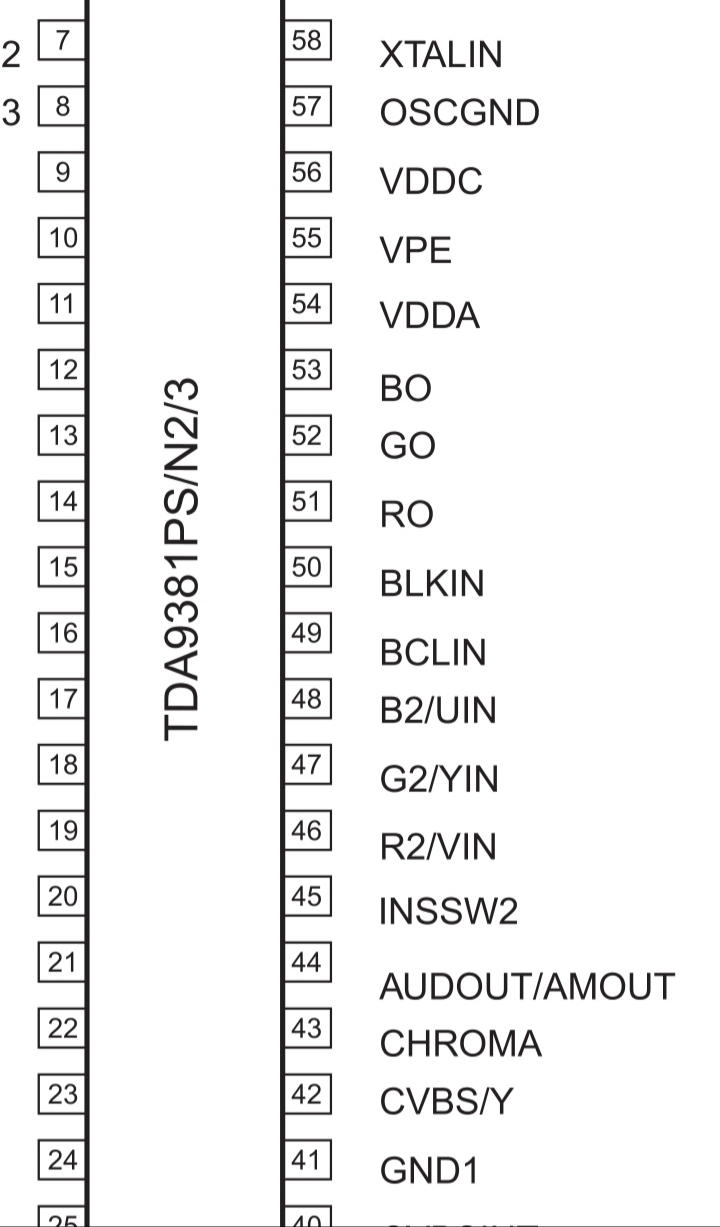

Pins 46, 47 and 48 are for the analog RGB, Pin 45 (INSSW2) is the fast blanking line.

I need some guidance, cause I not even have any idea as to where to start from.

This is from a CRT TV, I didn't buy its controller yet, but maybe this could be achieved from the Service Menu?
 

MisterBill2

Joined Jan 23, 2018
27,610
I suggest also looking at the manufacturer's application notes.
App. notes are mostly found on the manufacturer's website.
Application notes are created and published for the purpose of
showing how a device is intended to be used, and so they tend
to show how the best performance can be obtained.
They are often not the cheapest possible implementation, but rather
the most likely to provide the best results.
They are probably never shown on yoo-toob.
 
Last edited:

SirFlickka

Joined Jul 6, 2024
6
Idk how well this could be ..:

### Step-by-Step Guide:

#### 1. **Power Supply and Basic Setup:**
- **Power Supply:**
- Connect the Vcc and GND pins of the TDA9381 to a stable power supply (5V or as specified in the datasheet).
- Verify the power supply using a multimeter to ensure correct voltage levels.

- **Current Measurement:**
- Use an ammeter to measure the current drawn by the RGB output to ensure it's within safe operating limits.

#### 2. **Configure the TDA9381:**
- **I2C Configuration:**
- If the TDA9381 requires I2C configuration, use an Arduino or a similar microcontroller to set the necessary registers.
- Connect the I2C lines (SDA and SCL) of the Arduino to the corresponding I2C pins on the TDA9381.
- Use pull-up resistors (typically 4.7kΩ) on the SDA and SCL lines if they are not already present on the board.

#### 3. **Arduino Setup:**
- **Arduino Code:**
- Write a sketch to configure the TDA9381 via I2C. This may involve setting specific registers to enable RGB output.
- Example Arduino I2C setup code:

```cpp
#include <Wire.h>

// TDA9381 I2C address
#define TDA9381_ADDR 0x50 // Example address, check datasheet for correct value

void setup() {
Wire.begin();
Serial.begin(9600);

// Configure TDA9381 registers
Wire.beginTransmission(TDA9381_ADDR);
Wire.write(0x00); // Register address (example)
Wire.write(0xXX); // Data to enable RGB output (example)
Wire.endTransmission();
}

void loop() {
// Add any additional configuration or monitoring code here
}
```

#### 4. **Testing RGB Outputs:**
- **Initial Test:**
- Connect the RGB output pins of the TDA9381 to an oscilloscope or a display device to verify signal presence.
- Use 75-ohm termination resistors on the RGB outputs to match the impedance of the video signal path.

- **Signal Adjustment:**
- Adjust the configuration via I2C if the output signals are not correct. This may involve fine-tuning register values.

#### 5. **Use of Transistors or Zener Diodes:**
- **Voltage Regulation:**
- If the output voltage levels need adjustment, consider using transistors or Zener diodes to regulate the signal levels.
- For example, use a Zener diode to clamp the voltage to a desired level or a transistor to amplify the signal if needed.

### Additional Tips:
- **Component Datasheet:** Always refer to the TDA9381 datasheet for exact register addresses and configuration details.
- **Safety:** Ensure the circuit is powered down when making changes to avoid damage to the components.
- **Debugging:** Use serial output on the Arduino to print debug information and confirm that the I2C communication is successful.
 
Top