SunFounder I2C LCD1602 for PIC24FJ128GA110

Thread Starter

jcrunchwrap

Joined Jul 24, 2023
19
Hey guys !
So I'm working on a PIC24FJ128GA110 (custom PCB). I want to display something on my LCD screen, via I2C. I have a working I2C lib bc I tested it with an ADC and it worked well, but for some reason, I cannot manage to display anything on my LCD and as it's the fist time I'm using an LCD, I don't really know what I am doing or even if my library is working (I am pretty new to the world of embedded engineering lol). I have written this lib myself because I didn't find one on the internet.
I have included my work under this post, does anyone know what I could do to try and debug my code to display a simple string on the LCD please ?
Thanks heaps for your help !
 

Attachments

Thread Starter

jcrunchwrap

Joined Jul 24, 2023
19
Welcome to AAC!

What LCD screen?
There are a zillion different kinds of LCD screens.
Thank you heaps !
Sorry I should have precised that, my apologies. It is a sunfounder I2C 1602. Unfortunately, it came in the mail without the documentation, and I haven't found one yet on the web :/
 

Thread Starter

jcrunchwrap

Joined Jul 24, 2023
19
Hey guys !
So I'm working on a PIC24FJ128GA110 (custom PCB). I want to display something on my LCD screen, via I2C. I have a working I2C lib bc I tested it with an ADC and it worked well, but for some reason, I cannot manage to display anything on my LCD and as it's the fist time I'm using an LCD, I don't really know what I am doing or even if my library is working (I am pretty new to the world of embedded engineering lol). I have written this lib myself because I didn't find one on the internet.
I have included my work under this post, does anyone know what I could do to try and debug my code to display a simple string on the LCD please ?
Thanks heaps for your help !
LCD lib:
#include <xc.h>
#include "lcd.h"
#include "i2c1.h"

#ifndef _XTAL_FREQ
#define _XTAL_FREQ  8000000UL
#endif

#ifndef FCY
#define FCY _XTAL_FREQ/2
#endif


#include <libpic30.h>
#define LCD_ADDRESS 0x27

void lcd_init() {
    // Initialization sequence for 16x2 LCD
    lcd_send_command(0x33); // Initialize the LCD in 4-bit mode
    lcd_send_command(0x32);
    lcd_send_command(0x28); // 2 lines, 5x7 matrix
    lcd_send_command(0x0C); // Display ON, Cursor OFF, Blink OFF
    lcd_send_command(0x06); // Increment cursor
    lcd_clear(); // Clear the LCD
}

void lcd_send_command(unsigned char command) {
    send_i2c1_byte(LCD_ADDRESS << 1); //RW = 0
    send_i2c1_byte(command);
}

void lcd_send_data(unsigned char data) {
    // Set RS high (0x80) for data, and send data byte to LCD
    send_i2c1_byte((LCD_ADDRESS << 1) | 0x01); // Set R/W bit high for Write
    send_i2c1_byte(data);
}

void lcd_clear() {
    lcd_send_command(0x01); // Clear display command
    __delay_ms(2); // Delay to allow the LCD to process the command
}

void lcd_set_cursor(unsigned char row, unsigned char col) {
    unsigned char address = (0x80 | (row << 6) | col); // Calculate the DDRAM address
    lcd_send_command(address);
}

void lcd_display_string(const char *str) {
    while (*str) {
        lcd_send_data(*str);
        str++;
    }
}
I2C1 LIB:
#include <xc.h>
#include "i2c1.h"

#ifndef _XTAL_FREQ
#define _XTAL_FREQ  8000000UL
#endif

#ifndef FCY
#define FCY _XTAL_FREQ/2
#endif


#include <libpic30.h>

void i2c1_init() {

    I2C1BRG = 4; //8 7 4 = 300kH
    //I2C1CONbits.I2CEN = 0; // Disable I2C Mode
    // Clear Interrupt
    IFS3bits.MI2C2IF = 0;
    //Continue module operation in Idle mode
    I2C1CONbits.I2CSIDL = 0;
    //IPMIEN mode disabled
    I2C1CONbits.IPMIEN = 0;
    //Slew rate enabled
    I2C1CONbits.DISSLW = 0;
    //General call address disabled
    I2C1CONbits.GCEN = 0;
    //Disable SMBus input thresholds
    I2C1CONbits.SMEN = 0;
    //Software or receive call stretching disabled
    I2C1CONbits.STREN = 0;
    // Enable I2C Mode
    I2C1CONbits.I2CEN = 1;

}

void i2c1_wait(void) {
    //while(!IFS3bits.MI2C2IF);
    __delay_ms(500);
    IFS3bits.MI2C2IF = 0; // Reset flag
}

void i2c1_start(void) {
    I2C1CONbits.SEN = 1; //Initiate Start condition
    i2c1_wait();
}

void i2c1_restart(void) {
    I2C1CONbits.RSEN = 1; //Initiate restart condition
    i2c1_wait();
}

void i2c1_stop(void) {
    I2C1CONbits.PEN = 1; //Initiate Start condition
    i2c1_wait();
}

void reset_i2c1_bus(void) {
    I2C1CONbits.PEN = 1; //initiate stop bit
    while (I2C1CONbits.PEN);
    I2C1CONbits.RCEN = 0;
    IFS3bits.MI2C2IF = 0; // Clear Interrupt
    I2C1STATbits.IWCOL = 0;
    I2C1STATbits.BCL = 0;
}

char send_i2c1_byte(unsigned char data) {
    I2C1TRN = data; // load the outgoing data byte
    i2c1_wait();
    return (I2C1STATbits.ACKSTAT == 0); // return 1 if ACK   
}

unsigned char receive_i2c1_byte(char send_ack) {
    unsigned char data;

    if (send_ack)
        I2C1CONbits.ACKDT = 0;
    else
        I2C1CONbits.ACKDT = 1;

    I2C1CONbits.RCEN = 1; // Start reception
    //i2c1_wait();
    data = I2C1RCV; // Read data   
    I2C1CONbits.ACKEN = 1; // Send ACK/NAK
    //i2c1_wait();
    while (I2C1CONbits.ACKEN);
    return data;
}

unsigned char I2C1write(unsigned char dev, unsigned char reg, unsigned char value) {
    dev <<= 1; // RW=0
    i2c1_start(); // Send start
    if (!send_i2c1_byte(dev) || !send_i2c1_byte(reg)) { // Send device address and reg address
        i2c1_stop(); // Cancel if NACK
        return 0;
    }
    send_i2c1_byte(value); // Write data
    i2c1_stop(); // Send stop
    return 1;
}

char I2C1read(unsigned char dev, unsigned char reg) {
    unsigned char data;
    dev = (dev << 1); // RW=0   
    i2c1_start(); // Send start
    if (!send_i2c1_byte(dev) || !send_i2c1_byte(reg)) { // Send device address and reg address
        i2c1_stop(); // Cancel if NACK
        return 0;
    }
    dev |= 1;  // RW=1
    i2c1_restart(); // Send restart
    if (!send_i2c1_byte(dev)) { // Send device address
        i2c1_stop(); // Cancel if NACK
        return 0;
    }
    data = receive_i2c1_byte(0);
    i2c1_stop(); // Send stop
    return data; // Return read data
}
MAIN:
 i2c1_init(); // Initialize I2C1
    lcd_init();  // Initialize the LCD

    // Display "Hello World" on the first row
    lcd_set_cursor(0, 0);
    lcd_display_string("Hello World");

    while (1) {
        
    }
I updated the code that I had previously written in here :)
 

Thread Starter

jcrunchwrap

Joined Jul 24, 2023
19
Now we know it is Sunfounder I2C LCD1602, what happens when you apply power?
Does the backlight turn on?
Can you see rectangular blocks on the screen?
Have you looked at the tutorials?

https://learn.sunfounder.com/lesson-1-display-by-i2c-lcd1602/
Thank heaps for you reply. The backlight indeed turns on, i see the 16 little rectangles. And I have indeed looked at this tutorial, but I didn't know if I could use this lib because it is for arduino and I work with a PIC24F... I'm kinda new to this, sorry.
Thank you for you rhelp !
 

MrChips

Joined Oct 2, 2009
34,629
I2C requires two control signals, SDA and SCL.
Where and how did you declare these two signals and match them up with the PIC I/O pins?
 

Thread Starter

jcrunchwrap

Joined Jul 24, 2023
19
I2C requires two control signals, SDA and SCL.
Where and how did you declare these two signals and match them up with the PIC I/O pins?
So I have written an i2c library :
I2C1 LIB:
#include <xc.h>
#include "i2c1.h"

#ifndef _XTAL_FREQ
#define _XTAL_FREQ  8000000UL
#endif

#ifndef FCY
#define FCY _XTAL_FREQ/2
#endif


#include <libpic30.h>

void i2c1_init() {

    I2C1BRG = 4; //8 7 4 = 300kH
    //I2C1CONbits.I2CEN = 0; // Disable I2C Mode
    // Clear Interrupt
    IFS3bits.MI2C2IF = 0;
    //Continue module operation in Idle mode
    I2C1CONbits.I2CSIDL = 0;
    //IPMIEN mode disabled
    I2C1CONbits.IPMIEN = 0;
    //Slew rate enabled
    I2C1CONbits.DISSLW = 0;
    //General call address disabled
    I2C1CONbits.GCEN = 0;
    //Disable SMBus input thresholds
    I2C1CONbits.SMEN = 0;
    //Software or receive call stretching disabled
    I2C1CONbits.STREN = 0;
    // Enable I2C Mode
    I2C1CONbits.I2CEN = 1;

}

void i2c1_wait(void) {
    //while(!IFS3bits.MI2C2IF);
    __delay_ms(500);
    IFS3bits.MI2C2IF = 0; // Reset flag
}

void i2c1_start(void) {
    I2C1CONbits.SEN = 1; //Initiate Start condition
    i2c1_wait();
}

void i2c1_restart(void) {
    I2C1CONbits.RSEN = 1; //Initiate restart condition
    i2c1_wait();
}

void i2c1_stop(void) {
    I2C1CONbits.PEN = 1; //Initiate Start condition
    i2c1_wait();
}

void reset_i2c1_bus(void) {
    I2C1CONbits.PEN = 1; //initiate stop bit
    while (I2C1CONbits.PEN);
    I2C1CONbits.RCEN = 0;
    IFS3bits.MI2C2IF = 0; // Clear Interrupt
    I2C1STATbits.IWCOL = 0;
    I2C1STATbits.BCL = 0;
}

char send_i2c1_byte(unsigned char data) {
    I2C1TRN = data; // load the outgoing data byte
    i2c1_wait();
    return (I2C1STATbits.ACKSTAT == 0); // return 1 if ACK  
}

unsigned char receive_i2c1_byte(char send_ack) {
    unsigned char data;

    if (send_ack)
        I2C1CONbits.ACKDT = 0;
    else
        I2C1CONbits.ACKDT = 1;

    I2C1CONbits.RCEN = 1; // Start reception
    //i2c1_wait();
    data = I2C1RCV; // Read data  
    I2C1CONbits.ACKEN = 1; // Send ACK/NAK
    //i2c1_wait();
    while (I2C1CONbits.ACKEN);
    return data;
}

unsigned char I2C1write(unsigned char dev, unsigned char reg, unsigned char value) {
    dev <<= 1; // RW=0
    i2c1_start(); // Send start
    if (!send_i2c1_byte(dev) || !send_i2c1_byte(reg)) { // Send device address and reg address
        i2c1_stop(); // Cancel if NACK
        return 0;
    }
    send_i2c1_byte(value); // Write data
    i2c1_stop(); // Send stop
    return 1;
}

char I2C1read(unsigned char dev, unsigned char reg) {
    unsigned char data;
    dev = (dev << 1); // RW=0  
    i2c1_start(); // Send start
    if (!send_i2c1_byte(dev) || !send_i2c1_byte(reg)) { // Send device address and reg address
        i2c1_stop(); // Cancel if NACK
        return 0;
    }
    dev |= 1;  // RW=1
    i2c1_restart(); // Send restart
    if (!send_i2c1_byte(dev)) { // Send device address
        i2c1_stop(); // Cancel if NACK
        return 0;
    }
    data = receive_i2c1_byte(0);
    i2c1_stop(); // Send stop
    return data; // Return read data
}
I think it's working because I used the same library of the 2nd i2c bus of my PIC for an ADC and I managed to get the results I wanted. Besides, on the scope I can see my SCL and SDA signals.
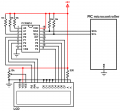
It's a custom PCB, and for the LCD basically the PIC is connected to a logic level translator to 'up' the voltage from 3.3V to 5V (which is the standard for a LDC i think) and this logic level translator is connected to the LCD pins, and ths is were I put my LCD screen. Sorry I don't know if it's clear, english isn't my first language.
But when I probe on the pull up resistors to see SCL and SDA, I can see the signals I'm supposed to get.
And I have this LCD lib, but I'm not sure at all if it is correct or not...
Thank you for your help !
 

MrChips

Joined Oct 2, 2009
34,629
So you do have an oscilloscope!

What I would do if I were in your position, is to ignore the library for now and send raw I2C SCL and SDA to the display.
Confirm with the oscilloscope that this is happening.

According to SunFounder, there are two possible I2C slave addresses, 0x27 and 0x3F.

Follow the PCF8574 documentation for guidelines.

Try to initialize the LCD by sending basic commands.
Then try sending a single character such as "A".
Have a look at this LCD example written in C.
https://forum.allaboutcircuits.com/ubs/msp430-lcd-example.568/
 

Thread Starter

jcrunchwrap

Joined Jul 24, 2023
19
So you do have an oscilloscope!

What I would do if I were in your position, is to ignore the library for now and send raw I2C SCL and SDA to the display.
Confirm with the oscilloscope that this is happening.

According to SunFounder, there are two possible I2C slave addresses, 0x27 and 0x3F.

Follow the PCF8574 documentation for guidelines.

Try to initialize the LCD by sending basic commands.
Then try sending a single character such as "A".
Have a look at this LCD example written in C.
https://forum.allaboutcircuits.com/ubs/msp430-lcd-example.568/
I do have a scope, so I tried and it works ! So when I probe SCL for example and I just initialize the i2c bus, i do observe my SCL signal on the SCL pin of the LCD output !
Now i'm going to try to send basic commands to the LCD, to see if it's working.
Thanks heaps for your help !
 

Thread Starter

jcrunchwrap

Joined Jul 24, 2023
19
I do have a scope, so I tried and it works ! So when I probe SCL for example and I just initialize the i2c bus, i do observe my SCL signal on the SCL pin of the LCD output !
Now i'm going to try to send basic commands to the LCD, to see if it's working.
Thanks heaps for your help !
*Edit*
So I tried to send basic commands for the LCD, and I start by sending the address 0x27 (or 0x3F) but when i do so, it's like i don't have the SCL signal anymore on the LCD output pin, and I reckon I don't understand why :/
 

geekoftheweek

Joined Oct 6, 2013
1,429
Another issue I see is the first couple lines of your LCD init needs to be sent as 4 bit data as in only send the high four bits before switching to the full eight bits. Check the HD44780 datasheet for the startup sequence https://www.sparkfun.com/datasheets/LCD/HD44780.pdf

So I tried to send basic commands for the LCD, and I start by sending the address 0x27 (or 0x3F) but when i do so, it's like i don't have the SCL signal anymore on the LCD output pin, and I reckon I don't understand why :/
Many slave I2C devices normally do that briefly to allow time to gather data, perform a function, or whatever. It's not normal for it to stay low though and that is usually a sign of something didn't happen right.
 

Thread Starter

jcrunchwrap

Joined Jul 24, 2023
19
Another issue I see is the first couple lines of your LCD init needs to be sent as 4 bit data as in only send the high four bits before switching to the full eight bits. Check the HD44780 datasheet for the startup sequence https://www.sparkfun.com/datasheets/LCD/HD44780.pdf


Many slave I2C devices normally do that briefly to allow time to gather data, perform a function, or whatever. It's not normal for it to stay low though and that is usually a sign of something didn't happen right.
Thank you for your reply !
I will read the datasheet you sent me, thanks heaps !
The thing i don't get is that I'm just trying to send the address to the device, and whenever i do so, suddenly there is no more SCL...
LCD:
//TEST LCD 2
    LED_IGN_TRIS = LED_OUTPUT;
    LED_IGN_LAT = LED_OFF;
    i2c1_init();
    LED_IGN_LAT = LED_ON;
    send_i2c1_byte(LCD_ADDRESS);
       
    __delay_ms(150);
    LED_IGN_LAT = LED_OFF;

    while (1) {
       
    }
    return 0;
I have tried with both addresses, but I still get nothing and i don't know whats wrong :/
 

Thread Starter

jcrunchwrap

Joined Jul 24, 2023
19
I have a feeling you are missing your stop command in your I2C library somehow. I didn't sort through all of it, but that would be my guess at this moment.
oh i feel really stupid, i had forgotten to use my stop function of my i2c library, sorry
It works now. I can send the address 0x27, and I see the clock signal on the LCD SCL pin
I will try to send some command.
Another issue I see is the first couple lines of your LCD init needs to be sent as 4 bit data as in only send the high four bits before switching to the full eight bits.
About this, does it mean I can only send the first 4 bits ?
 

geekoftheweek

Joined Oct 6, 2013
1,429
Check page 46 of the datasheet I linked. The first four bytes are sent as four bit only then everything else is sent as eight bits.

It actually starts out in eight bit mode. The first three bytes trigger a reset and the fourth finally switches it to four bits.
 

Thread Starter

jcrunchwrap

Joined Jul 24, 2023
19
Check page 46 of the datasheet I linked. The first four bytes are sent as four bit only then everything else is sent as eight bits.

It actually starts out in eight bit mode. The first three bytes trigger a reset and the fourth finally switches it to four bits.
ooh okay i think i see. to put it in 4-bits mode i use send_i2c1_byte(0x28); is it what you are talking about ?
 

MrChips

Joined Oct 2, 2009
34,629
If I were in your position I would reverse engineer the Sunfounder I2C LCD1602 board, document it, and put the information in a blog. This could be very useful to someone else.

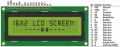
Start with the 16-pin LCD pinout.
1690294632168.png

Get the HD44780 documentation and learn how to initialize and drive the LCD in 4-bit mode.
https://www.sparkfun.com/datasheets/LCD/HD44780.pdf

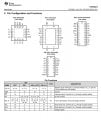
Get the PCF8574 documentation and study how it interfaces I2C to 8-bit parallel port.
https://www.ti.com/lit/ds/symlink/pcf8574.pdf

TI PCF8574 I2C to 8-bit parallel port.jpg
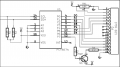
Get a DMM, trace and document the connections between the PCF8574 and the LCD module.

Get the oscilloscope out and start writing and testing code to send parallel data to the LCD module.
Document your findings.

If I find the time I would even order a Sunfounder I2C LCD1602 for myself and do this for you as this looks like a very useful exercise.
 
Top