splitting incoming string

Thread Starter

Dabu WhiteHacker

Joined Sep 5, 2017
68
I am using HC-12 to send and receive potentiometer values from one arduino to another.
i am sending potentiometer values in a form of string.
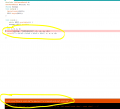
this is what i am getting at the other end.
T329E518A504D657
and i want to seperat them as follow
T = 329
E = 518
A = 504
D = 657
how is that possible?
 

Thread Starter

Dabu WhiteHacker

Joined Sep 5, 2017
68
CODE

C:
========================================================================================

Transmitter code:
#include <SoftwareSerial.h>
SoftwareSerial HC12(12, 11);

const int throttle = 0;
const int elevator = 1;
const int aerlone = 2;
const int adjust = 3;

int throttle_value=0;
int aerlone_value=0;
int elevator_value=0;
int adjust_value=0;

String throttle_string;
String elevator_string;
String aerlone_string;
String adjust_string;

String packet;

void setup() {
  pinMode(throttle,INPUT);
  pinMode(elevator,INPUT);
  pinMode(aerlone,INPUT);
  pinMode(adjust,INPUT);
  HC12.begin(9600);
  Serial.begin(9600);
}
void loop() {
  throttle_value=analogRead(throttle);
  elevator_value=analogRead(elevator);
  aerlone_value=analogRead(aerlone);
  adjust_value=analogRead(adjust);
  throttle_string = String(throttle_value);
  elevator_string = String(elevator_value);
  aerlone_string = String(aerlone_value);
  adjust_string = String(adjust_value);
  packet = "T"+throttle_string+"E"+elevator_string+"A"+aerlone_string+"D"+adjust_string;
  HC12.print(packet);
   delay(500);
}

========================================================================================

Receiver code:
#include <SoftwareSerial.h>
SoftwareSerial HC12(10, 9);

void setup() {
  Serial.begin(9600);
  HC12.begin(9600);
}

void loop() {
   while (HC12.available()) {            
    Serial.write(HC12.read());  
  }
}
Moderators note : used code tags
 
Last edited by a moderator:

WBahn

Joined Mar 31, 2012
32,823
Are the strings always rigidly in that format? Specifically, are the four numbers always 3 digit representations even if the values are less than 100?
 

danadak

Joined Mar 10, 2018
4,057
You can always put a delimiter character in between elements,
that takes care of variable sized elements being sent.

T329E518A504D657

In your case an upper case letter can be considered delimiter,
eg. test each char as you scan string, if upper case letter then
thats end of last var/start of new var.

or do this

T329/E518/A504/D657

and use "/" as delimiter.

Regards, Dana.
 

Thread Starter

Dabu WhiteHacker

Joined Sep 5, 2017
68
You can always put a delimiter character in between elements,
that takes care of variable sized elements being sent.

T329E518A504D657

In your case an upper case letter can be considered delimiter,
eg. test each char as you scan string, if upper case letter then
thats end of last var/start of new var.

or do this

T329/E518/A504/D657

and use "/" as delimiter.

Regards, Dana.
ok i wil use / as delimiter but how is that possible to scan that delimiter and save next characters as new?
 

ericgibbs

Joined Jan 29, 2010
21,439
hi Dabu,
I would suggest you use a comma ',' as the delimiter between text fields in a message string, terminate the string with <crlf> [at the HC12 TX end]
If you decided to log the data as text, it would be a text.csv file type, which could imported into a Excel type spreadsheet and plotted.

ie: T329,E518,A504,D657<crlf>

You could extract the fields by stepping thru the string, build a defined field sub string until the ',' is found and then build the second sub string and so on, upto the <crlf>.
The sub fields could be any length.

The leading 'T' character could be used as a RX Sync char.
[this method works well with GPS reception strings, which can vary in length, using '$' as the Sync char]

E

Update:
An alternative method would be to 'pad' out the individual fields in at the HC12 TX end, with leading zero's '0'.
[this is the method I use for HC12 data TX/RX]

So all the fields are 4 digits long, extracting the fixed length fields in the RX sketch is simplified.
 
Last edited:

jpanhalt

Joined Jan 18, 2008
11,087
I am using HC-12 to send and receive potentiometer values from one arduino to another.
i am sending potentiometer values in a form of string.
Considering the error shown in post #7, why not send the potentiometer values as values? None of the 3-digit strings represent values that are more than 2 bytes. Then, you would save the trouble of converting the string "329" and so forth back into binary values for further processing.
 

dl324

Joined Mar 30, 2015
18,326
You're using the wrong variable type. sscanf() requires a character variable; you're using a string variable that appears to be an Arduino construct that is more flexible, but uses more memory than a NULL terminated array of type char.

IMO, sscanf() is a better option than parsing the string yourself or inserting more delimiters. The %d field will accept variable length strings of digits. You just need to insure that your string will never be malformed.
 

danadak

Joined Mar 10, 2018
4,057
I was referring to standard C library, not Arduino. HiTech and Cypress
in most recent work.

scanf. I found using above compilers that burden in code space from scanf
was too high, had to write my own scanner. Not as general of course,
which is why scanf is bloated compared to simple user scan code.

Regards, Dana.
 

Thread Starter

Dabu WhiteHacker

Joined Sep 5, 2017
68
You're using the wrong variable type. sscanf() requires a character variable; you're using a string variable that appears to be an Arduino construct that is more flexible, but uses more memory than a NULL terminated array of type char.

IMO, sscanf() is a better option than parsing the string yourself or inserting more delimiters. The %d field will accept variable length strings of digits. You just need to insure that your string will never be malformed.
could you describe this method more briefly ?
 

ebp

Joined Feb 8, 2018
2,332
Is there some reason you wouldn't simply parse the characters as they arrive one by one rather than putting them into a string and then parsing the string.

This looks to me like other things I have seen where both ends are overburdened by making the data into some sort of human-readable strings instead of making it compact and easily parsed. Nothing in the system except the human at the far end cares if humans can read characters while they are traveling through the air or some wires. I'd make a fixed packet of 8 bytes of raw ADC data with a checksum of two more bytes. It is compact, easy to parse and has a reliability feature. Sometimes it does make sense to burden the transmitting end with formatting of one form or another if the receiving end is very busy all the time.
 

Thread Starter

Dabu WhiteHacker

Joined Sep 5, 2017
68
Is there some reason you wouldn't simply parse the characters as they arrive one by one rather than putting them into a string and then parsing the string.

This looks to me like other things I have seen where both ends are overburdened by making the data into some sort of human-readable strings instead of making it compact and easily parsed. Nothing in the system except the human at the far end cares if humans can read characters while they are traveling through the air or some wires. I'd make a fixed packet of 8 bytes of raw ADC data with a checksum of two more bytes. It is compact, easy to parse and has a reliability feature. Sometimes it does make sense to burden the transmitting end with formatting of one form or another if the receiving end is very busy all the time.
now i cam sending each byte separately and reading it one by one
https://hastebin.com/pegohacano.cs
 
Top