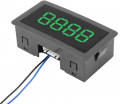
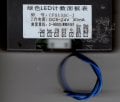
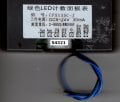
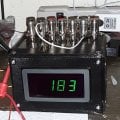
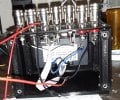
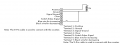
So I was looking at this on Amazon it appears that everything is written on Chinese, is there any chance that any other users out there have used it or something similar that they can suggest?
I have not bought one, but I would like to get a simple 4 digit at minimum counter. I have several experiments I would like to run and do not feel competent to wire such a simple item.
Description:
This digital display counter has bright LED light, high accuracy, good stability, and easy installation. The meter retains the number automatically when power off.
Specifications:
Working voltage: DC 8-24V
DC current: 30mA
Counting: Plus or minus
Counting range: 0-9999
Digit number: 4 digit
Color(Optional): Blue, Green, Red
Size: Approx. 8 x 4 x 2.5cm / 3.1 x 1.5 x 0.9inch
Weight: 48g
Wire diagram:
Terminal 1: Positive
Terminal 2: Ground
Terminal 3: Signal Ground
Terminal 4: Clear
Terminal 5: Switch Pulse Signal
Terminal 6: Blue wire for increasing
Terminal 7: Black wire for decreasing
Note: The 5-Pin cable is used to connect with the counter.
Packaging Include:
1 x Digital Display Counter
1 x 5-pin Cable
So I was looking at this on Amazon it appears that everything is written on Chinese, is there any chance that any other users out there have used it or something similar that they can suggest?
I tried finding the manufacturer's website with no luck. I looked at a few other places where it is sold to see if I could find a max count rate figure, but didn't find anything. However, every site I came across gave it really poor reviews. Also, it appears that there is no debouncing of the inputs, so you will have to add that yourself.
Lack of denouncing circuitry means one can connect directly to another circuit and use it as a frequency counter - if it had debounce circuitry, the frequency response would be terrible.
To me those negatives are good things, I'm hoping it doesn't debounce at all there have been several circuits I could use a counter on just to play with. Like I said I would build one from scratch except the soldering problem is a killer. I can solder simple things but ICs are beyond my skill level which is why we'll be using protoboards from now on to build permanent circuits I don't like it but it is something I have to live with. You try soldering with only one hand. Before the stroke I was very proficient at it. Now I make do.
I use mine with hall effect sensor mounted next to rotating shaft with magnet . Every revolution of magnet clicks the digital counter. Counter display runs off 9v battery. Input is from the output of sensor. I use DC motor controller for variable speed control of DC motor for rotation to count wire turns on magnet wire bobbin. (homemade wire counter mounted on wood board). click click click old style mechanical counter with rotating peg on revolver, or the quiet digital type can be used.
So I forgot the first one through stupidity now under the second. A quick scan of the bottom of the leads. I assume without knowing the blue and black wire are the counting inputs.
my plan is to make a 3D printed box for this unit and be a little bit more careful about connecting the wires. Knock on forehead( wood).
Description:
This digital display counter has bright LED light, high accuracy, good stability, and easy installation. The meter retains the number automatically when power off.
Specifications:
Working voltage: DC 8-24V
DC current: 30mA
Counting: Plus or minus
Counting range: 0-9999
Digit number: 4 digit
Color(Optional): Blue, Green, Red
Size: Approx. 8 x 4 x 2.5cm / 3.1 x 1.5 x 0.9inch
Weight: 48g
Wire diagram:
Terminal 1: Positive
Terminal 2: Ground
Terminal 3: Signal Ground
Terminal 4: Clear
Terminal 5: Switch Pulse Signal
Terminal 6: Blue wire for increasing
Terminal 7: Black wire for decreasing
Note: The 5-Pin cable is used to connect with the counter.
Packaging Include:
1 x Digital Display Counter
1 x 5-pin Cable
This is embarrassing, I am now trying to figure out how to wire this thing as a as a simple 4 digit counter and I'm not sure how to hook it up? Any suggestions would be welcomed:
So what does the switch pulse signal do? I assume without knowing that you take a plus signal to clear and it clears the counter? I'm also not sure what to do with the blue wire and the black wires?
I built a test jig to test this unit out. It has several flaws: the pinouts on the case are not accurate, they instead they are reversed from the way you think they would be (shown below) :
this was my test jig I will include the STL files as part of this post:
the only way I could get this unit to count is to ground the increasing and decreasing pins (pins 6 and 7) using this schematic:
grounding the increasing and decreasing pins causes a count grounding the clear pin clears the counter damn if I know what the signal ground is for, or the switch pulse signal as near as I can tell they don't do a thing. My next step is to hook up a transistor where the switch is and see what the frequency response of this unit is.
Basically I am calling this thread done. I am not going to close it because somebody might have some more questions.this is more of a review of this particular counter. I will add it to my personal index.

 Facebook
 Google
 GitHub
 Linkedin