Scrapped SATA hard drive and would like to use it in older computer

Thread Starter

Tonyr1084

Joined Sep 24, 2015
9,744
I have a 500 Gig hard drive scrapped out of an old DVR. It's an SATA drive and my computer mother board supports SATA 1, 2, 3 & 4 (I believe those are just the ports). I've plugged power and the SATA cable into the hard drive and launched the computer (running Windows XP). The computer is not recognizing it. I currently have the older type hard drives (two of them, drives C & F) Drives D & E are CD and DVD burners.

Can someone give me some pointers on how to make the computer recognize this hard drive? I'd like to set it up as the main and another (a 250 Gig older type (with the ribbon cable)) as a secondary. I'm willing to bet it's something in the bio's. Any help would be appreciated.

Thanks Y'all.
 

Thread Starter

Tonyr1084

Joined Sep 24, 2015
9,744
The computer is up and running. The computer is not recognizing the SATA drive. Something isn't recognizing the drive.

[edit] The hard drive is spinning, I can hear it when I put it against my ear.
 

Thread Starter

Tonyr1084

Joined Sep 24, 2015
9,744
GREAT! I just got a notification from the computer that "Windows has significantly changed. You have 3 days to reactivate." Remember, this is Windows XP. If I have an activation code somewhere in the house I'll NEVER find it.
 

dl324

Joined Mar 30, 2015
18,326
GREAT! I just got a notification from the computer that "Windows has significantly changed. You have 3 days to reactivate." Remember, this is Windows XP. If I have an activation code somewhere in the house I'll NEVER find it.
Just go on-line and re-register. As long as your copy is legal, you shouldn't have any issues reactivating.
 

Thread Starter

Tonyr1084

Joined Sep 24, 2015
9,744
I re-registered an XP system long after support was discontinued.
Well, I'll try. Can't hurt. If not - I guess I can just go to windows 10 ( ick! ).

Maybe then I can install ONLY the SATA drive and try to make the computer recognize it that way. Then, once up and running I can rebuild my computer. Thing I like about XP is how well it's worked and how easy it has been to operate. 10 stinks. 8 stinks. 8.1 stunk. So did 7. Wish they'd quit improving it. They're only making matters worse. My wife HATES her 10.

{ wonders to self } Do I still have the disk?
 

ebp

Joined Feb 8, 2018
2,332
I still run XP on a few machines. I have long had a dread of changing operating system or even application software. I put quite a bit of work into learning the ins and outs of the [string of expletives omitted] and developing work-arounds for all the bugs and shortcomings. Then "they" change things and I have to re-learn all sorts of stuff, which would be OK if it was better, but it usually isn't - just different, and develop a whole new suite of work-arounds. I have a lot of software I've written myself, so that is always in jeopardy. Fortunately I've said [another expletive] on the [expletive] whole lot, so it is no longer critical that I keep everything going.

I "upgraded" my PCB CAD package some years back. Within just a couple of hours of playing around, not even using it seriously, I had three bugs registered with my name attached. And it wasn't as if I upgraded minutes after the release. It had been around for a few months. My harsh and hateful attitude has been reinforced many times. I have a friend who forked out many thousands to get new schematic & PCB software and reverted to using his 20 year old crimeshareware version from the same company.
 

dl324

Joined Mar 30, 2015
18,326
Well, I'll try.
I recall Microsoft saying that XP can still be registered. You just have to have a valid key.
Maybe then I can install ONLY the SATA drive and try to make the computer recognize it that way.
Check Disk Management as I suggested earlier. If the disk isn't formatted, XP won't see it until you format it. You do that from Disk Management.

If it doesn't show up there, you can check device manager to see if it will give you any clues.
Do I still have the disk?
You can make a copy from any appropriate disk (OEM/Retail). You won't get any automatic updates, but I have copies of SP1, SP2, and SP3.

When Microsoft made an emergency critical patch for XP SP3, I started making images of my OS disk so I can restore XP if I should lose a disk or have to rebuild after some other catastrophic event (like a virus).
 

dl324

Joined Mar 30, 2015
18,326
I still run XP on a few machines. I have long had a dread of changing operating system or even application software.
One of the nice things about Win10 is that it will allow you to run some XP vintage apps that Win7 wouldn't even let you install.

I still have computers running XP because it's not worth paying for OS upgrades. For the cost of Win10, I can buy a refurbished SFF computer with Win10 installed.

The computer I use daily is XP, but I'll soon retire it and start using Win10 instead because XP is too insecure to use for browsing; even with Javascript disabled on all but trusted sites. No browsers are issuing XP updates, so vulnerabilities keep increasing (e.g. Meltdown, Spectre). Websites are using features only supported by updated browsers, so functionality keeps diminishing (no YouTube videos or LinkedIn).
 

Thread Starter

Tonyr1084

Joined Sep 24, 2015
9,744
If the disk isn't formatted, XP won't see it until you format it.
Problem with that is I can't see it to format it.

I suppose in my wife's office there's probably the disk package I originally purchased. I'll just have to dig through the bookshelf a bit. But I suspect I'll find it. It's been there for years, no reason why it's not going to be there now.

As for XP and its insecurities - I don't use it to go on line. Ever. The biggest reasons for having it is to hold all my music and to use my digital oscilloscope, I think it's a Hancook. I'm not down stairs right now and don't want to run down just to glean that information.
 

ebp

Joined Feb 8, 2018
2,332
[EDIT] DELETED bad advice - TS needs Disk Management

If you can't sort it out that way I'll consult my handy dandy copy of Windows XP Annoyances for Geeks.
 
Last edited:

Rahulk70

Joined Dec 16, 2016
538
Problem with that is I can't see it to format it.

I suppose in my wife's office there's probably the disk package I originally purchased. I'll just have to dig through the bookshelf a bit. But I suspect I'll find it. It's been there for years, no reason why it's not going to be there now.

As for XP and its insecurities - I don't use it to go on line. Ever. The biggest reasons for having it is to hold all my music and to use my digital oscilloscope, I think it's a Hancook. I'm not down stairs right now and don't want to run down just to glean that information.
Hi,
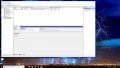
Right click My Computer>manage>Disk management (check on the left side of the explorer).

Check the screenshot below for reference.
 

Attachments

Thread Starter

Tonyr1084

Joined Sep 24, 2015
9,744
@Rahulk70 Getting there. I've found the drive. It's partitioned into 3 parts. How do I remove the partitions? Nevermind how to get rid of partitions. Figured that out. Still can't format it. The drive, though located, is unidentified. The other drives are listed as drive C & F. (D & E are disk drives) Don't ask me why, that's the way it is.

There IS a drive A mounted in the cabinet but it is not hooked up. I wouldn't care what the SATA drive is designated, I just want to format it. It's a 500 Gig drive. The other two are 250 Gig (F) and 40 Gig (C).
 
Last edited:

Thread Starter

Tonyr1084

Joined Sep 24, 2015
9,744
Found the "Convert to Dynamic". Should I? What happens if I convert it and don't want it converted? Do I want it converted? The others don't appear to be.
 
Top