Saving a circuit symbol in LTSpice

Thread Starter

grenken

Joined Oct 29, 2020
5
I am running LTSpice Ver 24.0.9.

I have created a circuit symbol for an inverter based upon a pair of complementary of PMOS and NMOS FET's.
The generating circuit is shown as the attachment, "Inverter Circuit_4".

The model based upon this MOSFET pair is shown in the attachment, "inverter.asy".

I have changed the symbol drawing to "cell" and have tried to save it to an LTSpice library so that I can bring it up and place it into a circuit that I am working on.

I continue to fail.

Where/how should I save this symbol so that when I hit the components icon, I can see the name "inverter" in this library, and when selected, this inverter model would come up, much the same as when I select "nmos" for example? Then I can place "inverter" into my LTSpice circuit model.

Or, should I save this model elsewhere into another LTSpice parts file to use it an LTSpice circuit model?
 

Attachments

crutschow

Joined Mar 14, 2008
38,388
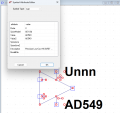
First you need to add the model reference (Spice Model) to the symbol file (example for an op amp below) so it can find the model file.
Then you put the symbol file in the appropriate sym directory.
After closing and opening LTspice, it should then show up as a selectable symbol.


1725492596529.png
 

Thread Starter

grenken

Joined Oct 29, 2020
5
I am running LTSpice Ver 24.0.9.

I have created a circuit symbol for an inverter based upon a pair of complementary of PMOS and NMOS FET's.
The generating circuit is shown as the attachment, "Inverter Circuit_4".

The model based upon this MOSFET pair is shown in the attachment, "inverter.asy".

I have changed the symbol drawing to "cell" and have tried to save it to an LTSpice library so that I can bring it up and place it into a circuit that I am working on.

I continue to fail.

Where/how should I save this symbol so that when I hit the components icon, I can see the name "inverter" in this library, and when selected, this inverter model would come up, much the same as when I select "nmos" for example? Then I can place "inverter" into my LTSpice circuit model.

Or, should I save this model elsewhere into another LTSpice parts file to use it an LTSpice circuit model?
crutschow:

Well I got the model into a library from which I can fetch the symbol. What does the entry of "X" do on the Prefix line? And I do not understand the use of the entries for Spice Model, and Value 1 and Value 2.

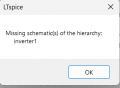
When I run the attached LTSpice File I get Messages #1 and #2 as documented in the Messages Document.

I really appreciate your help. I'm sorry to be such a dunce, but this the first time that I have tried to create a circuit model in LTSpice.

Best Wishes,
Jerry
 

Attachments

Thread Starter

grenken

Joined Oct 29, 2020
5
Don't know offhand what the X means, but I just leave it there.
Just put in a name for your model (Inverter).

Show me what the Symbols Attribute Editor shows for your .asy file.
Ahh yes. I forgot how to link the symbol to the PSPICE Circuit file. I think that I need your help creating a SUBCKT File from my Inverter circuit.

My inverter circuit, Inverter Circuit_4, is shown in Attachment 1. This inverter circuit uses model definition files for the PMOS and NMOS FET's. I need your help:
A. Creating a SUBCKT File for this inverter circuit, and
B. Linking the SUBCKT to the inverter circuit symbol

My test circuit for three of these inverter circuits is Attachment 2. This circuit worked and modeled correctly.

The wave forms for Inverter Circuit_10 are shown in the Word Document, Attachment 3.

Finally, the Inverter Circuit symbol is attached as Attachment 4.

Best wishes and I look forward to hearing from you.

Jerry
 

Attachments

Thread Starter

grenken

Joined Oct 29, 2020
5
Ahh yes. I forgot how to link the symbol to the PSPICE Circuit file. I think that I need your help creating a SUBCKT File from my Inverter circuit.

My inverter circuit, Inverter Circuit_4, is shown in Attachment 1. This inverter circuit uses model definition files for the PMOS and NMOS FET's. I need your help:
A. Creating a SUBCKT File for this inverter circuit, and
B. Linking the SUBCKT to the inverter circuit symbol

My test circuit for three of these inverter circuits is Attachment 2. This circuit worked and modeled correctly.

The wave forms for Inverter Circuit_10 are shown in the Word Document, Attachment 3.

Finally, the Inverter Circuit symbol is attached as Attachment 4.

Best wishes and I look forward to hearing from you.

Jerry
I assembled my version of an inverter subcircuit. "INV_1, which uses a pair of complementary MOSFET's". This is Attachment 1. How does it look? I had to teach myself the relationships for the pin order and names for the MOSFET's. They are indicated on the SUBCKT attachment.
Jerry
 

Attachments

eetech00

Joined Jun 8, 2013
4,704
I assembled my version of an inverter subcircuit. "INV_1, which uses a pair of complementary MOSFET's". This is Attachment 1. How does it look? I had to teach myself the relationships for the pin order and names for the MOSFET's. They are indicated on the SUBCKT attachment.
Jerry
The PMOS/NMOS symbols connect the substrate to GND by default.
You should use NMOS4/PMOS4 (4-pin) symbols and connect the substrate to VDD for PMOS, and VGND for NMOS.
 

eetech00

Joined Jun 8, 2013
4,704
Well I got the model into a library from which I can fetch the symbol. What does the entry of "X" do on the Prefix line? And I do not understand the use of the entries for Spice Model, and Value 1 and Value 2.
The "X" indicates to LTspice that the symbol should be associated to a spice subcircuit definition. This is a text based series of spice statements that "glues" or "wires" spice elements together to define the model behavior.
If you want to no more, read the LTspice "Help" information. There is too much to explain here.
 
Top