Facebook
 Google
 GitHub
 Linkedin

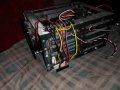
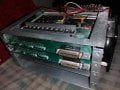
Hello so this is my first post and I'm not really sure about how to go about this so bear with me. I am self taught and have been messing around with electro-mechanical systems since I could pick up a screw driver so I may be ignorant to some of the stuff I may need to know however, I have a set of boards that have everything I need to run two 5 phase (.72 / .36) including endstop and some kind of rotational homing setup. The motors I have are Berger lahr rdm 566/50 and 564/50. They came out of a few slm aminco uv/vis photospectrometer I think model dw2000, along with the drivers. They ran the pl600 (base unit of the assembly).
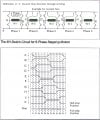
I have traced the traces and reviewed many datasheets for the ics. I get a bit confused about a couple of the logic bits. The problem I am having is finding a datasheets or service manual on the board itself. I've found what I believe to be two pins for selecting the stepper to drive, one step pin, one labeled u/d I assume is a direction pin, and a completely unidentified pin.
I have connected an Arduino nano and tried to use the unidentified pin as both a step enable pin and half step enable pin. I may be totally off on that and I was thinking it may be an oscillation signal that drove the step incrementation but im not so sure so I'm here. My results none the less for everything I did ended up being the motor I chose would go stiff and wouldn't take a step in either direction.
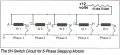
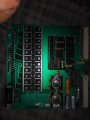
The board highlights might be its a two sided none multilayered board from the 1980s, mosfet h bridge style driver with a driving circuit, nothing else on board other than a 12 and 5 volt regulator circuit.
Components on board.
3X 74ls04n (hex inverter)
22X mje6044* (npn mosfet)**
2X n82s23n (256-bit ttl bipolar prom)
5X 75451n (duel hs/hc peripheral drivers)
1X sn74ls221n (monostable multivibrator)
1X 74ls00n (quad nand gate)
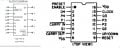
2X mc14510b (unsure, cmos presettable up/down counter)
* The other two boards use 2n6039s, otherwise they are the same.
** 2 mosfets drive a set of fans I believe
Any help would be appreciated, I've done what I know how to do and not sure where to go from here so thanks in advance.
I have traced the traces and reviewed many datasheets for the ics. I get a bit confused about a couple of the logic bits. The problem I am having is finding a datasheets or service manual on the board itself. I've found what I believe to be two pins for selecting the stepper to drive, one step pin, one labeled u/d I assume is a direction pin, and a completely unidentified pin.
I have connected an Arduino nano and tried to use the unidentified pin as both a step enable pin and half step enable pin. I may be totally off on that and I was thinking it may be an oscillation signal that drove the step incrementation but im not so sure so I'm here. My results none the less for everything I did ended up being the motor I chose would go stiff and wouldn't take a step in either direction.
The board highlights might be its a two sided none multilayered board from the 1980s, mosfet h bridge style driver with a driving circuit, nothing else on board other than a 12 and 5 volt regulator circuit.
Components on board.
3X 74ls04n (hex inverter)
22X mje6044* (npn mosfet)**
2X n82s23n (256-bit ttl bipolar prom)
5X 75451n (duel hs/hc peripheral drivers)
1X sn74ls221n (monostable multivibrator)
1X 74ls00n (quad nand gate)
2X mc14510b (unsure, cmos presettable up/down counter)
* The other two boards use 2n6039s, otherwise they are the same.
** 2 mosfets drive a set of fans I believe
Any help would be appreciated, I've done what I know how to do and not sure where to go from here so thanks in advance.