
Rubik's cube solver robot using Lego

Thread Starter

TheElectricCuber

Joined Feb 22, 2025
3
I'm currently building a Rubik's cube solving robot out of Legos, with an Arduino uno to run the three motors and to interpret the notation I give it (I'm going to use a website online to calculate the notation).


I'm using a servo, a DC motor and a step motor.
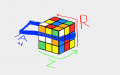
cube bot rotations.png

Z_step-motor turns the base (or the whole cube) 90 deg at a time. I am only going to have Z turn one direction for simplicity in the code.
R_DC-motor rotates the whole cube once, on the x axis.
A_servo-motor lifts the arm to enable Z to rotate the entire cube on the Z axis, instead of just the lower slice (in the code 'Au' for arm up and 'Ad' for arm down).
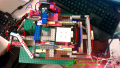
Motor placement and their moving parts.png

My goal is to keep things cheap and use only the Arduino uno kit I have for this robot.
 

Thread Starter

TheElectricCuber

Joined Feb 22, 2025
3
My first major problem is the code and wiring for all three motors.

This is a very rough draft code for test controlling the servo and step motor.
Arduino uses the C++ coding language, which I am not familiar with.
This is my test code for the servo and the step motor:
C++:
#include <Servo.h>
#include <Stepper.h>

Servo servo;

int x_axis;
int servo_val;

// define number of steps per revolution
#define STEPS 32

// define stepper motor control pins
#define IN1 11
#define IN2 10
#define IN3 9
#define IN4 8

// initialize stepper library
Stepper stepper(STEPS, IN4, IN2, IN3, IN1);

// joystick output is connected to Arduino A1
#define joystick A1

void setup() {
  pinMode(A0, INPUT);
  servo.attach(13);
}

void loop() {
  x_axis = analogRead(A0);

  servo_val = map(x_axis, 0, 1023, 0, 180);

  servo.write(servo_val);

  // read analog value from the potentiometer
  int val = analogRead(joystick);

  // if the joystic is in the middle ===> stop the motor
  if ((val > 500) && (val < 523)) {
    digitalWrite(IN1, LOW);
    digitalWrite(IN2, LOW);
    digitalWrite(IN3, LOW);
    digitalWrite(IN4, LOW);
  }

  else {
    // move the motor in the first direction
    if (val >= 523) {
      // map the speed between 5 and 500 rpm
      int speed_ = map(val, 523, 1023, 5, 1000);
      // set motor speed
      stepper.setSpeed(speed_);

      // move the motor (1 step)
      stepper.step(1);

      val = analogRead(joystick);
    }

    // move the motor in the other direction
    if (val <= 500) {
      // map the speed between 5 and 500 rpm
      int speed_ = map(val, 500, 0, 5, 1000);
      // set motor speed
      stepper.setSpeed(speed_);

      // move the motor (1 step)
      stepper.step(-1);

      val = analogRead(joystick);
    }
  }
}
and here is the DC motor test code:
C++:
#define E1 5 // Enable Pin for motor
#define I1 3 // Control pin 1 for motor
#define I2 4 // Control pin 2 for motor
 
void setup() {
 
    pinMode(E1, OUTPUT);
    pinMode(I1, OUTPUT);
    pinMode(I2, OUTPUT);
    
}
 
void loop() {
 
    analogWrite(E1, 255);
    digitalWrite(I1, HIGH);
    
    delay(3000);
 
    digitalWrite(E1, LOW);
    delay(2000);
    
 
}
 

Thread Starter

TheElectricCuber

Joined Feb 22, 2025
3
My first major problem is the code and wiring for all three motors.

This is a very rough draft code for test controlling the servo and step motor.
Arduino uses the C++ coding language, which I am not familiar with.
This is my test code for the servo and the step motor:
C++:
#include <Servo.h>
#include <Stepper.h>

Servo servo;

int x_axis;
int servo_val;

// define number of steps per revolution
#define STEPS 32

// define stepper motor control pins
#define IN1 11
#define IN2 10
#define IN3 9
#define IN4 8

// initialize stepper library
Stepper stepper(STEPS, IN4, IN2, IN3, IN1);

// joystick output is connected to Arduino A1
#define joystick A1

void setup() {
  pinMode(A0, INPUT);
  servo.attach(13);
}

void loop() {
  x_axis = analogRead(A0);

  servo_val = map(x_axis, 0, 1023, 0, 180);

  servo.write(servo_val);

  // read analog value from the potentiometer
  int val = analogRead(joystick);

  // if the joystic is in the middle ===> stop the motor
  if ((val > 500) && (val < 523)) {
    digitalWrite(IN1, LOW);
    digitalWrite(IN2, LOW);
    digitalWrite(IN3, LOW);
    digitalWrite(IN4, LOW);
  }

  else {
    // move the motor in the first direction
    if (val >= 523) {
      // map the speed between 5 and 500 rpm
      int speed_ = map(val, 523, 1023, 5, 1000);
      // set motor speed
      stepper.setSpeed(speed_);

      // move the motor (1 step)
      stepper.step(1);

      val = analogRead(joystick);
    }

    // move the motor in the other direction
    if (val <= 500) {
      // map the speed between 5 and 500 rpm
      int speed_ = map(val, 500, 0, 5, 1000);
      // set motor speed
      stepper.setSpeed(speed_);

      // move the motor (1 step)
      stepper.step(-1);

      val = analogRead(joystick);
    }
  }
}
and here is the DC motor test code:
C++:
#define E1 5 // Enable Pin for motor
#define I1 3 // Control pin 1 for motor
#define I2 4 // Control pin 2 for motor

void setup() {

    pinMode(E1, OUTPUT);
    pinMode(I1, OUTPUT);
    pinMode(I2, OUTPUT);
  
}

void loop() {

    analogWrite(E1, 255);
    digitalWrite(I1, HIGH);
  
    delay(3000);

    digitalWrite(E1, LOW);
    delay(2000);
  

}
View attachment 342961
Rubik's cube notation is very common and the most used letters are the ones in the top row (U, D, R, L, F and B).
To tun a side in reverse a ' is placed after the letter and if you want to rotate the side twice then you add '2' after the letter.

So for this robot a simple U' motion requires the algorithm R R Z Z Z R R
Here is a list of all the algorithms:

U: R R Z R R
U’: R R Z Z Z R R
U2: R R Z Z R R

D: Z
D’: Z Z Z
D2: Z Z

R: R R R Z R
R’: R R R Z Z Z R
R2: R R R Z Z R

L: R Z R R R
L’: R Z Z Z R R R
L2: R Z Z R R R

F: Au Z Ad R R R Z R Au Z Z Z Ad
F’: Au Z Ad R R R Z Z Z R Au Z Z Z Ad
F2: Au Z Ad R R R Z Z R Au Z Z Z Ad

B: Au Z Ad R Z R R R Au Z Z Z Ad
B’: Au Z Ad R Z Z Z R R R Au Z Z Z Ad
B2: Au Z Ad R Z Z R R R Au Z Z Z Ad
 
Top





