PSOC Logic Trainer

I can live with a low end board for a while.
What is a UDB?
If I program the board successfully for some simple circuit--say turn a led on and off--and then want to try a more complex circuit do I have to do something to program it or does the reprogramming take care of that?
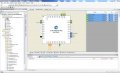
The "quich start" directions say that after the configure components step I am supposed to "open the <projectname>.cydr file to configure Design-Wide Resources such as pins ----" Then there is a picture of a different screen with the microprocessor on it. How do I do that--I tried clicking on the file but nothing happened.
I hope to spend much of tomorrow fighting through some of the examples on Cypress web site.

Thanks again.
 

Thread Starter

danadak

Joined Mar 10, 2018
4,057
Universal Digital; Block. FPGA like fabric from which many resources
can be configured to implement the more complex digital functions.

If you do an led simple circuit, and then want to do more complex
circuit, either you add to the existing project, or just start a new
project to work bigger project.

PSOC Creator earlier versions required the .cydwr file to be double clicked
in workspace explorer. Newer version, like current version 4.2, those configurators
for pins, clocks, system etc.. are already expanded in workspace explorer window,
so you just open the one needed, see attached.

Here I am looking at the pins configurator, pins highlighted/clicked in explorer
window.

Regards, Dana.
 

Attachments

Thread Starter

danadak

Joined Mar 10, 2018
4,057
Many examples need UDB to work. The PSOC 4200 family is the high end
with UDB in the low end PSOC families. The 4100 is a lesser part, the 4000
the least in overall resources.

https://www.google.com/url?sa=t&rct.../AN81623.pdf&usg=AOvVaw0K24ltStjjMuPJk32axbu2

The CY8CKIT-049 uses the 4200.

The break off board, if you decide to use it independently is the high end
with a lot of UDB and other resources like 2-12 bit SAR, digital filter, 20 bit
DelSig. 24 UDBs.

The PSOC 4200 has 4 UDB, the 4000S none.

Regards, Dana.
 
Last edited:
Well, I'm still lost with the info (and the zinfandel) but a further question before I start a new day--
Do I need to solder headers to all those pins to play with the board for several, many, circuits?
 
I spent a lot of time yesterday on the Cypress website and gleaned what seems to me to be a lot of information. The site is slow, probably because it is so large and littered with odd naming and numbering conventions. For instance, Dana early on--even before this thread--recommended the first four videos called 101-1 etc. I looked at them and found nothing about the PSoC boards but a lot of talk about the IoT. It turns out that there is a second set of videos, also called 101 but followed by the title PSoC Creator. THIS MUST BE THE FOUR DANA RECOMMENDED. If anyone but he and I is following this thread I recommend them too. Most of the other videos are not great; the ones by the guy who sits down are essentially worthless, at least to a beginner--he talks too fast, has lax enunciation, and flies through any vidieo demonstration so rapidly that the viewer can't follow. The guy who delivers his lecture standing is not great, but a whole lot better.

What I learned may seem trivial, but it is important. In their Creator software there is a place to enter TARGET. Nowhere is Target explained but in one video I noticed that it contained the name/number of the board you are working on. Down below that there is a checkbox labeled HW. Hot wired? Hand Wired? Nope, it means Hardware. If the box is checked you are telling the program that you will be adding external components to your circuit. If it is not checked you will use only the capabilities on the board.

A note to Dana; I think I can solder headers to the board without causing any short circuits but my poor small muscle control makes it certain that the pins will not be aligned well enough to fit in a plastic breadboard.

Today I hope to have time to try a couple of simple circuits.
 

Thread Starter

danadak

Joined Mar 10, 2018
4,057
I always put the pins thru the board into the protoboard, that aligns them, then solder them on
the top.

Where did you see the HW box ? When I start a project I can do it by device, or Target Kit
or Target Module.

Regards, Dana.
 
Well, I'm too tired to track it down but it seems always to pup up in the early stages of a soon to be disaster. I very nearly tossed the board this morning.I'm using that CY8KIT-145 as you know. I can see LEDs and switches on the board but over on the right where all the on-board components are listed not a one shows a LED or a switch. Then, careful examination of the board number shows differences from mine. I think I'll order one of the specific boards you mentioned and take a break from PDOC while it comes.

I remain dubious about soldering the pins, but if today is any guide, I'll never need to.
 

Thread Starter

danadak

Joined Mar 10, 2018
4,057
In the component catalog to the right are two tabs, "Cypress" and "Off-chip". The latter
is where the external components are. These are simply a schematic convenience
since they are generic per se., off chip. When you drop one on a schematic, like a
switch, then wire it the wire will be a dashed line indicating its not an internal route.
When you get to end of line placement, double click terminates it. Unlike a real internal
component where you have to terminate in an internal connection, and the line is solid.

These external routes are wiring that you will do externally yourself.

By the way, when you get proficient and start designing your own components
you will wind up having a 3'rd tab, name escapes me, where your created
component will reside. Same for user imported components.

Buss wiring -

https://www.google.com/url?sa=t&rct=j&q=&esrc=s&source=web&cd=1&cad=rja&uact=8&ved=0ahUKEwiHqNjq4-_aAhVH72MKHaUjA0UQtwIIKjAA&url=https://www.youtube.com/watch?v=pu-2RLhbYzo&usg=AOvVaw0Vrin-tXUWh6qix4e0rbLy

https://www.google.com/url?sa=t&rct=j&q=&esrc=s&source=web&cd=2&cad=rja&uact=8&ved=0ahUKEwiHqNjq4-_aAhVH72MKHaUjA0UQtwIILTAB&url=https://www.youtube.com/watch?v=4Er8oZilFL0&usg=AOvVaw1IwHr81qh6RKCokT9UWYk3

By the way the Analog list item in Explorer, "Design Wide Resources", allows you
to see analog routing, there is a tool, ohmmeter that you can use to measure
route R. Right click a node in this view for other options. Right click a pin to start
ohmmeter.

Regards, Dana.
 
Last edited:

Thread Starter

danadak

Joined Mar 10, 2018
4,057
One further comment. There was a discussion, years ago, about making Creator
"aware" of things like what leds are connected to what pins, switches, etc.. And
having the tool auto assign. Problem is this is an exponential cluster .....

Reason is should a vendor create for every chip and every board all possible
combinations of a blinking led project. And all other projects. Huge bloatware,
and massive programming resources would have resulted.

So when a project is used on a board one has to go to user manual to find out
what pins the parts on the board are connected to, and edit the project accordingly.
Some projects are pinned correctly, some are not. Just check your external
connections.

Regards, Dana.
 

Thread Starter

danadak

Joined Mar 10, 2018
4,057
One other tip.

Schematic window.

Right click tab at bottom to create a new schematic sheet when you run out of space.

Also if you are debugging piecemeal you can right clicking a schematic page tab
disable that page so that its not in the build. As long as nothing else in design needs
something from that page (like a code reference to a component on that disabled
page) it will compile.

Regards, Dana.
 
Still no joy. I'm trying to think back to other times when I have been stymied on a supposedly simple task. Often I have made an incorrect assumption at a very early point--so early that I don't even think to question it. So, is this statement true:

The PSoC boards have a microprocessor and some support circuitry installed; there are also installed items which might be used by a designer such as switches and LEDs. All of these items can be included in a design and are listed in a box on the right side of the screen.

OK is that true?

If yes, why don't I see LED 1 or LED 12 on the list as they are clearly labeled on the board. Also, why don't I see SW 1, SW 2 or SW 4?
 

Thread Starter

danadak

Joined Mar 10, 2018
4,057
LED, Switches, are all appendages, so when you place them on schematic
its just document housekeeping. Creator never knows you have an LED
or switch. But it does know you have configed a pin as input or output, and
your code manipulates that pin.

So anything in the Off Chip tab of the catalog is simply there so you can
complete the schematic. Nothing more.

Some board projects put in code what pin is used for what, and the code
manipulates that pin to either turn on LED or test switch state. So for that
board if there is a project manipulating all those LEDs you will see on
schematic a bunch of output pins with (hopefully) appropriately named
labels for those pins, and in main.c the code that writes to them.

Regards, Dana.
 

Thread Starter

danadak

Joined Mar 10, 2018
4,057
Now I understand what you are seeing. Yes there is a power LED, a boot/reset
switch, driven by programmer portion. So essentially not under your control.

Is that what you are referring to ?

Regards, Dana.
 

Thread Starter

danadak

Joined Mar 10, 2018
4,057
From my earlier post -

The break off board, if you decide to use it independently is the high end
with a lot of UDB and other resources like 2-12 bit SAR, digital filter, 20 bit
DelSig. 24 UDBs.
Point of this is that board is connected to those components not connected
to PSOC 4, so if you decide at a later time to use that board (KITPROG) then
you can program that board stand alone (which wipes out the debug/programmer
for the PSOC 4 part, can be restored at a later time). That chip, PSOC 5LP,
has most of the catalog components, lots of UDBs.....its a high end part. Just
limited I/O unless you solder directly to pins to gain access to rest of I/O. Note
to program standalone kitprog you would need a miniprog3.

https://www.google.com/url?sa=t&rct=j&q=&esrc=s&source=web&cd=3&cad=rja&uact=8&ved=0ahUKEwi55obayPPaAhWHj1QKHTO0CJEQFghHMAI&url=http://www.cypress.com/file/225961/download&usg=AOvVaw2eO0gtLblzxVcj7c6thvg3

http://www.cypress.com/documentatio...ckit-002-psoc-miniprog3-program-and-debug-kit

Regards, Dana.
 
Last edited:
I just noticed while I was cursing softly at the PSoC Creator board, that there is an icon called KITS over on the left hand side under the Start Menu. I clicked it and it came up with a board I do not have. There is a refresh symbol next to it (a blue circle made of two arrows). I clicked that and nothing happened. It occurred to me that probably there is some way to get my kit in there and then maybe the rest of the program will make a little more sense.

I have NEVER seen such poor documentation as Cypress offers. There is lots of it. LOTS of it. But finding an clear starting instructions is impossible. Their search function does not offer help on how install kit.

Apparently the starter kit I chose CY8KIT-145 is so new it is not mentioned in the Creator program. I took a deep breath and ordered a different, presumably more easily used, kit.
 

Thread Starter

danadak

Joined Mar 10, 2018
4,057
This in Kits window to right covers refresh symbol I think -

Note If you install any kits while PSoC Creator is running, click the Refresh icon to view those kits. The list will expand to show you what kits are installed.
Regards, Dana.
 
Top