PSOC Logic Trainer

Well, I think I successfully loaded PSOC Creator but it is clear as mud. I think I opened it and tried to get a blank work space but wound up with a bluetooth battery monitor--far beyond my comprehension. Could not delete it, could not go back. Closed program and re-opened it--still on the battery monitor. I finally found something called help which seemed like an interactive tutorial but I wasted a lot of time on that because it was not interactive--just a bunch of directions which I have no idea of how to follow. I thought Photoshop was hard. Actually it is hard, but there are tutorials which let you work on your own example while following instructions. I'll get a cup of coffee and come back to it but I'm pretty discouraged.
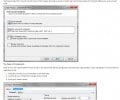
 
I seem trapped in the first step of one of those computer games that were popular long ago--not the heavy graphic oriented ones of today but the text versions: " You are on a path. The path is blocked by a tiger. ????" And no matter what I typed the tiger always ate me.

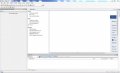
So, I have tried dozens of time to create a blank workspace and put a couple of items on it--a LED, cell, switch. What I get is the page shown in the attachment but nothing I click on does anything. Can't go back, forward, up, down. The tiger is eating me.
insurmountablewall.JPG
 

Jony130

Joined Feb 17, 2009
5,598
Have you installed the PSoC creator 4.1?
On my PC ( win7) the PSoC Creator 4.1 and CY8CKIT-059 works widout any problem. I even manage to display some text on the LCD.
I upload my first test project.
Simply open PSoC Creator 4.1 and click on File->Open->Project/Workspace -> Workspace01.cywrk
 

Attachments

Thread Starter

danadak

Joined Mar 10, 2018
4,057
Got me on auto open, never seen that.

Goto "File" upper left menu item, pick "Close Workspace".

Then go to "File", "New", "Project", and start a new design.

Regards, Dana.
 
Well, that got me past the tiger. Now I have a blank screen and nothing I click on seems to do anything. Isn't there supposed to be a first step blinking light somewhere? I'm going to call it a day and have a glass of zinfandel.
 

Thread Starter

danadak

Joined Mar 10, 2018
4,057
If you start a new project by definition it is empty.

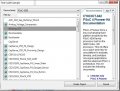
When you start Creator, the start page has a link, middle column, under
"Start", pick "Find Code Example", you pick the family you are working
with, and then the example project of interest. Note depending on which
board you use you may have to change the assigned pins being used.
For example the pin driving the onboard user LED. That pin designation
is in the board user manual, on schematic page. If the example project
selector menu shows a web globe icon next to it means you have to click
it to download it and install on your Creator installation, once done you do
not have to repeat.

You click in explorer window "source" tab, then "pins" underneath it to
change pin assignments.

Also when you open a example project, they are all done under the current
version of creator at the time of project creation. So once you open an example
project pick "Project" from top line menu, then "Update Components". That
will update all components to the version you are using.

One other thing, this is a wacky issue, the typing for code for main()
should be int main() { , it may have been typed void main() { which is no
longer used. This only produces a warning, will still compile.


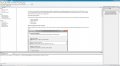
Screen shot of example project link, then screen shot to pick family and which
example project you want to work with.

Regards, Dana.
 

Attachments

Last edited:

Thread Starter

danadak

Joined Mar 10, 2018
4,057
Watch the first few "PSOC 101" videos, 1-4 at least, very intuitive and
instructive.

Regards, Dana.
 

Thread Starter

danadak

Joined Mar 10, 2018
4,057
Basically you have the correct main screen, and looks like you initiated
a new project dialog, rather than open a code example ? Which would
also be OK depending on what you want to do.

My screen now looks like yours, I must have had it open after purposely
opening the Workspace Explorer window sometime in the distant path,
with no project open, then exiting.

Regards, Dana.
 
Well, I got so frustrated that I deleted the file and tried to download it again. Big mistake! I have spent much of the day trying to download it again to no avail. Most of the tries get a "File Corrupt" message. I have tried it (several times each) both with and without the download manager they recommend. Then I started to try to get progressively earlier files. No luck. My computer does not seem to be in trouble but that file won't come. I have written Cypress but ????
my board came today. I ordered the larger one CY8KIT-145 with two interesting boards attached, one top, one bottom.

I'm concluding that Cypress is having web problems and that maybe tomorrow or the next day they will have found what is happening on their site and fixed it. Or maybe it's me, but I've CCleanered and all that.
 

Thread Starter

danadak

Joined Mar 10, 2018
4,057
I put the complete ISO with Creator and Kit files on Microsoft Onedrive, its
1.2G. Also just the kit files which is just 25MB. ISO has Creator, Programmer,
and kit files.

If you download the ISO file I recommend a file download manager that insures
checksums agree file was fully captured. I use a program, free, much of the
time, "Free Download Manager". https://www.freedownloadmanager.org/

Link for PSOC files (the folder for both files) -

https://1drv.ms/f/s!Al2JgiX7_qf0jgSZsRvcZFouh4M7

Note OneDrive is still synching with my local folder, wait 1 hour before downloading.

Regards, Dana.
 
Last edited:
Dana, I'm not sure I am reading your last two posts correctly, but I think you have downloaded the files I need and put them on a cloud server where I can get them. That is a lot of work on your part and you deserve my thanks. I may even need to take advantage of them but at the moment I think I have the necessary files--at least it seems so. What I did was conclude that my computer/router connection was weak (though comcast claims I have gigabyte speeds). So I put a flash drive in my wife's computer and sat down next to the router. Apparent success! I copied the setup file to my desktop and apparently everything is working.

I note some things: This is using Creator 3.1--I assume I will soon need to update to 4.1, but no changes till I get the blasted thing running, at least minimal. The small board with the USB pins appears to be called the MiniProgramer which is connected to the longer board with a breakaway so it can be used and then removed if I ever get an item developed which I want to keep and use. Is this correct?

Now, onto my first attempt. I want to turn a LED on or off. I find, on the right column a list of things the board has mounted on it. This includes LEDs but I can't find a switch. Will I need to wire a switch to a couple of pins on the board? How do I put a switch in the file area?

Well, It is going to be a long haul, but I thank you for what appears to be an interesting, if stressful, journey.
 

Thread Starter

danadak

Joined Mar 10, 2018
4,057
Definitely update right away to 4.2. I did not look at my ISO to see
what version it is, maybe its also 3.1. In any event do the update.

Yes the board small section is the programmer that you toss when
you no longer want to program/debug the board.

You drag from the component window on right a digital input pin,
look at schematic, I think its probably a switch to ground, and config
the input (right click component) for resistive pullup. That way sw will pull
down the pin when active. Then add a digital debounce component onto
schematic, a clock (in system part of component catalog), config it for 10 Hz
which is 100 mS of debounce. Then add a pin, output to schematic.

Now you can either attach the debounce output to the LED pin or you can write
code to poll the deboucer and then write to the pin. One is all HW approach,
the other a mix. The debounce output you want is the negative going output.
LED is driven high to turn it on. So you will have to place an inverter component
on the schematic between the debounce negative out and the ouput pin to LED.

By the way there is a user switch on board, connected to P0_7. The led is
on pin P2_5.

This board by the way is super low end, no UDBs in the part for the more sophisticated
digital components. So in the catalog you will see a lot of items with "incompatible" on
their symbol, cannot be used on schematic. Keep in mind the $4 board, CY8CKIT-049
has some UDB blocks in it.

Lastly when you fin a project, and snap off the programmer/debug, that is a high end
PSOC 5LP on it, but obviously minimal I/O because of board layout. It has tons of capability
though, most stuff in catalog. It has a bootloader in it you can overwrite and use it as a GP
board. Just a thought.

Regards, Dana.
 

Thread Starter

danadak

Joined Mar 10, 2018
4,057
Just caught an error, debounce component not available on that low end board, so
just connect the input pin to the output pin, essentially a hard wired input to output.
Or debounce in code. In fact you could in code do a simple loop, such that when
input is low, write output pin high, otherwise write it low. There is an ap note on
GPIO covering all parts,

http://www.cypress.com/documentation/application-notes/an86439-psoc-4-using-gpio-pins

Normally you would use a status register and connect to pin so you would write to register,
but this part does not have those registers, so you have to do direct pin writes.
Right click component, select datasheet, there is a section on reading and writing
pins.

Just a recommendation, That kit you have is focused on low end capsense work,
so it lacks a lot of general capability. The CY8CKIT-049 is a much better choice
as I alluded to in prior postings. The board you have because it is so low end is
a lot less flexible then the 049 board. More challenging.

Regards, Dana.
 
Last edited:
Top