Problems about SPI mode in MSP430

Thread Starter

hutai

Joined Jan 3, 2024
1
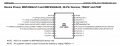
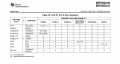
I am using MSP430G2553 and the software Energia. This is the following schematic design for the msp.
1724073779802.png

1724073155646.png

Can someone enlighten me what does it mean by "from USCI" in the table above?

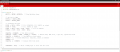
The problem is that im trying to configure the SPI Mode for a system (with registers.). my codes is as follow:
1724073531827.png


but when i connect the pin P1.4. i doesnt show anything on the oscilloscope. but when i remove the BIT4 from the register P1SEL2 like this corresponding line:

1724073614065.png

it does generate the clock of 1MHz. Based on the configuration ( the first image ), it does refer to SMCLK (sub-main clock) of the msp430. but in this case i would like to configure it to be UCA0CLK. Can someone enlighten me ? did i make some errors in the code ?
 

MrChips

Joined Oct 2, 2009
34,628
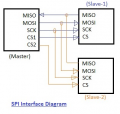
Standard SPI signals are:

MOSI = Master Out Slave In
MISO = Master In Slave Out
SCLK = Serial Clock
/CS = Chip Select

1724086594011.png

On TI MSP430, the names are changed to:

SIMO = Slave In Master Out
SOMI = Slave Out Master In
UCLK = USART Clock
STE = Slave Transmit Enable

Reference: https://www.ti.com/lit/ug/slau144k/slau144k.pdf

The first thing you have to decide is if your MSP430 will be the bus master or a slave device.
Assuming that your MSP430 is the master interfaced to a single device, then you can use 3-pin mode and ignore STE.

On MSP430G2553 MCU, the pin assignments are:
pin-3 = P1.1 = SIMO
pin-4 = P1.2 = SOMI
pin-6 = P1.4 = UCLK
pin-7 = P1.5 = STE

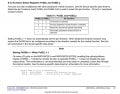
The next step is to configure the I/O pins for USART operation by configuring PxSEL and PxSEL2 where x refers to the I/O port, P1 in this case.

MSP430 Pin Function Select.jpg
slau144k - page 341

P1SEL2 and P1SEL are 8-bit registers. Hence you can configure all 8 I/O pins of port P1 at the same time.
We want to select Secondary function by setting bit-1, bit-2 and bit-4 to 1 in both registers.

P1SEL2 |= BIT4 | BIT2 | BIT1;
P1SEL |= BIT4 | BIT2 | BIT1;

Configure STE on P1.5, as you wish for 3-pin or 4-pin operation.
The next step is to configure the UCA0 module for SPI operation.

Have a look at this:
https://www.egr.msu.edu/classes/ece480/capstone/spring15/group12/Grager_Application_Note.pdf
 

MrChips

Joined Oct 2, 2009
34,628
The question refers to how to set up the direction of pin-6 = P1.4 = UCLK.
"from USCI" refers to how USCI module is configured and operating. For example, in a multi-master network, UCLK has to be in the input mode and is switched to output only when the master device is transmitting.

Read section 16.3 in slau144k.
 

MikeHutao

Joined Aug 2, 2024
11
Standard SPI signals are:

MOSI = Master Out Slave In
MISO = Master In Slave Out
SCLK = Serial Clock
/CS = Chip Select

View attachment 329550

On TI MSP430, the names are changed to:

SIMO = Slave In Master Out
SOMI = Slave Out Master In
UCLK = USART Clock
STE = Slave Transmit Enable

Reference: https://www.ti.com/lit/ug/slau144k/slau144k.pdf

The first thing you have to decide is if your MSP430 will be the bus master or a slave device.
Assuming that your MSP430 is the master interfaced to a single device, then you can use 3-pin mode and ignore STE.

On MSP430G2553 MCU, the pin assignments are:
pin-3 = P1.1 = SIMO
pin-4 = P1.2 = SOMI
pin-6 = P1.4 = UCLK
pin-7 = P1.5 = STE

The next step is to configure the I/O pins for USART operation by configuring PxSEL and PxSEL2 where x refers to the I/O port, P1 in this case.

View attachment 329551
slau144k - page 341

P1SEL2 and P1SEL are 8-bit registers. Hence you can configure all 8 I/O pins of port P1 at the same time.
We want to select Secondary function by setting bit-1, bit-2 and bit-4 to 1 in both registers.

P1SEL2 |= BIT4 | BIT2 | BIT1;
P1SEL |= BIT4 | BIT2 | BIT1;

Configure STE on P1.5, as you wish for 3-pin or 4-pin operation.
The next step is to configure the UCA0 module for SPI operation.

Have a look at this:
https://www.egr.msu.edu/classes/ece480/capstone/spring15/group12/Grager_Application_Note.pdf
actually sir, i think i have done exactly the same
 

MikeHutao

Joined Aug 2, 2024
11
The question refers to how to set up the direction of pin-6 = P1.4 = UCLK.
"from USCI" refers to how USCI module is configured and operating. For example, in a multi-master network, UCLK has to be in the input mode and is switched to output only when the master device is transmitting.

Read section 16.3 in slau144k.
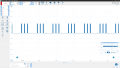
1724136530756.png i got think kind of wave for the P1.4
 
Top