Presettable Countdown Timer

128ITSH

Joined Jul 20, 2017
101
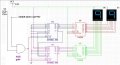
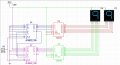
Hi, so the reason I only had one counter and display was that I was making sure I had inputting numbers correct before I added in another counter, because I want it to start at the number 30 and count down to zero. This is my new schematic I have drawn, but no matter the inputs for presets, it starts them both at 9. As you can see, for the first digit, I have 0011 going in so it will output 3. And for the second digit, I have 0000 going in so the output will be 0, hence start at 30. Is something hooked up where its not supposed to be?
You made everything almost perfect, except for the fact that the counter does not load its preset inputs on power up, so read what signal can do this instead.
Also make sure your reset lines are connected to either ground (by default) or 5V (to reset the counter). In the schematic they just seem to be connected together.
 

Thread Starter

ryan.schweitzer

Joined Nov 11, 2017
14
You made everything almost perfect, except for the fact that the counter does not load its preset inputs on power up, so read what signal can do this instead.
Also make sure your reset lines are connected to either ground (by default) or 5V (to reset the counter). In the schematic they just seem to be connected together.
So that was my mistake with the reset, so what youre saying is that if they are tied to ground it will have the counter stop once it reaches 00 and if it is set to power it will go back to 99 and keep counting down again?

Also, so putting in 0011 into P1(0 volts) P2(0 volts) P3(5 volts) P4(5 volts) does not set the counters preset to 3 using the binary input for it? Would I have to find a device that has a signal that will load the preset at the beginning?
 

Thread Starter

ryan.schweitzer

Joined Nov 11, 2017
14
I assume you're doing all of this in Multisim. When I've used that simulator in the past, I had problems with things looking connected, but not actually being connected. I used to have to resort to grabbing components and moving them around to make sure the wires were actually connected.

Measure the voltages on PE and Reset and compare that with what the datasheet says the counter should do.

Your circuit will be easier for you and others to troubleshoot if you do a neater schematic. You have a lot of unnecessary wire crossings and jogs on the inverter inputs going to the AND gates.
Okay so I checked the connections and theyre all connected. I made a new schematic with two counters and two displays since i am essentially trying to start at 30 and have it go down to 00. I can make it count down but cannot stop it at 00 and cannot start it at 30, it starts at 99 and counts down which is nice, just cant get it to stop at 00 and start at 30. I have also color coded my new schematic and made it more organized.
 

Attachments

dl324

Joined Mar 30, 2015
18,326
As previously mentioned, you don't have the counter resets connected (to anything but each other). Add a reset switch to initialize the counters to 30.

If you want the counter to stop at 0, add logic to do it.
 

absf

Joined Dec 29, 2010
1,968
I can make it count down but cannot stop it at 00 and cannot start it at 30, it starts at 99 and counts down which is nice, just cant get it to stop at 00 and start at 30.
You can put an AND gate before the clock enters the 4510 like this..

RYAN\'S 4510 circuit.jpg

Or you can control the Reset of the counter and make it High when counted down to zero then the counter would just ignore the clock coming in.

Allen
 
Last edited:

128ITSH

Joined Jul 20, 2017
101
So that was my mistake with the reset, so what youre saying is that if they are tied to ground it will have the counter stop once it reaches 00 and if it is set to power it will go back to 99 and keep counting down again?

Also, so putting in 0011 into P1(0 volts) P2(0 volts) P3(5 volts) P4(5 volts) does not set the counters preset to 3 using the binary input for it? Would I have to find a device that has a signal that will load the preset at the beginning?
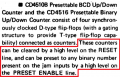
No. this is not how reset and preset work here. If you will read the first paragraph of the datasheet you will be able to understand how to do this:
upload_2017-11-13_13-33-17.png
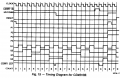
And also a timing diagram that might help you:
upload_2017-11-13_13-34-23.png
 

Thread Starter

ryan.schweitzer

Joined Nov 11, 2017
14
You can put an AND gate before the clock enters the 4510 like this..

View attachment 139228

Or you can control the Reset of the counter and make it High when counted down to zero then the counter would just ignore the clock coming in.

Allen
Yes that is essentially what I would like it do, but the only issue with that AND gate is with the logic I have, on start up there is 0000 coming out of each counter at the start right before power goes in. I need it to stop when each counter outputs (0000) and (0000), but with that happening twice in the circuit (right at the beginning) and (right at the end) it will not allow the pulse to go into the clock. I have thought about having an AND gate attached to the 0000 logic I have made and having the other input tied to when power is actually into the chip so it will not work right on start up with it reading zero volts on all 4 outputs. I just don't know how to tie power from the chip when its actually on into the AND gate. Suggestions?
 

dl324

Joined Mar 30, 2015
18,326
Suggestions?
Since this is school work and you have a simulator, try out your ideas and ask questions.

It would also be helpful if you summarized your requirements. What I gathered from the posts:
  1. You want the counters to initialize to 30 at power on.
  2. You want the counter to stop at 00.
  3. #2 implies that you need a way initialize the counters to 30 and restart counting.
 

Thread Starter

ryan.schweitzer

Joined Nov 11, 2017
14
Since this is school work and you have a simulator, try out your ideas and ask questions.

It would also be helpful if you summarized your requirements. What I gathered from the posts:
  1. You want the counters to initialize to 30 at power on.
  2. You want the counter to stop at 00.
  3. #2 implies that you need a way initialize the counters to 30 and restart counting.
My requirements are 1) Start at 30 on power up 2)Countdown every second until it reaches 00 3)Have the counter stop at 00
I can upload my updated circuit, but I do have the circuit starting at 30 which checks off number 1. I also have it counting every second which checks off number 2.
I have attempted multiple ways to get it to stop at 00 and stay there but havnt had luck. I have tried using an AND gate at the clock input to make it not true when the output is 00 but would not work since on start up there is 00 which allows it to not count. I have also tried to tie a AND gate to power from the chip and the output of 0000-0000 so it would not take the initial of 0 volts and not allow the clock to count like earlier, but it still would not allow it to count. Im just asking for some suggestions on how to make the input into the clock pulse not be true on 00.
 

absf

Joined Dec 29, 2010
1,968
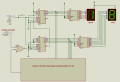
The trick is that you need a pulse on power-on to preset the 4510 to "30". So the output would not detect "00" to stop the counter. When the countdown reaches "01", the next output "00" would just briefly send a pulse to preset the 4510 to "30" so the whole cycle can repeat again...

4510 count down#2A .PNG
Can you figure out what's in the black box?

Allen
 

G.ravi

Joined Aug 20, 2018
3
The trick is that you need a pulse on power-on to preset the 4510 to "30". So the output would not detect "00" to stop the counter. When the countdown reaches "01", the next output "00" would just briefly send a pulse to preset the 4510 to "30" so the whole cycle can repeat again...

View attachment 139301
Can you figure out what's in the black box?

Allen
which simulation software you are using ???
 

dl324

Joined Mar 30, 2015
18,326
may be it will save my time to analyse my circuit
I suggest that you learn the basics and become confident of your design and analytical skills before becoming too dependent on simulators. Simulators have been known to be wrong, so you need to know the difference between a good and a bad simulator/simulation.

I don't know if Proteus is free. Some free ones are Cedar Logic, Logisim, and Digital Works.
 

G.ravi

Joined Aug 20, 2018
3
I suggest that you learn the basics and become confident of your design and analytical skills before becoming too dependent on simulators. Simulators have been known to be wrong, so you need to know the difference between a good and a bad simulator/simulation.

I don't know if Proteus is free. Some free ones are Cedar Logic, Logisim, and Digital Works.
i am undergoing training in Embedded systems since last week till now even my guide did not suggested to use a simulator so may be u r right. btw thanx for suggestion too. have a great night
 
Top