PHD ULTRA syringe Pump communicate with the Arduino

Thread Starter

zainiii

Joined Jul 26, 2024
39
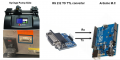
I have a PHD ULTRA syringe pump from Harvard Apparatus. I want to establish communication between an Arduino and the syringe pump. The company provided me with a Python code, but Arduino does not support Python. Therefore, I converted this code to C++ to make it compatible with the Arduino. I am using an RS-232 to TTL converter between the Arduino and the syringe pump.

However, when I attempted to use this code to establish communication, I encountered issues. Could someone please help me amend this code if there are any errors? I have attached a diagram of my setup and will also attach the Python code provided by the company.

Note: The syringe pump successfully responds and turns ON and OFF when using the pump terminal software provided by the company.
The C++ Code is:
Arduino Code:
#include <SoftwareSerial.h>

// Define the pins for RX and TX
#define RX_PIN 2
#define TX_PIN 3

SoftwareSerial pumpSerial(RX_PIN, TX_PIN);

void setup() {
  // Initialize hardware serial for debugging
  Serial.begin(9600);
  while (!Serial) {
    ; // wait for serial port to connect
  }

  // Initialize software serial for pump communication
  pumpSerial.begin(9600);

  Serial.println("Arduino ready to communicate with syringe pump.");
}

void loop() {
  // Command to send
  String command = "run\r\n";

  // Send the command
  Serial.print("Sending command: ");
  Serial.print(command);
  pumpSerial.print(command);

  // Wait for 1 second
  delay(1000);

  // Read and print the response
  String response = "";
  while (pumpSerial.available() > 0) {
    char inChar = (char)pumpSerial.read();
    response += inChar;
  }

  // Print the response if not empty
  if (response != "") {
    Serial.print("Response received: ");
    Serial.println(response);
  } else {
    Serial.println("No response received.");
  }

  // Wait before sending the next command (adjust as needed)
  delay(5000);
}

The diagram of the setup is:
[ATTACH type="full"]327932[/ATTACH]


The Python code that the company provide is:

[CODE lang="python" title="Python Code"]
# Assuming that PySerial is installed:

import serial
import time

# Configure serial connection
ser = serial.Serial(
    port='COM1',
    baudrate=9600,
    parity=serial.PARITY_ODD,
    stopbits=serial.STOPBITS_TWO,
    bytesize=serial.SEVENBITS
)

ser.isOpen()

input = 'run'
out = ''

# Send the input to the device
# Note the carriage return and line feed characters \r\n will depend on the device
ser.write(input + '\r\n')

# Wait 1 sec before reading output
time.sleep(1)
while ser.inWaiting() > 0:
    out += ser.read(1)

# Print the response
if out != '':
    print out
 

Attachments

Dave Lowther

Joined Sep 8, 2016
332
Caveat: I've done a lot of Arduino code using hardware serial, but I haven't used software serial. Someone who has used software serial may be able to spot the problem.
I would test by eliminating the pump and the TTL-RS232 converter. Just connect software serial tx pin on the Arduino to the software serial rx pin.
In the loop code just send a char on the software serial and see if you can receive that char on the software serial. Use some hardware serial prints to indicate what was received on software serial. I wouldn't put a delay between sending and receiving. Instead I'd immediately start checking if anything was received, and I'd do it with a time out so that if nothing was received after e.g. 1 second then print an error on the hardware serial.
If that test fails it may be due to the pins that you are using for software serial don't support the type of interrupt required by the library. You didn't say what type of Arduino board you are working with. From Googling it seems that different boards have different restrictions about which pins can be used.
 
I have a PHD ULTRA syringe pump from Harvard Apparatus. I want to establish communication between an Arduino and the syringe pump. The company provided me with a Python code, but Arduino does not support Python. Therefore, I converted this code to C++ to make it compatible with the Arduino. I am using an RS-232 to TTL converter between the Arduino and the syringe pump.

However, when I attempted to use this code to establish communication, I encountered issues. Could someone please help me amend this code if there are any errors? I have attached a diagram of my setup and will also attach the Python code provided by the company.

Note: The syringe pump successfully responds and turns ON and OFF when using the pump terminal software provided by the company.
The C++ Code is:
Arduino Code:
#include <SoftwareSerial.h>

// Define the pins for RX and TX
#define RX_PIN 2
#define TX_PIN 3

SoftwareSerial pumpSerial(RX_PIN, TX_PIN);

void setup() {
  // Initialize hardware serial for debugging
  Serial.begin(9600);
  while (!Serial) {
    ; // wait for serial port to connect
  }

  // Initialize software serial for pump communication
  pumpSerial.begin(9600);

  Serial.println("Arduino ready to communicate with syringe pump.");
}

void loop() {
  // Command to send
  String command = "run\r\n";

  // Send the command
  Serial.print("Sending command: ");
  Serial.print(command);
  pumpSerial.print(command);

  // Wait for 1 second
  delay(1000);

  // Read and print the response
  String response = "";
  while (pumpSerial.available() > 0) {
    char inChar = (char)pumpSerial.read();
    response += inChar;
  }

  // Print the response if not empty
  if (response != "") {
    Serial.print("Response received: ");
    Serial.println(response);
  } else {
    Serial.println("No response received.");
  }

  // Wait before sending the next command (adjust as needed)
  delay(5000);
}

The diagram of the setup is:
[ATTACH type="full"]327932[/ATTACH]


The Python code that the company provide is:

[CODE lang="python" title="Python Code"]
# Assuming that PySerial is installed:

import serial
import time

# Configure serial connection
ser = serial.Serial(
    port='COM1',
    baudrate=9600,
    parity=serial.PARITY_ODD,
    stopbits=serial.STOPBITS_TWO,
    bytesize=serial.SEVENBITS
)

ser.isOpen()

input = 'run'
out = ''

# Send the input to the device
# Note the carriage return and line feed characters \r\n will depend on the device
ser.write(input + '\r\n')

# Wait 1 sec before reading output
time.sleep(1)
while ser.inWaiting() > 0:
    out += ser.read(1)

# Print the response
if out != '':
    print out
 
# Configure serial connection
ser = serial.Serial(
port='COM1',
baudrate=9600,
parity=serial.PARITY_ODD,
stopbits=serial.STOPBITS_TWO,
bytesize=serial.SEVENBITS
)


you have not set up the protocols for Arduino
parity=serial.PARITY_ODD,
stopbits=serial.STOPBITS_TWO,
bytesize=serial.SEVENBITS
 

Thread Starter

zainiii

Joined Jul 26, 2024
39
Caveat: I've done a lot of Arduino code using hardware serial, but I haven't used software serial. Someone who has used software serial may be able to spot the problem.
I would test by eliminating the pump and the TTL-RS232 converter. Just connect software serial tx pin on the Arduino to the software serial rx pin.
In the loop code just send a char on the software serial and see if you can receive that char on the software serial. Use some hardware serial prints to indicate what was received on software serial. I wouldn't put a delay between sending and receiving. Instead I'd immediately start checking if anything was received, and I'd do it with a time out so that if nothing was received after e.g. 1 second then print an error on the hardware serial.
If that test fails it may be due to the pins that you are using for software serial don't support the type of interrupt required by the library. You didn't say what type of Arduino board you are working with. From Googling it seems that different boards have different restrictions about which pins can be used.
Dear Sir.
Thanks for you precious time and reply.
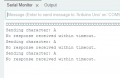
I have removed the RS 232 to TTL converter and short the Pin 2 and Pin3 using the software serial, as I used Rx as 2 and Tx as Pin 3 of Arduino UNO. i also used other pairs as well like (4,5),(6,7).(8,9),(10,11),(12,13). But no one worked. I sent the character A which successfully send but didn't received. I also add the time line as well.
Below picture i am going to attach for the response i get.
The program that i used is:


#include <SoftwareSerial.h>
// Define the pins for RX and TX
#define RX_PIN 12
#define TX_PIN 13
SoftwareSerial pumpSerial(RX_PIN, TX_PIN);
void setup() {
// Initialize hardware serial for debugging
Serial.begin(9600);
while (!Serial) {
; // wait for serial port to connect
}
// Initialize software serial for pump communication
pumpSerial.begin(9600);
Serial.println("Arduino ready to communicate with software serial.");
}
void loop() {
// Send a test character
char testChar = 'A';
Serial.print("Sending character: ");
Serial.println(testChar);
pumpSerial.print(testChar);
// Wait for a response with timeout
long timeout = millis() + 1000; // 1 second timeout
boolean received = false;
while (millis() < timeout) {
if (pumpSerial.available() > 0) {
char inChar = pumpSerial.read();
Serial.print("Received character: ");
Serial.println(inChar);
received = true;
break;
}
}
if (!received) {
Serial.println("No response received within timeout.");
}
// Wait before sending the next command (adjust as needed)
delay(5000);
}

Now i am going to buy the Arduino Mega and not use the Arduino UNO. because it support multiple serial port and can handle the parity bit advance setting as well. The main issue is that your C++ code doesn't handle parity and data bits settings, which are crucial for communication with your syringe pump. SoftwareSerial doesn't support these advanced settings, so you might need to use a different Arduino board with more hardware serial ports.

Your suggestions will be highly appreciated and i will wait for it
 

Attachments

Thread Starter

zainiii

Joined Jul 26, 2024
39
Dear Sir
Thanks for the example that you, itremoved few confusion.
I already ordered for the Arduino Mega that will support multiple serial port.
I have amended the program, can you look for this program, that i wrote, and can you tell me this will work for me now or not, If there is any error, i request you to kindly remove if it has
Your assistance will be highly appreciated

#define pumpSerial Serial1

void setup() {
Serial.begin(9600);
pumpSerial.begin (9600, SERIAL_7O2);
Serial.println("Arduino ready to communicate with syringe pump.");
pumpSerial.print("run\r\n");
delay(1000);
}

void loop() {
static char Line[30];

if (pumpSerial.available() > 0) {
Line = pumpSerial.readString();
Serial.print(Line);
}

if (Serial.available() > 0) {
Line = Serial.readString();
pumpSerial.print(Line);
}

// Wait before sending the next command (adjust as needed)
delay(5000);
}
 
https://www.arduino.cc/reference/en/language/functions/communication/serial/begin/

Serial.begin()
Description
Sets the data rate in bits per second (baud) for serial data transmission. For communicating with Serial Monitor, make sure to use one of the baud rates listed in the menu at the bottom right corner of its screen. You can, however, specify other rates - for example, to communicate over pins 0 and 1 with a component that requires a particular baud rate.
An optional second argument configures the data, parity, and stop bits. The default is 8 data bits, no parity, one stop bit.
Syntax
Serial.begin(speed)
Serial.begin(speed, config)
Parameters
Serial: serial port object. See the list of available serial ports for each board on the Serial main page.
speed: in bits per second (baud). Allowed data types: long.
config: sets data, parity, and stop bits. Valid values are:
SERIAL_5N1
SERIAL_6N1
SERIAL_7N1
SERIAL_8N1 (the default)
SERIAL_5N2
SERIAL_6N2
SERIAL_7N2
SERIAL_8N2
SERIAL_5E1: even parity
SERIAL_6E1
SERIAL_7E1
SERIAL_8E1
SERIAL_5E2
SERIAL_6E2
SERIAL_7E2
SERIAL_8E2
SERIAL_5O1: odd parity
SERIAL_6O1
SERIAL_7O1
SERIAL_8O1
SERIAL_5O2
SERIAL_6O2
SERIAL_7O2
SERIAL_8O2
Returns
Nothing
 

Thread Starter

zainiii

Joined Jul 26, 2024
39
https://www.arduino.cc/reference/en/language/functions/communication/serial/begin/

Serial.begin()
Description
Sets the data rate in bits per second (baud) for serial data transmission. For communicating with Serial Monitor, make sure to use one of the baud rates listed in the menu at the bottom right corner of its screen. You can, however, specify other rates - for example, to communicate over pins 0 and 1 with a component that requires a particular baud rate.
An optional second argument configures the data, parity, and stop bits. The default is 8 data bits, no parity, one stop bit.
Syntax
Serial.begin(speed)
Serial.begin(speed, config)
Parameters
Serial: serial port object. See the list of available serial ports for each board on the Serial main page.
speed: in bits per second (baud). Allowed data types: long.
config: sets data, parity, and stop bits. Valid values are:
SERIAL_5N1
SERIAL_6N1
SERIAL_7N1
SERIAL_8N1 (the default)
SERIAL_5N2
SERIAL_6N2
SERIAL_7N2
SERIAL_8N2
SERIAL_5E1: even parity
SERIAL_6E1
SERIAL_7E1
SERIAL_8E1
SERIAL_5E2
SERIAL_6E2
SERIAL_7E2
SERIAL_8E2
SERIAL_5O1: odd parity
SERIAL_6O1
SERIAL_7O1
SERIAL_8O1
SERIAL_5O2
SERIAL_6O2
SERIAL_7O2
SERIAL_8O2
Returns
Nothing
I already read your attachment and this Arduino forum function detail.
I amended the code and make it.
can you check the code please,.
I am just confuse about this line.
whether i should write
pumpSerial.begin (9600, SERIAL_7O2);
or
pumpSerial1.begin (9600, SERIAL_7O2);
 

Attachments

Dave Lowther

Joined Sep 8, 2016
332
Your suggestions will be highly appreciated and i will wait for it
It seems like buying an Arduino with more than one hardware serial port is a good move. I hadn't considered the need to set parity etc to match what the pump settings are. I don't know why you couldn't get the software serial to work with loopback. If you were stuck with having to use a software serial solution I might have spent some time trying your software serial code to see if I could get it to work here, but as you are moving on to an Arduino Mega I won't bother doing that.
 

Thread Starter

zainiii

Joined Jul 26, 2024
39
It seems like buying an Arduino with more than one hardware serial port is a good move. I hadn't considered the need to set parity etc to match what the pump settings are. I don't know why you couldn't get the software serial to work with loopback. If you were stuck with having to use a software serial solution I might have spent some time trying your software serial code to see if I could get it to work here, but as you are moving on to an Arduino Mega I won't bother doing that.
Dear Sir.
Dear Sir.
Today i used the Arduino Mega instead of Arduino UNO
I uploaded the program first i get the error " trying to assign a String object directly to a character array (char[]), which is not compatible.
So i did changes in the program and introduce two changes in it
  • String inputString = pumpSerial.readString(); reads the input into a String.
  • inputString.toCharArray(Line, sizeof(Line)); copies the String into the char array.
    the amended code is

Arduino Code:
#define pumpSerial Serial1

void setup() {
  Serial.begin(9600);
  pumpSerial.begin(9600, SERIAL_7O2);
  Serial.println("Arduino ready to communicate with syringe pump.");
  pumpSerial.print("run\r\n");
  delay(1000);
}

void loop() {
  static char Line[30];

  if (pumpSerial.available() > 0) {
    String inputString = pumpSerial.readString();
    inputString.toCharArray(Line, sizeof(Line));
    Serial.print(Line);
  }
 
  if (Serial.available() > 0) {
    String inputString = Serial.readString();
    inputString.toCharArray(Line, sizeof(Line));
    pumpSerial.print(Line);
  }

  // Wait before sending the next command (adjust as needed)
  delay(5000);
}

But unfortunately the syringe pump is still not responding
 

Dave Lowther

Joined Sep 8, 2016
332
first i get the error " trying to assign a String object directly to a character array (char[]), which is not compatible.
<snip>
But unfortunately the syringe pump is still not responding
I don't know why you would use Strings and char arrays. If you want to understand why you got the error, post the code giving the error and I, or someone, will take a look.
About the pump not responding. I would always check with a local loopback before adding the complexity of communicating with the pump. So without using the TTL -> RS232 converter, just connect Serial1 tx to Serial1 rx and see if you can receive what you send on Serial1.
BTW: The Arduino ATmega board I have has the serial RX/TX pins labelled the wrong way round (RX is the output, TX is the input). If you have a scope you could check which pin is being used to send data for Serial1.
 

Dave Lowther

Joined Sep 8, 2016
332
pumpSerial.begin(9600, SERIAL_7O2);
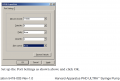
I'm looking at this manual which has this figure on page 80, which says 8 data bits, no parity, and 2 stop bits. Which would be SERIAL_8N2. Of course I may have the wrong manual. I'd trust the python code they gave you more than I'd trust this old manual.
1722455461254.png
Have you tried communicating with the pump using a terminal emulator? That's a bit like my local loop back suggestion, i.e. split the problem in 1/2. One half is check the Mega can receive what it sends. The other 1/2 is check that you can communicate with the pump using a known working terminal emulator.
 

Thread Starter

zainiii

Joined Jul 26, 2024
39
Dear Sir,

Thank you very much for your response. I conducted the experiment in the following sequence:

  1. First, I used the pump terminal software and connected a USB Type-A cable to the laptop and the other end to the USB Type-B port on the syringe pump. I was able to successfully control the syringe pump using the pump terminal software.
  2. I then connected a USB Type-A cable to the laptop and the other end to the RS-232 DB9 port on the syringe pump. Unfortunately, the pump terminal software did not detect the syringe pump, indicating that the RS-232 DB9 port could not establish communication with the laptop. Even though I used the pump terminal software provided by the company, I suspect there might be an issue with the RS-232 port on the syringe pump, preventing it from interfacing correctly. However, I am not certain about this.
  3. I connected an Arduino to the syringe pump using an RS-232 to TTL converter module. This case i only used the RS 232 port of the syringe pump and not the USB Type B port of the syringe pump. However, this attempt also failed. I have two possible explanations: either there is an issue with the RS-232 to TTL converter, or there is a problem with the RS-232 port on the syringe pump. I suspect the problem lies with the RS-232 port on the syringe pump, but I am not sure.
  4. There is another option: I could use the Arduino on one side and the USB Type-B port of the syringe pump on the other, since the syringe pump's USB Port B is working, as verified in my first step. The issue is that I couldn't find a cable with an RS-232 DB9 connector on one end and a USB Type-B connector on the other. In this setup, I would connect the RS-232 side of the RS-232 to TTL converter to the syringe pump's USB Type-B port, but I am not sure if this would work.

  5. The last thing the companies say, they didn't support the Arduino, they only support the python language and ask me the
    If that does not work, try adding in a null modem, i am also not sure, whether this will work or not.

  6. at this time, now i am going to use the relay in the power cable of syringe pump, there is one option in the pump called power up running, it will automatically start the pump after turn OFF, so i have no option except to avail that one.

  7. If you have any suggestion kindly let me know, your assistance and suggestion is highly appreciated
 
Top