Peltier Plate Current Reversing and Controlling the Current with Arduino Uno

  • Thread starter Deleted member 496780
  • Start date

Thread Starter

Deleted member 496780

Joined Dec 31, 1969
0
I used an h-bridge to reverse the current of a peltier plate, which was the same as this video
.

In the video, he had to physically remove a wire and place it somewhere else to reverse the current of a peltier plate. I was wondering how would I do it without removing a wire?

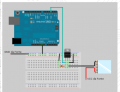
Also how do I control the current flow with an Arduino? In the image I provided, I figured out how to control the current with just the peltier itself without reversing current or anything

Would the circuit for the DC motor controlled by a L293NE h-bridge work if I just replace the DC motor with the peltier plate?

Source: https://itp.nyu.edu/physcomp/labs/motors-and-transistors/dc-motor-control-using-an-h-bridge/
 

Attachments

be80be

Joined Jul 5, 2008
2,394
L293NE probably not work it's only good for a 1 amp Continuous output current.

And that's on a pcb with heat sink made into it.
If you soldered it on a pref board you can't get a amp out of it.

Really need to know how big your peltier plate is.

That's not a good h-bridge for arduino you need to add some part's to insure that it don't power up and
have all 4 drivers on till your code is running.
 

wayneh

Joined Sep 9, 2010
18,092
I used an h-bridge to reverse the current of a peltier plate, which was the same as this video
.

In the video, he had to physically remove a wire and place it somewhere else to reverse the current of a peltier plate. I was wondering how would I do it without removing a wire?

Also how do I control the current flow with an Arduino? In the image I provided, I figured out how to control the current with just the peltier itself without reversing current or anything

Would the circuit for the DC motor controlled by a L293NE h-bridge work if I just replace the DC motor with the peltier plate?

Source: https://itp.nyu.edu/physcomp/labs/motors-and-transistors/dc-motor-control-using-an-h-bridge/
Yes, but make sure the h-bridge is rated to the peltier current. Most small motors would draw much less current.
 

Thread Starter

Deleted member 496780

Joined Dec 31, 1969
0
L293NE probably not work it's only good for a 1 amp Continuous output current.

And that's on a pcb with heat sink made into it.
If you soldered it on a pref board you can't get a amp out of it.

Really need to know how big your peltier plate is.

That's not a good h-bridge for arduino you need to add some part's to insure that it don't power up and
have all 4 drivers on till your code is running.
Sorry I'm new to electronics, but is there a way to add a switch to switch from off, cold or hot, so I don't have to physically arrange the wires like the person did in the video
 

be80be

Joined Jul 5, 2008
2,394
Yes post the circuit there just swapping the drivers base.
It can be done with the arduino but you got have the logic right need to see link to circuit.

L293NE works fine if your around a 1/2 amp but to get up to the 1 amp mark you have to have heat sink witch need see a datasheet for your cooler.
 
Last edited:

Thread Starter

Deleted member 496780

Joined Dec 31, 1969
0
Yes post the circuit there just swapping the drivers base.
It can be done with the arduino but you got have the logic right need to see link to circuit.

L293NE works fine if your around a 1/2 amp but to get up to the 1 amp mark you have to have heat sink witch need see a datasheet for your cooler.
Ah sorry I don't have the schematic of the drawing since I just followed the guy in the video, but I'm not sure how I would incorporate a switch to manage off, cold or hot. I guess I'm scrapping the idea of controlling the temperature

Edit: Never mind the guy gave me his schematic! https://computerwizardlab.files.wordpress.com/2017/01/h-bridge-circuit.png?w=676
 

Thread Starter

Deleted member 496780

Joined Dec 31, 1969
0
This is the data sheet it shows 6.4 amps for the cooler http://peltiermodules.com/peltier.datasheet/TEC1-12706.pdf
That kills the L293NE can't use it

The IRLB8721PbF are not good for driving from a port pin of the arduino
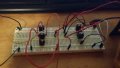
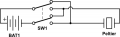
Oh I won't be using an arduino anymore, but is there a way that I can add a switch instead so I don't have to physically adjust the wires for hot and cold? Here's a picture of the wiring, I am not sure where to put the switch, or what kind of switch I'd need. Thank you so much for your advice!
 

Attachments

be80be

Joined Jul 5, 2008
2,394
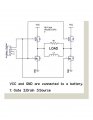
I reread the data sheet if you hooked it up like this using your IRLB8721PbF for the ones that are on there
you could use the arduino.


be80be

Joined Jul 5, 2008
2,394
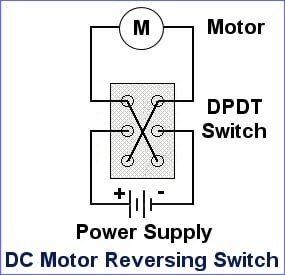
Yes they both work the dp-dt switch
or the h-bridge. I first though the IRLB8721PbF needed to much voltage to turn on but there 2.5 not 4.5
so the uno could switch them fine.

Just make sure your code doesn't set pin one and pin two high at the same time.
they need one low and one high at any giving time.
 

Thread Starter

Deleted member 496780

Joined Dec 31, 1969
0
Yes they both work the dp-dt switch
or the h-bridge. I first though the IRLB8721PbF needed to much voltage to turn on but there 2.5 not 4.5
so the uno could switch them fine.

Just make sure your code doesn't set pin one and pin two high at the same time.
they need one low and one high at any giving time.
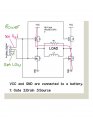
Again thank you so much for helping me!!!!!! I was wondering would the arduino circuit you provided above look similar if I just replaced the mosfet?

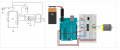
I have this basic circuit drawn out similar to yours, I'm also going to be powering the peltier plate with 12v and the arduino with 9v
 

Attachments

be80be

Joined Jul 5, 2008
2,394
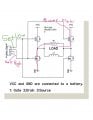
The circuit I posted you have to use the IRLB8721PbF the one's in it are too small ,But all you do is use the IRLB8721PbF.

The Switch circuit will work too.

FNAQR5RHEI47TC2.LARGE.jpg
 

Thread Starter

Deleted member 496780

Joined Dec 31, 1969
0
The circuit I posted you have to use the IRLB8721PbF the one's in it are too small ,But all you do is use the IRLB8721PbF.

The Switch circuit will work too.

View attachment 140337
Is Load the peltier plate? Sorry to ask again, what would the program look like roughly? Like this?
C:
int peltier = 3; //The N-Channel MOSFET is on digital pin 3
int power = 0; //Power level fro 0 to 99%
int peltier_level = map(power, 0, 99, 0, 255); //This is a value from 0 to 255 that actually controls the MOSFET

void setup(){
Serial.begin(9600);

//pinMode(peltier, OUTPUT);
}

void loop(){
char option;

if(Serial.available() > 0)
{
option = Serial.read();
if(option == 'a')
power += 5;
else if(option == 'z')
power -= 5;

if(power > 99) power = 99;
if(power < 0) power = 0;

peltier_level = map(power, 0, 99, 0, 255);
}

Serial.print("Power=");
Serial.print(power);
Serial.print(" PLevel=");
Serial.println(peltier_level);

analogWrite(peltier, peltier_level); //Write this new value out to the port

}
 
Last edited by a moderator:

be80be

Joined Jul 5, 2008
2,394
Something more like this
And try to use the code tag's its under the + button on the editor.
C:
int cold = 3;
int hot = 5;
int power = 0; //Power level fro 0 to 99%
int peltier_level = map(power, 0, 99, 0, 255); //This is a value from 0 to 255 that actually controls the MOSFET
int val = 0;
void setup() {
  Serial.begin(9600);
  pinMode (cold, OUTPUT);
  pinMode (hot, OUTPUT);

}


void loop() {
  char option;

  if (Serial.available() > 0)
  {
    option = Serial.read();
    if (option == 'a')
      power += 5;
    else if (option == 'z')
      power -= 5;

    if (power > 99) power = 99;
    if (power < 0) power = 0;

    peltier_level = map(power, 0, 99, 0, 255);
  }

  Serial.print("Power=");
  Serial.print(power);
  Serial.print(" PLevel=");
  Serial.println(peltier_level);
  digitalWrite(hot, LOW);
  val = peltier_level;
  analogWrite(cold, val); //Write this new value out to the port
  digitalWrite (hot,LOW);
  // add here to change from cold to hot
}
 
Last edited:

Thread Starter

Deleted member 496780

Joined Dec 31, 1969
0
Something more like this
And try to use the code tag's its under the + button on the editor.
Code:
int cold = 3;
int hot = 5;
int power = 0; //Power level fro 0 to 99%
int peltier_level = map(power, 0, 99, 0, 255); //This is a value from 0 to 255 that actually controls the MOSFET
int val =0;
void setup() {
  Serial.begin(9600);
  pinMode (cold, OUTPUT);
  pinMode (hot, OUTPUT);
}
void loop(){
char option;
if(Serial.available() > 0)
{
option = Serial.read();
if(option == 'a')
power += 5;
else if(option == 'z')
power -= 5;
if(power > 99) power = 99;
if(power < 0) power = 0;
peltier_level = map(power, 0, 99, 0, 255);
}
Serial.print("Power=");
Serial.print(power);
Serial.print(" PLevel=");
Serial.println(peltier_level);
digitalWrite(hot, LOW);
val = peltier_level;
analogWrite(cold,val); //Write this new value out to the port

// add here to change from cold to hot
}
You're a guru! Thank you so much, but the code I posted was just to control the current of this https://imgur.com/a/OIOA2

I am not sure how to breadboard your schematic, and reverse the current. Also in the code what component is connected to pin 5 of the arduino for the hot side?
 
Top