Pace BMS troubleshooting and repair

Thread Starter

posix77

Joined Oct 12, 2023
7
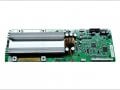
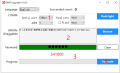
The BMS shut down during the firmware upgrade, but actually the upgrade didn't start. after selecting the new firmware file, and click start, the update tool reported error like fail to communicate with MCU (master control unit ). then I found the BMS power LEDs are all off. ( it was on normally). The button to startup/shutdown the BMS can't startup the BMS anymore. The interesting thing is that the small display screen still has power and shows voltage parameters, but all values are 0. Normally, if the BMS is off, the screen should also be off . The whole BMS looks between on and off status.
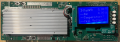
This BMS has 2 main chips, one is the Panasonic battery cell monitoring chip, another is an ST embedded ARM processor (stm32h725vgt6), I found this processor has built in Flash memory and DRAM. kind of SOC.
See picture below , If I put a voltage > 15V to the B+ and B-, the small display screen will be powered up. and a small DC to DC converter component is also working (mornsun b1205s-1wr2, 12v to 5v). By default, if the BMS if off power and put power on, the screen should has no power, now it has 12V and lighted up. normally it should only have power after I long press the power button(marked as reset button which powers on/off the board by long pressing). I suspect some MOS component could be broken down because it always directly powers up part of the circuit (display power), but I check some MOS on the board, looks normal. Also I checked ST SOC, it has 3.3v VDD on, but not running because checked with thermo-detector, it was not warmed.
Any ideas?
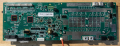
BMS-Aside.png
BMS-Bside.png
 
The BMS shut down during the firmware upgrade, but actually the upgrade didn't start. after selecting the new firmware file, and click start, the update tool reported error like fail to communicate with MCU (master control unit ). then I found the BMS power LEDs are all off. ( it was on normally). The button to startup/shutdown the BMS can't startup the BMS anymore. The interesting thing is that the small display screen still has power and shows voltage parameters, but all values are 0. Normally, if the BMS is off, the screen should also be off . The whole BMS looks between on and off status.
This BMS has 2 main chips, one is the Panasonic battery cell monitoring chip, another is an ST embedded ARM processor (stm32h725vgt6), I found this processor has built in Flash memory and DRAM. kind of SOC.
See picture below , If I put a voltage > 15V to the B+ and B-, the small display screen will be powered up. and a small DC to DC converter component is also working (mornsun b1205s-1wr2, 12v to 5v). By default, if the BMS if off power and put power on, the screen should has no power, now it has 12V and lighted up. normally it should only have power after I long press the power button(marked as reset button which powers on/off the board by long pressing). I suspect some MOS component could be broken down because it always directly powers up part of the circuit (display power), but I check some MOS on the board, looks normal. Also I checked ST SOC, it has 3.3v VDD on, but not running because checked with thermo-detector, it was not warmed.
Any ideas?
View attachment 304746
View attachment 304747
I have an older Pace BMS. I can communicate with it with RS485, but I need to change some parameters. I need the password! Do you have any suggestions?
 

mrkwagga

Joined Jan 6, 2024
1
Hi @posix77 Did you ever get back into your BMS? I have the exact same issue - as if the there was a failed firmware update, but I can't get back into the BMS via RS485 or RS232 - yet like your issue, the screen is on, but no LED's...
 

Thread Starter

posix77

Joined Oct 12, 2023
7
Hi @posix77 Did you ever get back into your BMS? I have the exact same issue - as if the there was a failed firmware update, but I can't get back into the BMS via RS485 or RS232 - yet like your issue, the screen is on, but no LED's...
I think the firmware got damaged, can't find the suitable firmware to fix it.
 

bassbindevil

Joined Jan 23, 2014
918
The unlabeled (except for 3.3V) pins below the SOC are intriguing. It's likely there is an interface like JTAG available to communicate with the SOC.
 

Arque.45

Joined Feb 19, 2024
7
I have an older Pace BMS. I can communicate with it with RS485, but I need to change some parameters. I need the password! Do you have any suggestions?
I may have a fix to your issue. I got a system from Tandem Kinetics and it uses a pace bms. I ran into a similar issue. I contacted them and they provided the upgrade file. I connected to Rs232 and used the file they sent. As soon as it was done uploading, the system came back on.
 

JayTee24

Joined Mar 20, 2024
8
I may have a fix to your issue. I got a system from Tandem Kinetics and it uses a pace bms. I ran into a similar issue. I contacted them and they provided the upgrade file. I connected to Rs232 and used the file they sent. As soon as it was done uploading, the system came back on.
Hey Arque, hope you are doing well.
Can you share the firmware file please, either in the forum or via DM? I have a Pace BMS with assumed bad firmware becuase the CAN and RS485 protocol read from the BMS is blank in the PC software and a choice cannot be selected. I would like to reflash the firmware and see if it fixes this issue.
Cheers,
 

Arque.45

Joined Feb 19, 2024
7
Hi Jay, how do I send the files? Not sure they've been attached properly here.

Hey Arque, hope you are doing well.
Can you share the firmware file please, either in the forum or via DM? I have a Pace BMS with assumed bad firmware becuase the CAN and RS485 protocol read from the BMS is blank in the PC software and a choice cannot be selected. I would like to reflash the firmware and see if it fixes this issue.
Cheers,
 

JayTee24

Joined Mar 20, 2024
8
Thats a great question !
I am writing this now and I see an orange box saying "Attach files" right underneath the text box. That button opens a file picker on the Windows laptop I am using. After I select a file I see it appears in its own box area under this text box. I did also try a .zip file and it was also shown in the attachments area but I have not uploaded that file here.
I will attach a file and see if it is visible in the post. If this works perhaps you can try again, many thanks.
 

Attachments

Arque.45

Joined Feb 19, 2024
7
The file attachment appears to be unsuccessful. It's a bin and exe file.

Thats a great question !
I am writing this now and I see an orange box saying "Attach files" right underneath the text box. That button opens a file picker on the Windows laptop I am using. After I select a file I see it appears in its own box area under this text box. I did also try a .zip file and it was also shown in the attachments area but I have not uploaded that file here.
I will attach a file and see if it is visible in the post. If this works perhaps you can try again, many thanks.
 

JayTee24

Joined Mar 20, 2024
8
The file attachment appears to be unsuccessful. It's a bin and exe file.
Hi, are you able to convert to a zip file? Sometimes that will work. I am happy to DM you my email address and wesendit.com is a free online file transfer I use with work. Thanks for your efforts!
 

JayTee24

Joined Mar 20, 2024
8
Hi Arque, thats fantastic, thank you!
I will give this a go as soon as possible and let you know how I get on.
You're a superstar, have a great evening.
 

JayTee24

Joined Mar 20, 2024
8
Hi Arque, I was unable to get the .bin firmware file to upload. This may be because my BMS is a different model or it is locked in some way. I have contacted PACE in China but they refuse to provide a firmware file without permission on the original battery supplier who is now gone bust.

Thank for your assistance to get the file, its very much appreciated. Its a shame PACE are not so open to supporting end users but I will keep trying with them.
 
Top