Noob needs help with opto isolator circuit.

Thread Starter

kawgomoo

Joined Aug 5, 2014
19
I might add i am building this CNC lathe as an education tool for my 7 yr old son. Which is why I'm so weird about safety.

It absolutely cannot run, under any circumstances, unless the hood is shut and the Mach commands it to do so. I have my hands full as it is, don't need to be worrying about flakey hardware while I'm at it.
 

MaxHeadRoom

Joined Jul 18, 2013
30,684
The Charge Pump Function inside of Mach is an ATTEMPT to rectify this situation, Unfortunately it is not very effective, at all.

Charge pump is a single output, like everything else. Since the PP goes into an undefined state, and then goes through an "ALL HOT" state when the bios probes the port. Anything plugged into the PP at this time will trigger if its an active high during the bios port probing. During the undefined times, anything can happen.
.
The charge pump detection/output relies on a constant (5Khz?) signal, this is not going to happen during power on/boot up or if the P.C. crashes etc so the external charge pump will always be off at this point, my use of the charge pump would be to put its output in the E-stop AND string.
This is often called a watch dog timer and has been used in some form for decades on processor operated equipment.

Incidentally, you have to take care when using a Laptop with Mach, there are some that are known to have 3.3v instead of 5v on the P.P.
Max.
 

Thread Starter

kawgomoo

Joined Aug 5, 2014
19
Ahh nice, i wasn't aware the watchdog was like that. I thought it to be a simple on/off. Its hard learning every detail of mach, before you need to use it!

My ultimate goal here is to make a Dongle that can plug into these machines, and put them back into service. With little or no internal machine modifications.

There are thousands of these little machines sitting unused in classrooms around the country. The company that built them is USELESS!!!!

It may not be ultimately realistic, but assuming this $3.99 dongle with a couple i/c's in it can bring functionality back to these little machines it would be great. And open so many doors for youngsters.

My intent is to freely distribute the dongle to anyone who asks. Most are teachers with no education budget supporting the classroom environment out of their own paychecks.

Most of these machines that get opened up by educators, Never get put back together. {This is how i end up with them}

So like i was saying my goal here is to create a plug and play package to make these little machines useful once more. I don't even know if its possible.

I bet i can even get Mach to help me out with educational licensing of their software. Imagine, a whole generation of kids growing up that were writing G code in 2nd grade.

Part Patriot, Part Dreamer. Just trying to do my part. :)
 

Thread Starter

kawgomoo

Joined Aug 5, 2014
19
Max, can you give me an example of watchdog being implemented into a control scheme?

How is communication between the two devices setup?

Does the driver board need hardware to support this function specifically? {i.e. gecko's have it others don't}

Would really like more info on mach's lock out scheme…. i spent all last night researching the homing and limit switches scheme. Which opens up a lot of inputs on the db25 for me!!

Still need to address stepper lockout/watchdog circuit.
 

MaxHeadRoom

Joined Jul 18, 2013
30,684
Max, can you give me an example of watchdog being implemented into a control scheme?

How is communication between the two devices setup?

.
I will see if I can put something together.
I see by a search that most have a DC spindle motor on them, so I assume it has a simple SCR controller controlled by a pot? But I am not sure if they implemented M3/M4/M5 to control it?
Max.
 

Thread Starter

kawgomoo

Joined Aug 5, 2014
19
The spindle is 110v. it is controlled by an SSR. however the SSR turns it on and off only. the speed control is a rheostat thing, like a router speed controller.

right now m3/m5 work. m4 cannot reverse the spindle however..{i don't think the spindle can run in reverse at all, given the motor it comes with}

From my brief research it looks like i can replace the XOR gate in my Dongle with a Missing Pulse Detector circuit and all should be golden.

Now, how to build one? lol. In the most compact way possible mind you.

Is there a single IC that can read the 12.5khz signal directly, or will this be a 555 timer and some other components?
 

Thread Starter

kawgomoo

Joined Aug 5, 2014
19
also, the PP on my laptop has 3.3 volts. I can source 5vdc from the lathe to power circuits etc. but thats as high as it goes. {no 12vdc}

the 3.3vdc signal works fine with the optical couplers that are on this board.

My pc only has 3.3 volts at the port as well, but its a PCI PP card.
 

MaxHeadRoom

Joined Jul 18, 2013
30,684
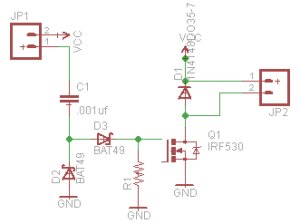
This is the circuit from Mariss Fromanis of Gecko, JP2 is to the relay 5 to 24vdc supply with the relay suitably sized. .
You should be able to use a 2N7000 in place of the larger IRF530.
Your simple drive does not have a reversing relay, or else you could use M4.
Max.


THE_RB

Joined Feb 11, 2008
5,438
...
When you power up the laptop the steppers do in fact move. Not much, only a couple steps. However, it is really freaking annoying. Also if machining a piece and you rebooted the computer your tool would move. Does this matter? i don't know. But it seems like it would suck.
...
Sounds like a job for homing switches. I couldn't live without mine! I can set the home position to approx 0.01 mm each time. And even re-set the homes as the machine warms up and expands.

Check out this forum thread;
http://www.cnczone.com/forums/open-...01878-electronic-home-switches-made-easy.html

And regarding the problem I still don't see why you can't just switch the PC or laptop on FIRST, then after it boots up switch on the CNC machine? :Confused:
 

Thread Starter

kawgomoo

Joined Aug 5, 2014
19
Its a machine for kids, and kids don't follow the damn instructions! lol.

Ive got the drop out protection handled more or less. Im going to revisit this area last once everything else is dialed in. {little burned out on this circuit, but ill convert it to 12hz input once the components come in}

Now my question is.

The machine has a "door" much like a real CNC machine. When the door is opened, what exactly should this trigger?

When you estop the machine you can't start back up where you left off easily correct?

Will mach only estop if it sees the door open while the machine is running?

little confused on my options here. Basically trying to decide if the estop button and machine door should be on the same circuit, or separate ones.
 

MaxHeadRoom

Joined Jul 18, 2013
30,684
Here is the conundrum, For safety reasons you would want the spindle to stop and the axes stop moving.
But this could ruin the part.
In the case of a hobby system such as Mach, this is usually all the option you have, on a 'real' CNC machine you may have a restart ability where you would punch in the line number to continue from then Cycle Start.
There is issue a feed hold, but AFAIK it does not stop the spindle in Mach.
For safety reasons, you may be limited to switching off the spindle power and disable the stepper drives, this could be handled by the previous belabored description of putting the door switch in the E-stop relay string, this would also notify Mach that a E-stop had occurred.
If safety is uppermost, this may be the way!
Max.
 

THE_RB

Joined Feb 11, 2008
5,438
On door open I would perform this sequence;
1. all axes stop
2. tool lift to max height
3. spindle stop

That lets you open the door and clear away swarf etc then reclose the door to automatically restart where it was.
 

Thread Starter

kawgomoo

Joined Aug 5, 2014
19
At work we have several "real" HAAS machines. It is not my dept at all, but i do sneak in there and watch over folks shoulders from time to time.

I had assumed mach would work more like one of the haas machines, where you can open the door, look around, take measurements, but once you close the door the cycle start button is pressed and the machine picks up from where it left off.

It seems that may not be the case however.

This is a lathe. So when i X- should that be towards, or away from the spindle centerline?

I auto homed the machine tonight before i had to leave. That felt like a big accomplishment.

All the safeties and home switches are in place, i just need to make the estop button talk back to mach so when its depressed the software knows it as well. right now it shuts down the power to the spindle is all.

I did want to ask. The machine has 2 micro switches. I have them setup only as "home" switches, should these be limit switches or what? Little confused on how the machine will react to bumping a home switch while running, would it see that as a limit and stop?

RB- How do i go about programming that type of sequence into mach? I feel like this software has so many features, but I'm having a hard time finding where to look to give me details about each one. Its hard to know what you don't know, when you don't know what it is you don't know!
 

MaxHeadRoom

Joined Jul 18, 2013
30,684
The home switches on Mach operate like this, they do double duty as over travel and home limits.
When you perform a home sequence, say X, the axis moves away from the centre line in the X+ until it strikes the limit registering home to the X axis.
Next the Z home is performed and the Z moves away from the chuck in the Z+ the X L.S. and registers home, once the machine is homed, both limits switches act as O.T. L.S. from then on.
The limit switch's -X,+X,-Z,+Z (if you have all four) are all wired in series to one input.

If you want the door switch to act out of the E-stop string and perform the action suggested by RB, you could input the door switch via independent input to Mach and write a M-code routine for it.

G-code = motion, M-code = machine control side, S-code = spindle control, T-code = tool code.
For the e-stop S/W stop you would need a separate contact on the E-stop relay to input the provided Mach E-stop input pin.
Max.
 
Last edited:

Thread Starter

kawgomoo

Joined Aug 5, 2014
19
I told my machinist buddy i was learning G code and his response was i needed to know M and S as well. lol. Now i know what he was talking about {i just nodded and played along ;) }

My machine only has one set of switches. I have seen it recommended to wire the NC terminals in series to the limit input, and wire the NO terminals in series to the home input. This would be easy to implement, and makes sense in my head.

Right now, it has home switches, but no limit switches. I just wasn't sure if the one switch could do double duty through programming in Mach or if i actually needed to have separate limit and home switches/contacts.

I need to calibrate steps per rev. But don't have a dial indicator. :|

As far as estop. My plan was to add a small relay with 120vac coil, triggered off the estop button itself, to close a pin to ground as my signal for Mach to estop. The estop on this machine is wired in AC, which i don't really care for. But, whatever, it is what it is.

That should be the last bit of control setup i think.

Also, a curios note. i have this setup as mach 3 turn, but all the tool/path screens seem to be for a mill. is there anyway to change this? or is it just how it is?
 

MaxHeadRoom

Joined Jul 18, 2013
30,684
As I pointed out, Mach uses the same N.C. limits in series for both O.T. limits and home limits.
When you initially home, it just treats them as such, after this they are O.T. limits.
Mach turn you should have the XZ axis? I will fire up the lathe version and double check.
Normally it is best, especially on a training machine to keep everything low voltage, actually the industry standard now is 24vdc for all control where possible, a separate supply of 12vdc or 24vdc is normal.
If using a desk top PC the 12vdc can be obtained from the internal 4 pin 5-0-0-12v sockets.
I use a small 24vdc for the hard wired relay with a contact back to the E-stop input on the controller.
I am a CNC integrator for my 'real' job so I don't usually get involved with Mach that much, but have kept tabs on it out of interest.
Max.
 
Last edited:

MaxHeadRoom

Joined Jul 18, 2013
30,684
Mach turn comes up as a 2 axis lathe, there is a utility called mach loader where you can set a few machines and profiles including Plasma.
As well Mach has the ability for you to customize and configure the operator screens how you want them to look.
Max.
 

THE_RB

Joined Feb 11, 2008
5,438
...
RB- How do i go about programming that type of sequence into mach? I feel like this software has so many features, but I'm having a hard time finding where to look to give me details about each one. Its hard to know what you don't know, when you don't know what it is you don't know!
Sorry I'm not a Mach3 user.

I just wrote all my own PC software including machine driver (equiavent of Mach3 etc) and CAM processor to g-code, g-code modifier software etc. If I want new features I just re-write the code.

Because it's a lathe you will have trouble safely retracting the cutting tool. A boring bar operation will be inside the job, where turning will be on the outside, and facing will be on the end. That's 3 different directions to retract the tool!

In a pinch (when opening the door) you could just make it stop all axis movement where it is, and shut down the spindle (chuck). That's not so bad as you might think and is compatible with all 3 of those operations.

Then on closing the door spin up the chuck first, then continue axis movement. If it was a final facing operation that would leave a tiny mark on the surface of the job but it won't hurt other operations because thr tiny mark would be cut away by the next pass.

Anyway you don't really want to encourage the kids to be opening the door of the machine while it is cutting!
 

tom_s

Joined Jun 27, 2014
288
Sorry I'm not a Mach3 user.

...

Anyway you don't really want to encourage the kids to be opening the door of the machine while it is cutting!
the thought of kids fingers just ran through my mind...

any way of using a lock of some description (solenoid/magnetic/whatever)
on the door while the machine is running to stop the door from being opened or is this not feasible?
 

MaxHeadRoom

Joined Jul 18, 2013
30,684
Also does this Lathe version you have, have the Manual CNC option that turns the drives off and using the hand-wheels on the end of the stepper motors?
If so you will need to incorporate the door inter-lock with this, obviously, as the door will need to be open for manual use.
If so, if may be a good idea to make it fully CNC if used by young students.
Max.
 
Top