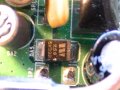
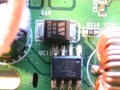
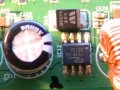
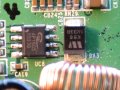
thanks a lot, first finish your thinks to do. i will wait & i understand you are bussy.
and i am trying to make arrangement of this 4 ic's of this Router 1)1509-33 2)1509-50 3)RT1967A 4)AP1605, but did not find it.
but i look around on scrap computer boards haning some ic's on it with diffrent names having 4 & 4 total 8 legs on it, where it is not written above part numbers. so i like to know is this work or not.
when you finish your job after couple of days, please let me know.
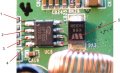
The first IC from left is 3.3V DC to DC converter.
Pin 1 is the incoming supply which you are measuring 15V---means OK
Pin 2 is the output and ur measurement says 48, --- confusing
U see it should be 3.3V or 0V not 48. Take the measurement correctly once again and confirm the DC voltage at pin 2 of this IC.
Be careful not to short circuit the adjacent pins of the IC when u probe it.
Post back with results
form left side counting 1st IC to 4th IC readings are here, and this readings i take more than one time to be confirm same readings all the time.
FROM LEFT 1st IC : pin1:15.20, pin2:0.50 only, pin3:0.50 only, pin4:0.00 & all opposit side pins shows reading 0.00's.
FROM LEFT 2nd IC : pin1:15.28, pin2:5.15, pin3:5.15, pin4:0.00 & all opposit side pins shows reading 0.00's.
FROM LEFT 3rd IC : pin1:0.18, pin2:0.48, pin3:0.00, pin4:0.00 & all opposit side pins shows reading 0.00's.
FROM LEFT 4th IC : pin1:5.15, pin2:5.15, pin3:0.16, pin4:0.00 & all opposit side pins shows reading 0.00's.
Please remember in 1st IC on leg 2 & 3 never get 0v or 3.3v after trying many times, there is the voltage 0.50 measuring when i set my DMM at 20v DC
and another thing is that i keep on searching this IC's online, do you know where i can buy this IC's online.
and i look on computer boards, vcr boards & satellite receiver boards never find exact matching part numbers on ICs. so do you know i must need the exact part number or any 8 legs ICs i can use to replace.
Any way I took it out 4 ICs from old boards below numbers.
ON 2 ICS WRITTEN LM358
ON 1 IC WRITTEN L4C32WP
ON 4th IC I CAN'T READ ANY LETTER CLEARLY.
After you rectify problem when you say me to change then i will replace.
See the first IC, this is our first problem, we'll tackle one at a time.
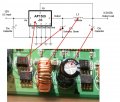
This IC is a DC to DC converter. It coverts 15V to 3.3V
Pin 1 is input = 15V
Pin 2 is Output = 3.3V
Pin 3 is FBack = 3.3V ( with output 0V this will also be 0V)
All the other pins are tied to GND
The problem is that this regulator output is 0V, but this is not an indication that this chip could be faulty as they are pretty tough and can handle short circuits and thermal overload.
My assumption is that an output schottky diode is shorted.
A diode will be reverse biased at the pin 3 of this chip.
You need to check for a shorted diode.
Tell me if you can figure out this diodes by looking at the board, if not You need to take a high resolution picture of that area with that cable wire out of the way. Then I can mark them for you.
Remember, with a low resolution picture I cannot, repeat, I cannot make out the component area when I zoom in to the picture, without this I am sorry my help on this is rather limited.
WHEN POWER IS OFF & DMM switch at Diode symbol When BLACK PBOBE on Head pin (W side) & RED PROBE on bottom pin of DIODE, as well as exchange PROBE opposite side readings below. from left side 1st diode 147 & opposite side no reading (close to yellow fuse) 2nd diode 141 & opposite side 864 3rd diode 146 & opposite side no reading 4th diode 149 & opposite side 478
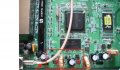
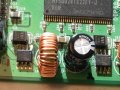
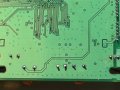
Below are some pictures i split in peces, but we can see clearly, please let me complite this little board, i will try my best to take pictures.
Since the pictures are clear we can proceed much faster.
Here is what I want you to measure.
Look at the pictures, I will be referring to them and asking you what to do.
So read carefully one at a time. Go in oder one by one. DO not jump the order and don't do any thing else as you might confuse me, which will result in loosing my time as well u'rs.
If you find anything other than what I asked for, stop and post back what you find. OK.
I have labeled the picture in proper order so you can follow them without confusion
First. Connect power to the board using the adapter.
Put the meter in DC 20V, connect the black probe to ground of the board and use The RED probe to take measurements
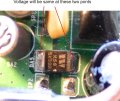
Step 1 picture 1.
The diode voltage measurement. Both the anode and cathode voltage should be same and will be equal to the adapter voltage. Check them and note the results.
If they are below 12V, Stop and post back your readings.
Progress to next step if the above is passed.
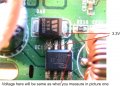
Step 2 Picture 2
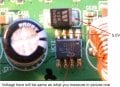
U can see the point where the 3.3V should be. Any voltage other than 3.3V is wrong. And pin 1 should be same as the voltage you got from step 1.
Even though there are 4 Pictures. I want you to post after these two.
Picture is there for you to see the proper no. and avoid confusion.
There you go again, you never read the whole post do you. If you want my help you need to follow the steps and do exactly what I say.
Trouble shooting is a step by step procedure, follow my lead and don't do any thing else what I did not ask for.
Anyways
Looking at picture 2 and it's results.
This converter output is too low, we need to rectify this fault first.
There could be couple of reasons. it could be that diode is faulty or the capacitor is leaky and to make things worse it could be the load creating the problem.
Since taking any component out of the circuit will result in the converter shutting down, our only choice it to remove the diode and cap and test it with the meter.
So, Before taking out a surface mount component ( I doubt that you could, if you can tell me ). I like to see what other options I have to fix this fault.
The last pictures you took are perfect. So I need 2 more pic just like that.
Take a look at the attached picture. Note the area I have marked in the red square. I want a good close of the area in the square, I want the square complete, not smaller than this, if you take a small picture, the area I want to see will be not complete. And also another picture of the same area from the other side of the board.
I need to see the traces and find out what is the load of that converter.
Don't be sorry. It's not mine, it's ur's, feel sorry for ur self.
As any mistake will effect you only.
So carefully read the post.
I'm checking the pics.
tell me, can you take out a SMD component
yes i will try to take it out by using Soldaring Iron, and this is first time i am trying SMD component take out.
yes i little understand circut diadram in pic input volatge is 12v DC applying & outupt should be 3.3v. And i understand which is Diode, Inductor, Capacitor & IC. And i know where is the Ground points on IC.
i learn component identification & thier symbols how they look in circuit diagram,. But technically how they work inside the board & which component is not working that i don't know.

 Facebook
 Google
 GitHub
 Linkedin