Nixie clock runs too slowly

MrChips

Joined Oct 2, 2009
34,828
Of course I had the same thought, but the pot doesn't seem to be good anymore. Rotating it a little or a lot doesn't appear to make the clock run at a different speed. Maybe I just need to get with someone who knows how to hook it up to a meter and see the results.
You cannot calibrate this with a meter. You need a high precision frequency counter.

Trimming the crystal capacitor will take time (days) to see any change.
Make a note of its current position. See how many seconds are lost/gained in 24hrs.
Turn the trimmer one-quarter of a turn. Test and record after 24hrs.
Do this two more times.

From this you will arrive at four measurements:
0 turn
¼ turn
½ turn
¾ turn

After you have done this, you need to do it all over again starting with a single 1/8 turn.
This is going to take 8 days total - only for this part of the test.
 

Thread Starter

RobMendell

Joined Mar 15, 2019
21
I don't know for sure, but I suspect it is broken because that pot is what the manufacturer suggested I adjust and turning it doesn't appear to affect the clock's speed.
 

MrChips

Joined Oct 2, 2009
34,828
You don't know for sure as yet if it is broken.

Test the clock for 24 hours and see how many seconds it gains or loses.
Rotate the trimmer ¼ turn and repeat the test for another 24 hours.

If you observe no change, then repeat the test over 72 hours (3days).
 

MrChips

Joined Oct 2, 2009
34,828
Post a sharp, clear, closeup photo of the trimmer and we can tell you if it is a trimmer cap or pot.

Post photos of top side and bottom side of the circuit board.
If possible, include the MCU chip in the photo.
 

Thread Starter

RobMendell

Joined Mar 15, 2019
21
I can start a long test and see if there's a difference. Good idea.

I can also send a picture or two. What is an MCU and how do I identify it?

Thank you!
 

JoeJester

Joined Apr 26, 2005
4,390
Synchronizing time is a long process. The fastest adjustment I've seen done with a Cesium Standard was 24 hours, and even then it took a couple of days, one to figure out how many nanoseconds it was from UT, then the adjustment on day two, then the new difference measurement on day 3. Got lucky, within a week we had all three Cesium Clocks within 10 nanoseconds of UTC. 90 days later, we were 900 nanoseconds out. I should have corrected the frequency with a 10 x 10 to the minus 15th adjustment per second.

RobMendell, this will take time. You have to record the time with another timekeeper (your computer for instance) and note the time on the nixie tubes. Then wait. Do the same record keeping the next day. Find the difference in your timekeeper and also the difference in time for the nixie tubes. Divide the total nixie tube seconds by the total difference in time (in seconds) from your time keeper. That is your error rate.

There are 86400 seconds in a day. You might not see much of a change in the first 86400 seconds. Patience.
 

Thread Starter

RobMendell

Joined Mar 15, 2019
21
Thank you, kind people. Again, what is an MCU?
I'm not looking for nanosecond accuracy, just to not have to adjust the clock (or re-plug it in at noon/midnight) because it's a minute off every month. I'll do the tests and let you know in a couple of weeks (a fortnight -- I like getting to use that word) what the results are.
 

MrChips

Joined Oct 2, 2009
34,828
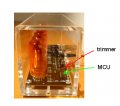
MCU stands for Micro Controller Unit.

mapsevoli nixie MCU.jpg
It is very likely the chip closest to the trimmer.
There should be a time keeping crystal in a small shiny metal case close to the MCU and trimmer. See if you can include that in the photo as well.
 

MrChips

Joined Oct 2, 2009
34,828
Hah!
I see John has posted a clearer photo in post #9.
It clearly shows the crystal.

Now we need two sharp photos taken directly from above and directly from below so that we can clearly read the part numbers and be able to view the traces on both sides of the board.


Thread Starter

RobMendell

Joined Mar 15, 2019
21
"There are 10 types of people in the world: those who understand binary and those who don't." says MrChips.
This is charming. Would it be more accurate (in spite of the wonky grammar) to say that there are 1 types?

If you need a better picture of something, let me know. The black-ish circuit board doesn't make for sparkling clarity of circuit trace with the likes of my camera, and I can only load so many Mb in each message.
 

JohnInTX

Joined Jun 26, 2012
4,787
@RobMendell
MCU= Micro-Controller Unit, a little computer, the 'brains' and timekeeper. This one looks like a PIC16F84-04/P - best guess. The red adjuster (C7) looks like it varies the frequency of the MCU's oscillator a little bit by loading the crystal (silver oblong thing). Inside, the program counts the oscillator cycles to derive a 1 second internal timer. Those seconds are then counted to make the time display - 60 seconds = 1 minute, 60 minutes = 1 hour etc. Varying the MCU's oscillator makes the clock run faster or slower. Frequency trimming like this is probably subject to several error sources - temperature changes, mechanical jarring etc. As others have pointed out, even a small error will accumulate and be noticeable after a few days or weeks. Hopefully you can get it close..

The MCU also takes care of setting the time with the buttons, driving the display etc. It's busy.

KM155 is a Russian clone of the 7441 BCD-Decimal Nixie Decoder/Driver (so not the timekeeper):
https://hackaday.io/project/1940-modular-nixie-display/log/11088-driving-the-in-12a

Datasheets attached if your Russian is up to snuff.
EDIT: I guess they're attached even if your Russian isn't up to snuff.

Since there is only one decoder, I would expect that along with the timekeeping function, the PIC is multiplexing the tubes i.e. turning them on one at a time with the correct numeral selected at a rapid rate and letting persistence of vision make it look like an always on display. Shake the clock under florescent light (it should flicker) or take a picture of the display with a fast shutter speed to verify.

Q2, Q3 et. al. look like the tube selects.

What happens if you pull the MIL jumper? Maybe it puts the clock into a calibration mode where the timing is sped up by some factor that you can tune the timing without waiting a day's worth of seconds??

It's a pretty clock. Good luck!
 

Attachments

Last edited:

Thread Starter

RobMendell

Joined Mar 15, 2019
21
"Pull the MIL jumper" might as well be Russian. I'm not an engineer, but a clock owner. I don't think the designer was so fancy as to build in any such functionality. He said the following in an email message six years ago.

"I'm happy you like the clock. From the get-go, it was meant to be a mimialist design appreciation of the tubes themselves. I ran across too many 'cheezy' clocks and decided to make one as simple as possible using SMT components to show off the beauty of the tubes themselves. I'm pretty OCD about details. The actual circuit has a lot of intricacies to it that's going to be lost on the non-engineering crowd, for example, things that were done to maximize the life of the tubes and enhance the design of the circuit board.

I have a long list of design ideas I'd like to try to launch at some point, some electronic and some not, but I have two growing toddlers and that part of life has gotten the best of me. If I do happen to have a new creation, I'll reach out to all previous customers via email as an announcement.

Let me know if you need anything else and enjoy the clock! The one I first build back in 2001 is still going strong with the original tubes!"
 

Thread Starter

RobMendell

Joined Mar 15, 2019
21
The designer of the clock said this about six years ago, and I just located it.

"To set the clock, it's a matter of using the two switched in the back. ADJ
switches which pair of digits to increment. SET increments the pair of
digits.

To switch from 12 hour to 24 hour display, just remove the 2-pin jumper marked
MIL on the board. If the jumper is on, the clock shows 12 hour display,
otherwise it's 24 hour.

To trim the clock for accuracy, just follow this:

To make the clock faster, turn the screw on the red trimmer with a small
jewel screwdriver counter-clockwise. To make it slower, clockwise. It is
*extremely* sensitive. There is a small marking on the gold dial and a small
notch in one of the corners of the red plastic. To the left of the notch is
about 4.5pF and if you do almost one full clockwise revolution to the right
side of the notch it's at 22.5pF. The clock should be most accurate
somewhere between 12-16pF.

You will realize that a number of the tubes never have a subset of their
digits lit. Not having all the digits lit over longer periods of time can
cause cathode poisoning which significantly reduces the lifespan of the
tubes. Due to this, it's recommended that the tubes are rotated every few
months to allow tubes to have all their cathodes lit at some point."
 

Thread Starter

RobMendell

Joined Mar 15, 2019
21
And this:

"Because it's RC oscillator based, it will be tough to get it spot on unless we do something like sync it to a GPS signal. Depending on how long ago you purchased the board, one of the capacitors for the RC oscillator circuit may be lower than it should be. We can send you a replacement for it if you're comfortable soldering SMT components."
 
Top