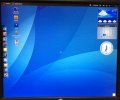
New Windows OS?

MrSalts

Joined Apr 2, 2020
2,767
No, the system is back to WIN 10 Home.

The mystery screen was on with the time displayed. Normally, when my computer goes to sleep the screen is blank.
On the mystery screen I was unable to go to my normal desktop or view my files. There was a menu option to reboot the system which I did. Now it remains a mystery.

Next time, if there is ever a next time, I will make a point of taking photos.
The restart was required to finish my spyware installation. Thank you.
 

ApacheKid

Joined Jan 12, 2015
1,762
What we call simply "Windows" today was for some time called "Windows NT", with "Windows" being used solely to refer to the old 16 bit DOS bolt on that was the desktop OS back in those days. The technology of Windows NT (which was a complete redesign and rewrite) has now been basically named "Windows" for years.

Anyway, one of the design goals for NT set by the core team back then was to minimize the need to restart the OS. Installing updates should rarely need the OS to restart. This principled was designed in and the structure of the core OS components and so on was designed partially with this goal in mind.

Well my experience of the recent few years is that MS have let this slip, many time when updates come out we must restart the OS.

In the cold light of day this is - IMHO - reduced system availability, it can be a huge interruption when deeply immersed in complex work. It is not unusual for me to have seven instances of Visual Studio open, Git clients, SQL Server Studio and so on, all open and in use for weeks at a time and then "slap" I find the system was rebooted overnight by the IT dep't.

So I'd say despite huge reliability improvements over the past decade, system availability has fallen, anecdotal I know but I do "live in" Windows and have for decades (I was running beta versions of NT back in the early 1990s on a 486 with 8MB).
 

Ya’akov

Joined Jan 27, 2019
10,235
No, the system is back to WIN 10 Home.

The mystery screen was on with the time displayed. Normally, when my computer goes to sleep the screen is blank.
On the mystery screen I was unable to go to my normal desktop or view my files. There was a menu option to reboot the system which I did. Now it remains a mystery.

Next time, if there is ever a next time, I will make a point of taking photos.
Just a surmise, but perhaps it booted up after an update into a user account not your normal one, and rebooting started it up in your account. It’s been quite a while since I was very current on Windows internals, but there is, or at least used to be, a guest account which might just be in a default configuration.
 

k1ng 1337

Joined Sep 11, 2020
1,038
In addition, keep in mind that not all changes are IMPROVEMENTS. So change is good only half of the time.
Also understand that most microsoft products are released and sold long before all the bugs are fixed, and that they are totally aware of the fact that they are selling "buggy" products. And it does not bother them at all.
Plus they have made their software so idiot proof it places road blocks left and right for any serious developer or gamer.. many services are consolidated into single processes where making a change to one affects the other.. a disabled unrelated service causes another to hang. I got the free offer to upgrade to windows 11 - no thank you I've been tricked before. It blows my mind they keep building on broken software designed to lock out the user while archaic code allows viruses
No, the system is back to WIN 10 Home.

The mystery screen was on with the time displayed. Normally, when my computer goes to sleep the screen is blank.
On the mystery screen I was unable to go to my normal desktop or view my files. There was a menu option to reboot the system which I did. Now it remains a mystery.

Next time, if there is ever a next time, I will make a point of taking photos.
Sounds like it was a demo mode of some sort. On the Android Play Store, you can play some games for a bit without installing as it seemingly saves to RAM and not permanent storage with minimal downloading / loading.
 

Ramussons

Joined May 3, 2013
1,568
I don't really want to get into it, but while I am very aware of Microsoft's shortcomings, and only use Windows at this point when I have no other choice, I spent a significant portion of my career working with Microsoft and Windows very closely. I've met Bill Gates several times, he's rather unassuming in person and he appeared genuinely interested in selling good products. He's a programmer, and actually writes code, so he knows the internals of Windows and applications.

I am not minimizing the corporate sins of Microsoft, but the context of the business, and the many other people in management, greatly influenced decision-making at the level were many of the problems with Microsoft products, and they were not technical issues for the most part.

Microsoft made many innovations, and yes, they did stifle some in the name of profit, but Bill Gates is not the evil person he's made out to be. My personal experience is that he wanted to release good products and was unhappy when "business" decisions led to releasing essentially beta level products to avoid losing market share.

Having been there when desktop computing became a thing, it is my opinion that we own a lot to Microsoft's hegemony. They created a situation where a de facto standard platform for hardware and software, using the non-proprietary IBM PC architecture, spawned an industry at a time when competition among incompatible platforms would have squelched it. Having one (flawed) target for hardware and software meant the focus was on making those things better and cheaper rather than trying to invent a new "standard".

So, did Microsoft under Bill Gates do things that were "bad"? I think there is no question about that. But, was the net effect of Microsoft positive or negative? I think it is critical not to start with what we have today and reason backwards. I believe we have what we have today because some of the ruthless competitive moves by Microsoft focused the industry on a single target and while it could have been someone other than Microsoft, who knows, maybe better—or worse—it was Microsoft and we needed someone to be that focus point to get to the industry we have today.

[EDIT: added missing word "in"]
I understand and do admire Bill Gates, the person.
I dislike Bill Gates, the CEO.
 

Ramussons

Joined May 3, 2013
1,568
No, the system is back to WIN 10 Home.

The mystery screen was on with the time displayed. Normally, when my computer goes to sleep the screen is blank.
On the mystery screen I was unable to go to my normal desktop or view my files. There was a menu option to reboot the system which I did. Now it remains a mystery.

Next time, if there is ever a next time, I will make a point of taking photos.
Suppose it was just a Desktop image, one among the lot that Windows pushes in?
 

Thread Starter

MrChips

Joined Oct 2, 2009
34,815
It did it again this time on a different computer.
The computer (normally Win 10) was off and I turned it on. This is what appeared.

20220322 Linpus Linux.jpg

I have identified it as Linpus Linux 2.1 "Lite"
The question is how did it get on to my computer?
How did it become the startup OS?
 

Thread Starter

MrChips

Joined Oct 2, 2009
34,815
You might be on to something there.

I am now looking at what is on this USB memory stick.
There is a folder labeled LiveOS.
There are two Disk Image Files.
osmin.img 11/07/2014
squashfs.img 11/07/2014

Those dates appear to be around the same time that Linpus Linux 2.1 "Lite" was released.
 

eetech00

Joined Jun 8, 2013
4,705
You might be on to something there.

I am now looking at what is on this USB memory stick.
There is a folder labeled LiveOS.
There are two Disk Image Files.
osmin.img 11/07/2014
squashfs.img 11/07/2014

Those dates appear to be around the same time that Linpus Linux 2.1 "Lite" was released.
Do you have linux installed somewhere?
You could find out executable info using the "uname" command.
The one of the .img files might be a bootable image file.
 

Thread Starter

MrChips

Joined Oct 2, 2009
34,815
Do you have linux installed somewhere?
You could find out executable info using the "uname" command.
That is the strange thing.
I don't use Linux. How the image files got on to my USB memory stick is a mystery.
I am convinced now that this is what is happening. I don't have the time now to try it again but I will later.
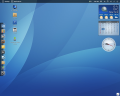
It is definitely Linpus Linux 2.1 "Lite". Here is an image from the web.

1647984306215.png
 

eetech00

Joined Jun 8, 2013
4,705
That is the strange thing.
I don't use Linux. How the image files got on to my USB memory stick is a mystery.
I am convinced now that this is what is happening. I don't have the time now to try it again but I will later.
It is definitely Linpus Linus 2.1 "Lite". Here is an image from the web.
Definitely linux of some sort.
One of the .img files on the usb disk is probably bootable.
The squashfs is a read only filesystem image. My guess is osmin.img is for boot, and the squashfs.img is a RO filesystem that is mounted by the osmin.img. That's commonly done for firmware updates.

If you have a throw away computer lying around somewhere, you could try booting it from the USB drive.
Make sure network port on the computer is not connected to anything though (disconnected), just in case it wipes the hard disk or attempts to do something BAD.:oops:
 
Last edited:

k1ng 1337

Joined Sep 11, 2020
1,038
Some bios have an option to set boot priority of usb first for OS. I recall LiveOS being a very light version of Linux designed to install packages on demand. If the desktop is not interactive then I think it's a demo image or maybe it is the real system have you tried to boot the image? You can boot Linux while running Windows as well. I had several flavours of Linux boot off USB with no issues and with very little file space on the drive.
 
Top