Facebook
 Google
 GitHub
 Linkedin

MODERATOR NOTE: Please use informative subjects on posts, it helps people to help you. The subject has been changed to be more specific.
Hi Peeps,
I have recently been asked to input *.nc files to various machines at work. After the initial learning curve, I am now aware of irritating abnormalities in some of the files I receive. So after a little exploration I thought I could make a little app to fix some of the abnormalities.
Sorting the text in the files shouldn't be too much of a problem, but displaying the drives and files in the way that I want is proving to be more of a challenge.
The Info:
Windows 10
Vis Studio 2022 (just installed)
Building for .NET7
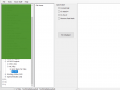
1. I am trying to get the filenames only of any folder selected in the lefthand TreeView to appear in the next pane (which is a ListView).
2. I don't want any files shown in TreeView, just folders.
Any comments or assistance would be appreciated, and I look forward to your replies.
Regards
GB
Hi Peeps,
I have recently been asked to input *.nc files to various machines at work. After the initial learning curve, I am now aware of irritating abnormalities in some of the files I receive. So after a little exploration I thought I could make a little app to fix some of the abnormalities.
Sorting the text in the files shouldn't be too much of a problem, but displaying the drives and files in the way that I want is proving to be more of a challenge.
The Info:
Windows 10
Vis Studio 2022 (just installed)
Building for .NET7
1. I am trying to get the filenames only of any folder selected in the lefthand TreeView to appear in the next pane (which is a ListView).
2. I don't want any files shown in TreeView, just folders.
VS2022 .net:
Imports System.IO 'Allows operations on Files

Imports DSTV_Wiz_3.My

Public Class Main

    Public mypath As String
    Public MyFiles As String

    Private Sub Form1_Load(sender As Object, e As EventArgs) Handles MyBase.Load
        Me.Text = Settings.AppName & " - " & Settings.AppVersion ' Sets the name & version at top of window

        ListView1.View = View.Details 'Set View of ListView

        ' Add ListView Columns With Specified Width
        ListView1.Columns.Add("File Name", 150, HorizontalAlignment.Left)
        ListView1.Columns.Add("File Type", 80, HorizontalAlignment.Left)
        ListView1.Columns.Add("Date Modified", 150, HorizontalAlignment.Left)

        TreeView1.Nodes.Clear()

        'Loop For Get Drives
        For Each myDrives As System.IO.DriveInfo In System.IO.DriveInfo.GetDrives()
            Dim myDrivesNode As TreeNode = TreeView1.Nodes.Add(myDrives.Name)
            'Adding "Expand" string is use for Add Expand "[+]" option on Drives
            myDrivesNode.Nodes.Add("Expand")
        Next
    End Sub

    Private Sub Main_Loaded(sender As Object, e As RoutedEventArgs, TreeView1 As TreeView)

        Dim trvNode As New TreeViewNode
        For Each drive As DriveInfo In DriveInfo.GetDrives()
            trvNode.Tag = drive
            trvNode.Header = drive.ToString()
            ' The placeholder string below is never shown,
            ' because the node begins in collapsed state.
            TreeView1.Nodes.Add("*")
            'Dim value = TreeView1.Nodes.Add(trvNode.Tag)
            'AddHandler trvNode.Expanded, AddressOf Node_Expanded
        Next

    End Sub

Private Sub OpenToolStripMenuItem_Click(sender As Object, e As EventArgs) Handles OpenToolStripMenuItem.Click

        'Open File and display

        Dim openFileDialog1 As New OpenFileDialog()

        openFileDialog1.Filter = "NC files (*.nc)|*.nc|NC1 files (*.nc1)|*.nc1"
        openFileDialog1.FilterIndex = 1
        openFileDialog1.RestoreDirectory = True

        Try
            If openFileDialog1.ShowDialog() = System.Windows.Forms.DialogResult.OK Then
                Dim fileName As String = Path.GetFileName(openFileDialog1.FileName)
                Dim filePath As String = openFileDialog1.FileName
                'MessageBox.Show(fileName & " - " & filePath)

                If (fileName IsNot Nothing) Then
                    Dim reader = My.Computer.FileSystem.ReadAllText(filePath)
                    TextBox1.Text = ""  ' Clear Richtextbox before writing new file
                    TextBox1.Text = reader
                End If

            End If
        Catch Ex As Exception
            MessageBox.Show("Cannot read file from disk. Original error: " & Ex.Message)

        End Try
    End Sub

Private Sub TreeView1_BeforeExpand(sender As Object, e As TreeViewCancelEventArgs) Handles TreeView1.BeforeExpand
        Dim MyExistNode As TreeNode = e.Node
        'Clear TreeNode
        MyExistNode.Nodes.Clear()


        Try
            'Loop For Get Folders
            mypath = MyExistNode.FullPath

            'Loop For Get Folders
            For Each myFolders As String In System.IO.Directory.GetDirectories(mypath)
                Dim FldrNode As TreeNode = MyExistNode.Nodes.Add(System.IO.Path.GetFileName(myFolders))
                'Here, Expand is use for add Expanding option "[+]" on folder
                FldrNode.Nodes.Add("Expand")
            Next

        Catch ex As Exception

        End Try

    End Sub

    Private Sub TreeView1_AfterSelect(sender As Object, e As TreeViewEventArgs) Handles TreeView1.AfterSelect

        'Loop For Get Files
        For Each MyFiles As String In System.IO.Directory.GetFiles(mypath)
            Dim FileNode As ListViewItem = ListView1.Items.Add(MyFiles)
            Dim MySelectedNode As TreeNode = e.Node
        Next

    End Sub

    Private Sub ListView1_SelectedIndexChanged(sender As Object, e As EventArgs) Handles ListView1.SelectedIndexChanged

        Dim ListViewItem item1 As New ListViewItem()
        item1 = ListView1.SelectedItems[0].Tag

        If (MySelectedFileName IsNot Nothing) Then
            Dim reader = My.Computer.FileSystem.ReadAllText(MySelectedFileName)
            TextBox1.Text = ""  ' Clear Richtextbox before writing new file
            TextBox1.Text = reader
        End If

    End Sub
End ClassRegards
GB
Last edited by a moderator: