Need to load .asm file into PIC18F4420

Thread Starter

denniscj7

Joined Oct 15, 2010
13
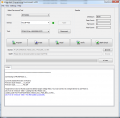
That looks OK, it is updating the PK3 firmware for the 4420. It looks like the programming was successful. I assume the snips are duplicates, it shouldn’t have to update the firmware twice.
Does it work in the clock?
No, unfortunately it doesn't. I'm comfortable the clock is OK since I see all digits set to 0 when it's powered up and the ammeter shows 430ma which I'm guessing is reasonable since the circuit steps 9vdc up to 190vac for the nixie tubes.
 

JohnInTX

Joined Jun 26, 2012
4,787
Just thinking out loud..
EDIT 2: First, check the manual to see if it is waiting for,user input. Then,

The standard stuff applies: check Vdd/Vss. Make sure the clock is running by measuring with a DVM on OSC2. It should read roughly 1/2 Vdd if the oscillator is running. Check a few output ports for solid logic levels - the PIC has to run to get those set up. If the nixies show all 000000 then it's likely that the PIC is at least running - there is no power on reset on the 74141 parts so to get all zeros, the PIC has to come alive and init the ports to 0 data.

Some observations from the code:
When the program starts up, it is supposed to flash the SERVICE LED 8 times in the SHOW_ALIVE routine called by MAIN. If it gets that far, the PIC is probably programmed OK.
After that, it checks the EEPROM in EE_CHK to see the daylight savings time and GMT zone settings. If the EEPROM is not programmed, it loads default info.
Then it calls ADJUST_CLOCK which flashes the service LED again.
Then INIT_408 inits the GPS unit by sending some info to it by loading a buffer then calling SEND_SERIAL. That routine could hang waiting for a character to be sent but probably is OK. It doesn't look like INIT_408 expects any data from the GPS unit.
Then it turns on the SERVICE LED and at WE_RS1 and WE_RS2, it waits for some transitions on the serial input (RC7) - it will hang if there are none with the LED on.
Then it delays for 200ms to ignore the rest of that GPS sentence. If it gets that far, it turns the SERVICE LED off.
Then it calls REC_SERIAL to receive the next GPS sentence. There is a guard timer on that so it shouldn't hang there forever.

Those are a few places it could hang if the GPS isn't working and sending sentences. The PIC watchdog is on and should reset the PIC if it gets hung at waiting fro WE_RS1 etc. In that case, the SERVICE LED should flash the 8 times over and over. Hopefully, observing the SERVICE LED will provide some clues. My bet is the GPS is inop or not getting strings to the PIC.

Also, look for things like switches stuck ON.

You can use the PK3 to see how far in the code it's getting by starting at MAIN: and setting a breakpoint at various places to see how far it gets. Start the debugger by clicking Debug Main Project on the toolbar. Set/clear breakpoints by clicking on the line number in the source code.

Good luck!
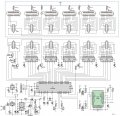
Here's the schematic and code for others to chime in. Project Source and HEX are from Elector's site. Nixie.zip is the code with the warning (above) fixed.

EDIT: Upon examination, there are a few differences in the .HEX from our builds (I get the same checksum as you) and the .HEX in Elector's file posted in the zip here. You might try using MPLABX IPE (Integrated Programming Environment - a separate program that comes with MPLABX, it's on your desktop) and blast the PIC using that. I rebuilt Elector's raw source again and get the same cksum as you got so the source is the same. Sometimes, different versions of the assembler can make minor differences in the .HEX that program the same but give it a try using Elector's .HEX and IPE.


Schematic 15163.jpg
 

Attachments

Last edited:

Thread Starter

denniscj7

Joined Oct 15, 2010
13
Just thinking out loud..
EDIT 2: First, check the manual to see if it is waiting for,user input. Then,

The standard stuff applies: check Vdd/Vss. Make sure the clock is running by measuring with a DVM on OSC2. It should read roughly 1/2 Vdd if the oscillator is running. Check a few output ports for solid logic levels - the PIC has to run to get those set up. If the nixies show all 000000 then it's likely that the PIC is at least running - there is no power on reset on the 74141 parts so to get all zeros, the PIC has to come alive and init the ports to 0 data.

Some observations from the code:
When the program starts up, it is supposed to flash the SERVICE LED 8 times in the SHOW_ALIVE routine called by MAIN. If it gets that far, the PIC is probably programmed OK.
After that, it checks the EEPROM in EE_CHK to see the daylight savings time and GMT zone settings. If the EEPROM is not programmed, it loads default info.
Then it calls ADJUST_CLOCK which flashes the service LED again.
Then INIT_408 inits the GPS unit by sending some info to it by loading a buffer then calling SEND_SERIAL. That routine could hang waiting for a character to be sent but probably is OK. It doesn't look like INIT_408 expects any data from the GPS unit.
Then it turns on the SERVICE LED and at WE_RS1 and WE_RS2, it waits for some transitions on the serial input (RC7) - it will hang if there are none with the LED on.
Then it delays for 200ms to ignore the rest of that GPS sentence. If it gets that far, it turns the SERVICE LED off.
Then it calls REC_SERIAL to receive the next GPS sentence. There is a guard timer on that so it shouldn't hang there forever.

Those are a few places it could hang if the GPS isn't working and sending sentences. The PIC watchdog is on and should reset the PIC if it gets hung at waiting fro WE_RS1 etc. In that case, the SERVICE LED should flash the 8 times over and over. Hopefully, observing the SERVICE LED will provide some clues. My bet is the GPS is inop or not getting strings to the PIC.

Also, look for things like switches stuck ON.

You can use the PK3 to see how far in the code it's getting by starting at MAIN: and setting a breakpoint at various places to see how far it gets. Start the debugger by clicking Debug Main Project on the toolbar. Set/clear breakpoints by clicking on the line number in the source code.

Good luck!
Here's the schematic and code for others to chime in. Project Source and HEX are from Elector's site. Nixie.zip is the code with the warning (above) fixed.

EDIT: Upon examination, there are a few differences in the .HEX from our builds (I get the same checksum as you) and the .HEX in Elector's file posted in the zip here. You might try using MPLABX IPE (Integrated Programming Environment - a separate program that comes with MPLABX, it's on your desktop) and blast the PIC using that. I rebuilt Elector's raw source again and get the same cksum as you got so the source is the same. Sometimes, different versions of the assembler can make minor differences in the .HEX that program the same but give it a try using Elector's .HEX and IPE.


View attachment 138240
I tried the IPE and now it doesn't connect whereas it did just fine with the IDE
 

Thread Starter

denniscj7

Joined Oct 15, 2010
13
IPE doesn't connect to the PK3? Or can't it find the target (no Vdd detected)?

View attachment 138365
Below is the output of the IDE and it looks to me like it worked perfectly - except the clock shows all zeroes.
IPE doesn't connect to the PK3? Or can't it find the target (no Vdd detected)?

View attachment 138365
Well, JohnInTX miracles never cease. I was about to send you a replay yesterday telling you that I was going to write this clock off as a bad item and find a suitable replacement. Something told me to try it again and I did and it worked perfectly and is now running as expected. I really do not know what changed but now the frustration is over.
A big thank you to you for your help and patience. It is only because of your kind help that this project stumbled across the finish line.
 

JohnInTX

Joined Jun 26, 2012
4,787
Hey, you're welcome and I am glad you got it working. It is a very cool looking clock and I know your son will love it. I would.
Good work!
J
 
Top