Need to load .asm file into PIC18F4420

Thread Starter

denniscj7

Joined Oct 15, 2010
13
Trying to finish an Elektor Nixie tube clock kit for a gift to my son. I'm very familiar with Arduino, C++ and the arduino IDE and not at all familiar with PIC.
I have MPLAB X 4.01, PICKIT3, and the clock with an 18F4420. I have spent several hours trying to load the .asm file which will complete the kit. I'm 75 years old and still kickin' but I see quite a learning effort to get familiar with MPLAB so as to load the file. I have looked through several youtube videos and haven't seen what I think I need. Can someone point me to the steps required to compile and upload the file into the PIC?
 

JohnInTX

Joined Jun 26, 2012
4,787
Welcome to AAC! We can help you with that.

Have you set up MPLABX and created a new 'Project'? If not, we can walk you through that.
Once you have a project set up the easiest way to get your file there is to copy-paste the source into a new .asm file in the project then assemble it. Where are you stuck?

Meanwhile, can you post a link to the .asm source or upload it here?
 

spinnaker

Joined Oct 29, 2009
7,830
Trying to finish an Elektor Nixie tube clock kit for a gift to my son. I'm very familiar with Arduino, C++ and the arduino IDE and not at all familiar with PIC.
I have MPLAB X 4.01, PICKIT3, and the clock with an 18F4420. I have spent several hours trying to load the .asm file which will complete the kit. I'm 75 years old and still kickin' but I see quite a learning effort to get familiar with MPLAB so as to load the file. I have looked through several youtube videos and haven't seen what I think I need. Can someone point me to the steps required to compile and upload the file into the PIC?
You need to first compile the ASM file. MPLabX will do that for you and load the code into the pic.

You first need to create a project where you pick your chip type and programmer you are using. You will also be asked for existing source files which would be your asm file.


There are a couple of videos on that. Here is one of you can stand the music,


Thread Starter

denniscj7

Joined Oct 15, 2010
13
Welcome to AAC! We can help you with that.

Have you set up MPLABX and created a new 'Project'? If not, we can walk you through that.
Once you have a project set up the easiest way to get your file there is to copy-paste the source into a new .asm file in the project then assemble it. Where are you stuck?

Meanwhile, can you post a link to the .asm source or upload it here?
Here's link to .asm it's in the 150289-11.zip file. https://www.elektormagazine.com/labs/150189-6-digit-nixie-clock
I have set up MPLABX and was nearly successful in loading the hex file - also at the above link. Got to the point where the row of dots is shown as it's starting communication and then error message "file contains addresses not in referenced pic". That's why l'm now trying to load the asm file.
When I start building a new project, first screen I selected Microchip embedded and standalone project. Is this right?
On the next - select device screen - I selected Advanced 8-bit MCUs (PIC18) and PIC18F4420 , this last one is stamped on the pic chip I have.
on the next TOOL screen I selected PICKit3 which is the one I have.
on the next select compiler I chose mpasm
on select project name and folder is confusing in that I created a folder on my D drive ClifsNixieClock and put the .asm file in it. I then named the project - ClifsNixieClock project location is D:\PIC Stuff\ClifsNixieClock and project name is D:\PIC Stuff\ClifsNixieClock\ClifsNixieClock.X I also checked Set as main project. the encoding defaults to ISO-8859-1 which I l didn't change
So far no error messages.
I now need to get the .asm file involved and cannot figure out how to do it. It's in the project folder but it doesn't look like that enough.
 

JohnInTX

Joined Jun 26, 2012
4,787
I now need to get the .asm file involved and cannot figure out how to do it. It's in the project folder but it doesn't look like that enough.
Looks like your project is created OK. To add the .asm file:
Put the .asm file in ClifsNixieClock.X folder.
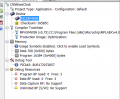
Click on '+' near the the project name 'ClifsNixieClock' in the Projects window to expand the list of sub folders created by the project.
Right click Source Files then click Add Existing Item. Navigate to your .asm file and select it. The file should appear under Source Files.
Click 'Clean and Build Main Project'

It assembles with one warning at line 1041 (now fixed).

If you have the .hex file, you can use IPE (Integrated Programming Environment) to try to program the chip with the .hex, bypassing the assembly process.
The .hex file should be at:
D:\PIC Stuff\ClifsNixieClock\ClifsNixieClock.X\dist\default\production

EDIT: Fixed it.
The fixed .asm, resultant .hex and .lst files are in the zip. You should be able to use the .hex with IPE.

Good luck!
 

Attachments

Last edited:

AlbertHall

Joined Jun 4, 2014
12,622
Line 1039 generates a warning message: 'MOVLW 0C3C ;Yes so add 60'
I suspect it should be 'MOVLW 0x3C ;Yes so add 60'

Apart from the warning message above it compiles OK.
(MPLABX 4.01, MPASM 5.75
 

Thread Starter

denniscj7

Joined Oct 15, 2010
13
OK, here's what happened - looks to me like it tried to load a hex file. I watched the pickit3 while I thought it was loading but did not see any activity with the leds. After the load is complete, the nixies are still showing all zeroes.

upload_2017-10-12_16-0-29.png
 

Attachments

JohnInTX

Joined Jun 26, 2012
4,787
‘Loading’ the .hex in this case means read the .hex into MPLABX’s memory, you still have to blast the chip.

Now you have to click the ‘PROGRAM’ icon on the toolbar. It looks like an arrow pointing down into an IC. When you do that, MPLABX will open another window in the output window area called PICkit3 and report the status of the programming to the chip.

Note that the first time you do that, MPLABX may update the PICkit's firmware. That is normal. Don't interrupt the process.
 
Last edited:

Thread Starter

denniscj7

Joined Oct 15, 2010
13
‘Loading’ the .hex in this case means read the .hex into MPLABX’s memory, you still have to blast the chip.

Now you have to click the ‘PROGRAM’ icon on the toolbar. It looks like an arrow pointing down into an IC. When you do that, MPLABX will open another window in the output window area called PICkit3 and report the status of the programming to the chip.

Note that the first time you do that, MPLABX may update the PICkit's firmware. That is normal. Don't interrupt the process.
Thought I was ready to fall across the finish line, however got the message that "failed to connect" the programmer could not be started. This is a new PickIt3 that I bought for this purpose. I did note that after I clicked the PROGRAM icon a small window popped up telling me to chose the programmer and showed a list of 15 or so possibilities. I chose the PickIt3 line which then showed PickIt3 default s/n which I clicked on. I have noticed in other things I saw that a specific serial number was used. I do not see any s/n on my PickIt3.
 

JohnInTX

Joined Jun 26, 2012
4,787
Right click the project name, go to the bottom of the dropdown and select Properties.
In the Hardware Tool window be sure PICkit3 is selected and click Apply. You should get a serial number reported from the PK3. If you do, MPLABX is communicating with PK3.
You can double check by disconnecting PK3 and verifying that the serial number disappears. Reconnect and the SN should be back. That means that you are ready to go.

Click the little down arrow to the right of the Program toolbar button and select Make and Program Device Main Project. You should see it build in the Build window then:

Loading code
Loading Completed
Connecting to Programmer
Programming Target..

The PICkit3 window will also open showing the firmware version of the PK3 and the results of programming.
If you get that far, the PK3 is working correctly.

Is this a Microchip PK3 or clone?
 

Thread Starter

denniscj7

Joined Oct 15, 2010
13
Right click the project name, go to the bottom of the dropdown and select Properties.
In the Hardware Tool window be sure PICkit3 is selected and click Apply. You should get a serial number reported from the PK3. If you do, MPLABX is communicating with PK3.
You can double check by disconnecting PK3 and verifying that the serial number disappears. Reconnect and the SN should be back. That means that you are ready to go.

Click the little down arrow to the right of the Program toolbar button and select Make and Program Device Main Project. You should see it build in the Build window then:

Loading code
Loading Completed
Connecting to Programmer
Programming Target..

The PICkit3 window will also open showing the firmware version of the PK3 and the results of programming.
If you get that far, the PK3 is working correctly.

Is this a Microchip PK3 or clone?
PK3 is a clone Funny DIY Expert PICkit3 PIC KIT3 Debugger Programmer Emulator board Controller Development

I know my pc is recognizing the PK3 when I plug it in due to the short sound I hear. I'm not getting the serial number, below is snippet of the screen in the tools menu after I have clicked reply -
upload_2017-10-14_12-25-13.png

If I need to buy a new PK3 I will in order to finish this.
 

JohnInTX

Joined Jun 26, 2012
4,787
Hmmm.. I'm not too sure about the clone. Maybe the USB connects but it doesn't respond correctly when MPLABX tries to invoke the programmer. It's hard to say. That DEFAULT_PK3 serial number may be a problem. Once you set up a project, if you change from one PK3 to another, it will flag it and ask you if you want to change programmers (I have several of each with firmware loaded for different families so that's useful). It might be trying to download new firmware to PK3 and the clone doesn't support it.

If it is saying 'Can't connect to programmer' try unplugging it and replugging it with the Properties window open. You should see PK3 go away then come back.
Also, try clicking Debug->Disconnect from Debug Tool then Reconnect (if it will let you).

Note that a common problem when you DO have a good connection is the ISCP circuitry on the target board. Those messages say things like 'Unexpected Target - expected 0x1234, received 0x0000' or 'Vdd error'. Those won't make you happy but at least you know that the programmer section is working.

Personally, I don't mess with clones. Many users swear by them but lots more swear at them. If you look at the challenges even Microchip faces keeping their programmers up to date, imagine the clone guys..

If you decide to buy a real one buy it from a legit outfit like Mouser or Digikey or even Microchip Direct. Amazon has too many counterfeiters and junk merchants.

http://www.mouser.com/new/microchip/microchip-pickit-3-programmer-debugger/
https://www.digikey.com/product-detail/en/microchip-technology/PG164130/PG164130-ND/2171224
http://www.microchipdirect.com/product/search/all/PG164130
 
Last edited:

Thread Starter

denniscj7

Joined Oct 15, 2010
13
Hmmm.. I'm not too sure about the clone. Maybe the USB connects but it doesn't respond correctly when MPLABX tries to invoke the programmer. It's hard to say. That DEFAULT_PK3 serial number may be a problem. Once you set up a project, if you change from one PK3 to another, it will flag it and ask you if you want to change programmers (I have several of each with firmware loaded for different families so that's useful). It might be trying to download new firmware to PK3 and the clone doesn't support it.

If it is saying 'Can't connect to programmer' try unplugging it and replugging it with the Properties window open. You should see PK3 go away then come back.
Also, try clicking Debug->Disconnect from Debug Tool then Reconnect (if it will let you).

Note that a common problem when you DO have a good connection is the ISCP circuitry on the target board. Those messages say things like 'Unexpected Target - expected 0x1234, received 0x0000' or 'Vdd error'. Those won't make you happy but at least you know that the programmer section is working.

Personally, I don't mess with clones. Many users swear by them but lots more swear at them. If you look at the challenges even Microchip faces keeping their programmers up to date, imagine the clone guys..

If you decide to buy a real one buy it from a legit outfit like Mouser or Digikey or even Microchip Direct. Amazon has too many counterfeiters and junk merchants.

http://www.mouser.com/new/microchip/microchip-pickit-3-programmer-debugger/
https://www.digikey.com/product-detail/en/microchip-technology/PG164130/PG164130-ND/2171224
http://www.microchipdirect.com/product/search/all/PG164130

I just ordered the microchip pk3 from Mouser. I'll be back here when I get it in 3-4 days.
 

Thread Starter

denniscj7

Joined Oct 15, 2010
13
Cool. Let us know how it worked.
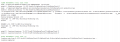
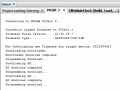
I'm back and I think I've made some real progress but not falling across the finish line yet.
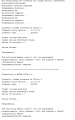
Here are screen shots of what happened -
Here is the build screen
upload_2017-10-28_10-52-8.png
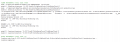
Here is the top portion of lower right window that wouldn't fit in the snip -
upload_2017-10-28_10-50-48.png
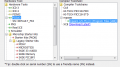
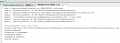
Here is the lower right window


Here you can see that the new PickIt3 did respond with serial number
 

Thread Starter

denniscj7

Joined Oct 15, 2010
13
I'm back and I think I've made some real progress but not falling across the finish line yet.
Here are screen shots of what happened -
Here is the build screen
View attachment 138202
Here is the top portion of lower right window that wouldn't fit in the snip -
View attachment 138201
Here is the lower right window


Here you can see that the new PickIt3 did respond with serial number
Look like I lost 2 of the snips -
upload_2017-10-28_10-56-55.pngupload_2017-10-28_10-55-43.png upload_2017-10-28_10-56-55.png upload_2017-10-28_10-55-43.png upload_2017-10-28_10-56-55.png

upload_2017-10-28_10-55-43.pngupload_2017-10-28_10-55-43.png
 

JohnInTX

Joined Jun 26, 2012
4,787
That looks OK, it is updating the PK3 firmware for the 4420. It looks like the programming was successful. I assume the snips are duplicates, it shouldn’t have to update the firmware twice.
Does it work in the clock?
 
Top