need someoard and help with usb relay board and vb.net

Thread Starter

saint1000

Joined Jan 23, 2013
20
i have a 8 relay usb board.i need to be able to send on and off commands to the board in visual studio. i am new to programming and figuring my way aroud it, so please bear with me. i do not need any user buttons to turn relays on. i have a random number generator that will generate random numbers between 1-4 and posts it to a label box. every 5 secs the rnd number generator replaces the number in the label box with another random number. i need for when a number 1 is in the label box for relay 1 to turn on. when the number is replaced i need the coresponding relay to turn on. so basiclly i need to know how to open the usb port and send on and off comands to the relay board. thanks for any help
 

ErnieM

Joined Apr 24, 2011
8,415
No one can tell you how as no one but you knows what board you have. Open the manual and see what kind of USB interface this is.

Oft it is made to look like a serial port to a Windows app, so the COMM control can talk to it. But you need to check that for your specific board.
 

Thread Starter

saint1000

Joined Jan 23, 2013
20
i have this board
http://www.robot-electronics.co.uk/htm/usb_rly08tech.htm
tjis is my code
Public Class Form1

Private Sub three()

Form2.TextBox1.Text = AutoDetect()
SerialPort1.BaudRate = 9600
SerialPort1.DataBits = 8


End Sub

Sub RELAYON()
Dim data(2) As Byte

data(0) = 255

data(1) = Form2.Label2.Text

data(2) = 1
SerialPort1.PortName = "COM" + Form2.TextBox1.Text
SerialPort1.Open()
SerialPort1.Write(data, 0, 3)
SerialPort1.Close()
End Sub

Sub RELAYOFF()
Dim data(2) As Byte

data(0) = 255

data(1) = Form2.Label2.Text

data(2) = 0
SerialPort1.PortName = "COM" + Form2.TextBox1.Text
SerialPort1.Open()
SerialPort1.Write(data, 0, 3)
SerialPort1.Close()
End Sub

the only way i can get this to work is i have to open the trial board software on my desktop the run the debug in visual studio. but even then no matter what i do i only lights up relay 1
 

kubeek

Joined Sep 20, 2005
5,796
I think you should send 0x5c first and then 0xff to turn on all relays.
Anyway, why are you putting a string in data(1)? Are you sure it shouldn´t be an unsigned byte (I dont know visual basic...)?
I would simply try sending data(0)=0x5c data(1)=255 SerialPort1.Write(data, 0, 2) and see what happens.
 

tshuck

Joined Oct 18, 2012
3,534
i have this board
http://www.robot-electronics.co.uk/htm/usb_rly08tech.htm
tjis is my code
Public Class Form1

Private Sub three()

Form2.TextBox1.Text = AutoDetect()
SerialPort1.BaudRate = 9600
SerialPort1.DataBits = 8


End Sub

Sub RELAYON()
Dim data(2) As Byte

data(0) = 255

data(1) = Form2.Label2.Text

data(2) = 1
SerialPort1.PortName = "COM" + Form2.TextBox1.Text
SerialPort1.Open()
SerialPort1.Write(data, 0, 3)
SerialPort1.Close()
End Sub

Sub RELAYOFF()
Dim data(2) As Byte

data(0) = 255

data(1) = Form2.Label2.Text

data(2) = 0
SerialPort1.PortName = "COM" + Form2.TextBox1.Text
SerialPort1.Open()
SerialPort1.Write(data, 0, 3)
SerialPort1.Close()
End Sub

the only way i can get this to work is i have to open the trial board software on my desktop the run the debug in visual studio. but even then no matter what i do i only lights up relay 1
Your COM port settings are wrong.
From the link you didn't bother to read:
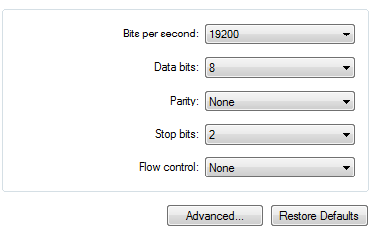
The COM port should be set up for 19200 baud, 8 data bits, no parity and two stop bits.
 

Thread Starter

saint1000

Joined Jan 23, 2013
20
thanks for the help. i changed the baud rate and still have the same results. the only relay that turns on is 1. im stumped
 

tshuck

Joined Oct 18, 2012
3,534
thanks for the help. i changed the baud rate and still have the same results. the only relay that turns on is 1. im stumped
So where is it that you are sending 0x5C?

Again, from the link you didn't read:
Command|Action
...|...
5C | Set relay states - the next single byte will set all relays states, All on = 255 (11111111) All off = 0
...|...
So your sequence should be send 0x5C, then your desired relay states....
 

ErnieM

Joined Apr 24, 2011
8,415
the only way i can get this to work is i have to open the trial board software on my desktop the run the debug in visual studio. but even then no matter what i do i only lights up relay 1
If the board does not work using the manufacturer's own supplied software then it sounds like this is a defective unit and should be returned.
 

Thread Starter

saint1000

Joined Jan 23, 2013
20
i tried switching the baud rate but makes no difference, i get the same results. when i run it like this, everything works as expected except #3. when it calls relay #3 it turns on 1+2 together.i am new to programming, so i know im going to make mistakes, there is going to be things i dont understand. so please if your not trying to help dont reply.

Sub RELAYON()
Dim data(2) As Byte

data(0) = 255

data(1) = Form2.Label2.Text

data(2) = Form2.Label2.Text
SerialPort1.PortName = "COM" + Form2.TextBox1.Text
SerialPort1.Open()
SerialPort1.Write(data, 0, 3)
SerialPort1.Close()
 

tshuck

Joined Oct 18, 2012
3,534
i tried switching the baud rate but makes no difference, i get the same results. when i run it like this, everything works as expected except #3. when it calls relay #3 it turns on 1+2 together.i am new to programming, so i know im going to make mistakes, there is going to be things i dont understand. so please if your not trying to help dont reply.

Sub RELAYON()
Dim data(2) As Byte

data(0) = 255

data(1) = Form2.Label2.Text

data(2) = Form2.Label2.Text
SerialPort1.PortName = "COM" + Form2.TextBox1.Text
SerialPort1.Open()
SerialPort1.Write(data, 0, 3)
SerialPort1.Close()
I'm pretty sure everyone that has posted so far is trying to help.

if you are entering "3", this is 0b00000011, meaning LEDs 1+2 is normal. If you want each one individually, use either 1 << some_number, or only enter 2^n, where n = 0 - 7.
 

Thread Starter

saint1000

Joined Jan 23, 2013
20
I'm pretty sure everyone that has posted so far is trying to help.

if you are entering "3", this is 0b00000011, meaning LEDs 1+2 is normal. If you want each one individually, use either 1 << some_number, or only enter 2^n, where n = 0 - 7.
thanks for your reply, but i dont understand.

if form2.label2.text=1 then relay1 turns on
if form2.label2.text=2 then relay2 turns on
if form2.label2.text=3 then relays 1 and 2 turn on
if form2.label2.text=4 then relay 4 turns on

why would 3 be any different?
 

tshuck

Joined Oct 18, 2012
3,534
thanks for your reply, but i dont understand.

if form2.label2.text=1 then relay1 turns on
if form2.label2.text=2 then relay2 turns on
if form2.label2.text=3 then relays 1 and 2 turn on
if form2.label2.text=4 then relay 3 turns on

why would 3 be any different?
Are you sure 4 doesn't light LED 3?

If so, it is taking the bit position in the number to turn on a relay, at least that's what the link you provided said.
 

Thread Starter

saint1000

Joined Jan 23, 2013
20
tshuck you are correct, 4 turns on relay 3. so now im lost. what would form2.label2.text have to = to
turn on relay 1
turn on relay 2
turn on relay 3
turn on relay 4
turn on all relay
turn off all relay
 

tshuck

Joined Oct 18, 2012
3,534
tshuck you are correct, 4 turns on relay 3. so now im lost. what would form2.label2.text have to = to
turn on relay 1
turn on relay 2
turn on relay 3
turn on relay 4
turn on all relay
turn off all relay
Aside from the codes specified in the link you supplied, you would send 255 to turn on all of the relays(255 = 0xFF = 0b11111111)
If you look at the binary representation of a byte, bit 0 is 1 << 0, bit 2 is 1 << 2, bit 7 is 1 << 7, etc. you can OR all of these together if you want, or, simply write 6 = 0x06 = 0b00000110 to turn on relays 2 and three...

Note, when we count bits, the right most bit(the least significant bit(LSB)) is bit 0.

So,
turn on relay 1 = 0x01 = 1 = 1<< 0 = 0b00000001
turn on relay 2 = 0x02 = 2 = 1<< 1 = 0b00000010
turn on relay 3 = 0x04 = 4 = 1<< 2 = 0b00000100
turn on relay 4 = 0x08 = 8 = 1<< 3 = 0b00001000
turn on all relay = 0xFF = 255 = 0b11111111
turn off all relay = 0x00 = 0 = 0b00000000
 

tshuck

Joined Oct 18, 2012
3,534
So, look at this:
bit 7 | bit 6 | bit 5 | bit 4 | bit 3 | bit 2 | bit 1 | bit 0
relay 8 | relay 7 | relay 6 | relay 5 | relay 4 | relay 3 | relay 2 | relay 1
2^7 | 2^6 | 2^5 | 2^4 | 2^3 | 2^2 | 2^1 | 2^0

to turn on relays 4 and 7 = 2^(4-1) + 2^(7-1) = 72 = 0x48
 

Thread Starter

saint1000

Joined Jan 23, 2013
20
Aside from the codes specified in the link you supplied, you would send 255 to turn on all of the relays(255 = 0xFF = 0b11111111)
If you look at the binary representation of a byte, bit 0 is 1 << 0, bit 2 is 1 << 2, bit 7 is 1 << 7, etc. you can OR all of these together if you want, or, simply write 6 = 0x06 = 0b00000110 to turn on relays 2 and three...

Note, when we count bits, the right most bit(the least significant bit(LSB)) is bit 0.

So,
turn on relay 1 = 0x01 = 1 = 1<< 0 = 0b00000001
turn on relay 2 = 0x02 = 2 = 1<< 1 = 0b00000010
turn on relay 3 = 0x04 = 4 = 1<< 2 = 0b00000100
turn on relay 4 = 0x08 = 8 = 1<< 3 = 0b00001000
turn on all relay = 0xFF = 255 = 0b11111111
turn off all relay = 0x00 = 0 = 0b00000000
thank you so much! that works. i may have to study this for a while to understand, but i will get it. thank you

Sub RELAYON()
Dim data(2) As Byte

data(0) = 255

data(1) = 0


If (Form2.Label2.Text) = 1 Then data(2) = 1
If (Form2.Label2.Text) = 2 Then data(2) = 2
If (Form2.Label2.Text) = 3 Then data(2) = 4
If (Form2.Label2.Text) = 4 Then data(2) = 8


SerialPort1.PortName = "COM" + Form2.TextBox1.Text
SerialPort1.Open()
SerialPort1.Write(data, 0, 3)
SerialPort1.Close()
 
Top