Need some help with Switches/Buttons and mA specs

Thread Starter

Happ

Joined Mar 18, 2022
22
I'm a new hobbyist to electronics and have been having a great time learning about the subject. I have a question about buttons like the icstation and current. I don't quite understand how a small button or switch can operate a string of led's with a rating of 20mA each and have in the spec sheet that the button can handle a max of 50mA. A string of say 10 led's in parallel would be drawing some 200mA. I'm trying to put together a little combo using 80mA of parallel led's tied into one of those sound module wav players that record messages and uses a 1 watt 36mm speaker. I just need to find a small button that can handle the current they are going to draw at the same time. I'm not sure what the sound module with speaker draws, maybe something like 3-4 hundred mA which if it does draw that much how can it use that small icstation button just for it. I'm certain that I'm missing something obvious but I would sure appreciate any help that came my way.
 

dl324

Joined Mar 30, 2015
18,326
Welcome to AAC!
I have a question about buttons like the icstation and current.
What is an icstation switch? Do you have a picture and part number or specifications?
I don't quite understand how a small button or switch can operate a string of led's with a rating of 20mA each and have in the spec sheet that the button can handle a max of 50mA.
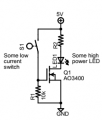
If you can't find a switch that can handle the current you require, you could have the switch turn on a transistor that can handle the current.
1647655916092.png
AO3400 is a logic level N channel MOSFET that can handle around 5A.
 

Thread Starter

Happ

Joined Mar 18, 2022
22
I think icstation might be the company name that sells the switch. Here's some quick specs: Electrical specifications: DC5~24V 1~50mA. 4mmx4mm momentary push button. I was just using that as an example. Thank you for the schematic, I will definitely try and put that together to see what it'll do. I see R1 is 10k but what is R2? Forgive me if R2 is supposed to be blank, like I said I'm new to all of this and quite honestly I'm going to have to look up a few of those symbols...lol. But hey, figuring out what all this stuff does and means is the fun part. I've got all my led's programmed on a board along with the sound module wav player with speaker and I see the "high power LED" after R2 but where would my board plug into this schematic? Thanks again for helping me sort this out and learn a few things along the way.
 

Reloadron

Joined Jan 15, 2015
7,887
In the schematic dl324 was nice enough to post we are using a MOSFET to do the heavy lifting. So here is what id going on. A LED is a current driven device. A good LED data sheet will tell us the Vfwd (the led forward working voltage) and Ifwd (the LED forward working current.

Lets assign a Vfwd of 2.0 volts and an Ifwd of 20 mA. Lets even string out maybe 10 LEDs in parallel along with their series resistors. We have a supply voltage of 5.0 volts so here is what we do.

Vsupply - Vfwd = 5.0 - 2.0 = 3.0 volts so now we have 3.0 volts / 20 mA = 150 Ohms. So R2 is an ideal 150 Ohms for each LED. We need to know the forward voltage and current of the LED and VCC the supply voltage and then we calculate the series resistance for the LED(s).There is more to things but this is basically what's going on. :)

Ron
 

MisterBill2

Joined Jan 23, 2018
27,501
It makes more sense to run a string of LEDs in series, needing only one current limiting device, and also keeping the current the same in each one. It aso makes the connection scheme simpler.
 

Reloadron

Joined Jan 15, 2015
7,887
Series and Parallel explained. While each has their good and bad normally one looks at the application. Running in series does limit us to a single current limiting resistor but the VCC needs to be higher and depending on LEDs the resistor may need a higher power rating. Running in parallel does require more resistors and a current increase. Then we also have series parallel configurations. So I figure you choose a configuration based on the application. With that in mind:

I'm a new hobbyist to electronics and have been having a great time learning about the subject. I have a question about buttons like the icstation and current. I don't quite understand how a small button or switch can operate a string of led's with a rating of 20mA each and have in the spec sheet that the button can handle a max of 50mA. A string of say 10 led's in parallel would be drawing some 200mA. I'm trying to put together a little combo using 80mA of parallel led's tied into one of those sound module wav players that record messages and uses a 1 watt 36mm speaker. I just need to find a small button that can handle the current they are going to draw at the same time. I'm not sure what the sound module with speaker draws, maybe something like 3-4 hundred mA which if it does draw that much how can it use that small icstation button just for it. I'm certain that I'm missing something obvious but I would sure appreciate any help that came my way.
If you can provide the LED data and total number used in your design I am sure you will get plenty of suggestions. Not sure where the sound module figures into things? First thought was a color organ but I doubt that is the case. The more details the better the help you will get.

Ron
 

Thread Starter

Happ

Joined Mar 18, 2022
22
Thank you for the post Reloadron. I absolutely appreciate the schematic from dl324 and your help as well as MisterBill2. I don't know all of the symbols or how to write a schematic yet so I'll try to explain it as best I can. I understand how series and parallel work and how to get the resistance for an LED so that's not a problem. Then again I probably don't understand as much as I think but I'll get there...lol. Here's what I have that is working with direct current applied without a switch. I am using a nodemcu with 9v (square battery) power connected to the vin and ground to pulse a 3v 20mA 5mm LED from pin D7. Pin D7 is probably only giving the LED 15mA but it works fine. I've got all my resistors in place and everything works as it should. I then have 4 LED's, not going through the nodemcu, that are 3-3.4v 20mA that I have wired in parallel with a shared (common/communal?) 75 ohm 1/2 watt resistor also attached to the 9v rail. I was going to use a combination of a 100+10 ohm resistor and put it in parallel with a 220 ohm resistor to reach my 75 ohms but didn't have room on my board. I wanted to tie in a wayintop sound module with 8mb of memory and a small speaker so that when the button is pushed everything comes on and starts at the same time. The wayintop is using AA batteries so it likely has a higher current than my LED's. I haven't tested the mA for the sound module yet because the meter I have has a blown fuse but I'm thinking it probably draws around 3-400 mA. So if it does draw 300+ mA I'm going to use a 9v power supply made of AA batteries to get the mA I will need since a square 9v battery doesn't have quite enough current. This is all arranged into a small homemade toy I've made for my daughter so I'm trying to tie it all together with a single push button. So as far as my LED's go they are all soldered into the board and working and I just need to attach the sound module into the same power rail as the LED and power the whole thing up with my 9v AA batteries and a push button that can handle the current. I'm excited to try and build the circuit dl324 provided but I don't have everything on hand since just starting out but I will get it done. I'm just not sure how to integrate my already completed circuit into the build. I don't need it to power an LED but everything; so do I just plug my + and - of my completed board in place of where the "high power LED" is? Do I need the R2 resistor in dl324's schematic since my board is already setup with resistors to handle the volatage? Sorry for the long winded description, you guys could probably have said the same thing with a short schematic...lol. Anyways I hope this helps explain what I'm trying to do. Thanks again everyone for your help.
 

dl324

Joined Mar 30, 2015
18,326
what is R2?
It depends on your LEDs. You had mentioned 10 in parallel.

You calculate the resistor based on the supply voltage and the forward voltage of the LED. Assuming a 5V power supply, a 2V forward voltage, and a current of 20mA:
\(R_{LED}=\frac{V_{LED}} {I_{LED}}=\frac{V_{supply}-V_{LED}} {I_{LED}}=\frac{5V-2V} {20mA}=150\Omega\)

20mA is a typical maximum continuous current for many LEDs. You don't have to operate them at the maximum value unless you want maximum brightness.

AO3400 is a surface mount device. How are your soldering skills?

EDIT: Also note that the absolute maximum gate voltage is 12V. If your supply voltage is higher than 10V, you should use something like a voltage divider to keep the gate voltage within the allowed limits.

The AA batteries you intend to use may have a voltage higher than the nominal rating when fully charged, so be sure take that into consideration. For example NiMH batteries have a nominal voltage of 1.2V, but they're closer to 1.45 when fully charged.

A device isn't guaranteed to survive absolute maximum ratings. It might withstand 12V on the gate because they measure leakage at that voltage.
 
Last edited:

Thread Starter

Happ

Joined Mar 18, 2022
22
Your existing resistors will be sufficient.
Using paragraphs would make it easier to read.

Which symbols in the schematic aren't clear to you?
My apologies about the paragraphs. I just get going on a thought and keep writing.

The symbols I need to lookup are just after the LED in your schematic where the line turns 90 degrees left and t's down into the broken vertical line. There's also another vertical solid line that turns 90 degrees left that joins a dot next to R1. There's also a little square with a black arrow that's on the same level to left of AO3400.

Thank you for inquiring about where I'm stuck at but please don't trouble yourself with trying to explain the schematic to me. I just have to find the time to learn how to read them.
 

MisterBill2

Joined Jan 23, 2018
27,501
For a given supply voltage, the dropping resistor for a number of LEDs in series will ALWAYS have a lower power handling requirement because it is both handing LESS current, and a lower voltage drop. The voltage drop will be the supply voltage MINUS the sum of the voltage drops of the LEDs, while the current will be that of only one LED.

In the case of dropping resistors, if the calculated value is 150 ohms, you can get away with using a 180 ohm resistor and the current wil ony be a bit less. 180 ohms is a standard value among 10% tolerance resistors, and the odds are half that it will be less than 180 ohms by at least 5%. Very seldom do resistance values need to be exact.

And since the package is going to be a play toy, I suggest adding an automatic turn off after a few minutes, and making the on switch a momentary one. That will add an interesting function and also save batteries.
 

dl324

Joined Mar 30, 2015
18,326
The symbols I need to lookup are just after the LED in your schematic where the line turns 90 degrees left and t's down into the broken vertical line. There's also another vertical solid line that turns 90 degrees left that joins a dot next to R1. There's also a little square with a black arrow that's on the same level to left of AO3400.
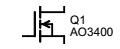
This is a symbol for an enhancement mode N channel MOSFET:
1647710931809.png
The vertical dashed line denotes enhancement mode. For depletion mode, which is less common, the line would be solid to indicate that the device is "normally on". I and others don't dash the line when we're hand drawing, so you have to pay attention to part numbers and/or discern the mode from the context in which it's being used.

The arrow indicates N channel. Note that in bipolar junction transistors (BJTs), the arrow for an NPN points out. It points in on N channel JFETs.

The backwards L denotes the gate. Sometimes it would be drawn like a 7 or a sideways T. I prefer the T configuration, but the schematic editor draws it like a backwards L and I don't feel like making a custom symbol.

Some symbols will also show the parasitic diode that is formed between the source and drain; cathode on the drain and anode on the source, so it's reverse biased during normal operation. There's also one formed on the source, but its anode is shorted to the source in 3 terminal devices because the bulk has to be connected to the most negative voltage to prevent it from becoming forward biased.

Note that MOSFET and JFET are acronyms for Metal Oxide Semiconductor Field Effect Transistor and Junction Field Effect Transistor, respectively, and are therefore capitalized. Some people use the imprecise term FET when referring to MOSFETs. Since there are dozens of types of FETs, the term is vague. When I see FET, I think JFET because, at one time, it was the only field effect transistor that had been manufactured and could be called a FET without causing confusion.

Thank you for inquiring about where I'm stuck at but please don't trouble yourself with trying to explain the schematic to me. I just have to find the time to learn how to read them.
The N channel MOSFET with a pulldown resistor on its gate would be off. Closing the switch would apply 5V to the gate which would turn the MOSFET on. Switching the low side of the load is referred to low side switching.

High side switching would use a P channel MOSFET.
 
Last edited:

Thread Starter

Happ

Joined Mar 18, 2022
22
Thank you everyone for all the help and suggestions. This is truly a great community with a lot of helpful people.

I seemed to have gotten a head of myself here. In my haste to figure out a way to make a switch that can handle more than 50mA; I forgot the fact that the voltage required for my project is going to be several volts above the 9v supply that I am using. I tried hooking in all my components and the speaker module was intermittent and choppy and dimmed the LED's by quite a bit. I'd put a 12v pack in but don't have the room.

My multimeter seems to be on the fritz or I just don't know how to read it correctly. I wire it in series, plug the red cable into the 10a side, fuse blew on mA side who knows when, set at 200m and it reads a 1. Thats with a known 100mA draw. Tried to find the mA for the sound module and it read between .3 and 1.1, depending on volume, on the same settings. Thought for sure it would be more.

So I'll be in search of another multimeter to read amps, unless someone knows how to build one, so that I can get accurate specs to figure out what I need to get this working.

Thanks again everyone.
 

Reloadron

Joined Jan 15, 2015
7,887
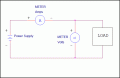
When using your multimeter current measurements are done in series with the load and voltage measurements across the load. My read is you were setup correctly in series with the load.

Meters.gif

Where things go wrong is when starting out people select Current and place the meter across a voltage. On the 10 Amp range a multimeter has a very, very low input resistance, well below one ohm so the meter acts like a short to the source. Quality meters normally have the current inputs fused.

Ron
 

Thread Starter

Happ

Joined Mar 18, 2022
22
When using your multimeter current measurements are done in series with the load and voltage measurements across the load. My read is you were setup correctly in series with the load.

View attachment 263234

Where things go wrong is when starting out people select Current and place the meter across a voltage. On the 10 Amp range a multimeter has a very, very low input resistance, well below one ohm so the meter acts like a short to the source. Quality meters normally have the current inputs fused.

Ron
Yes, it looks like I was using it correctly in series. The fuse for the mA was already blown but I know that didn't happen recently which is why I'm using the 10a side. I wonder if it damaged the meter when the fuse went. Perhaps I'm just reading the meter wrong. If I've got it set to 200m and it's reading 1 shouldn't that be 1mA? If it is 1mA and I have a known draw of 100mA that sounds like a meter issue.
 

Reloadron

Joined Jan 15, 2015
7,887
Normally the fuse will spare the meter, not always but normally. On the 200 mA range you should not be seeing a 1. The 200 mA range is likely a 0 to 199.9 mA range and if you expect to see 100 mA the meter should display 100 or depending on resolution 100.0 so something is not right. This all assumes a good fuse.

Ron
 

dl324

Joined Mar 30, 2015
18,326
I wire it in series, plug the red cable into the 10a side, fuse blew on mA side who knows when, set at 200m and it reads a 1. Thats with a known 100mA draw.
I'd get out of the habit of using a meter to measure current. They can introduce enough resistance to perturb a circuit.

I measure the voltage drop on a resistor and calculate the current. If there isn't a convenient resistor, I insert a low value resistor and measure the voltage across it.
 

Thread Starter

Happ

Joined Mar 18, 2022
22
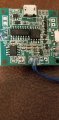
Here's a picture of the device I'm trying to get the specs on. It looks like surface mount chips that might be the resistors. Super tiny so I'm not even sure I could get a lead on them to measure the resistor. The voltage is 4.7 on the board. Could you point out which ones to try and read?20220319_201419.jpg
 

Thread Starter

Happ

Joined Mar 18, 2022
22
I'd get out of the habit of using a meter to measure current. They can introduce enough resistance to perturb a circuit.

I measure the voltage drop on a resistor and calculate the current. If there isn't a convenient resistor, I insert a low value resistor and measure the voltage across it.
I like the idea of using a low value resistor to measure the voltage but I don't know which is the resistor from the image I uploaded and I tried to insert a 20 ohm which didn't work as well as a 10 ohm. Wouldn't run for more than a second. Would a 0 ohm resistor work to measure the voltage?
 
Top