Need some help with an H-Bridge

Thread Starter

Carsten Svendsen

Joined Oct 2, 2015
17
I've decided that I'd want to get an arduino uno R3 instead of using my LEGO NXT brick. Reason being I've been trying hard to see what I can do to make it work with only 1 output signal and 1 PWM signal but in the end I figured I'd just end up breaking something.
I already know how to use C+ and the similar so working with the arduino would not be that hard.
'The real kicker was that the photoMos I wanted to use cost around $14. I need 3 circuits so getting an arduino would actually be cheaper and then I could also use it for other stuff in the future.

Since the arduino outputs 5v I'll assume the 4,7k and 2,2k are sufficient since its just a general value for low voltage.
 

MikeML

Joined Oct 2, 2009
5,444
I've decided that I'd want to get an arduino uno R3 instead of using my LEGO NXT brick. ....
So you still have choices.

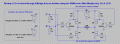
First, using the Arduino, here is a no-shoot-through method of starting, coasting, PWM'ing and reversing (but not braking) the 12Vdc motor using only two port pins, both of which must be the PWM type...

H2Bridge.gif

I optimised the resistor values for a 5V Arduino and the default 980Hz PWM rate that the Arduino makes on its "pwm" pins. When you write the code for the two Arduino pins A and B, there is a restriction that both pins are never high (11) at the same time. The valid states are 00= coast, 01 = CW rotation, 10=CCW rotation. You can just set either A or B high with the opposite pin low, and the motor will run full speed, or you can PWM pin A with pin B set low, or vice versa, so both A and B pins would have to be PWM'able.

Note that digitalWrite(A, Low); overwrites a previous AnalogWrite(A,pwmValue) on PWM'able port pin A, and forces it low...

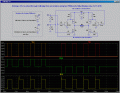
The simulation above shows either A being actively PWM'ed with B low and vice versa. When switching directions, always leave some time for the motor to coast to a stop before beginning PWM on the other pin. I show the motor current (middle pane) and the 12V supply current on the bottom pane.

If you need motor braking, you could use two PWM'able pins, and two regular port pins, as shown in post #9. I would make the C and D ports the PWM'able ones, while A and B could be regular port pins.
 

ScottWang

Joined Aug 23, 2012
7,501
Since the arduino outputs 5v I'll assume the 4,7k and 2,2k are sufficient since its just a general value for low voltage.
There are 4.7K and 2.2K, the symbol is "." not ",".
The new circuit can be connected A with B and C with D together and using two pins to control two directions for 3.3V.
 

crutschow

Joined Mar 14, 2008
38,549
There are 4.7K and 2.2K, the symbol is "." not ",".
In many European countries the use of the "." and "," are interchanged for the decimal mark and the thousands mark as compared to their use in other areas of the world.
Neither is right or wrong, either convention is allowed.
I'm surprised that's not common knowledge. ;)
 

ScottWang

Joined Aug 23, 2012
7,501
In many European countries the use of the "." and "," are interchanged for the decimal mark and the thousands mark as compared to their use in other areas of the world.
Neither is right or wrong, either convention is allowed.
I'm surprised that's not common knowledge. ;)
crutschow, thanks.
Actually I really don't know about that, but I really saw the members used that some times and I only felt that quite strange, I thought that it must be have some reasons, but I don't know why, I think we reading and receiving the western culture, specially the science and technology much more than Europe.
 

Thread Starter

Carsten Svendsen

Joined Oct 2, 2015
17
Hi, I got my parts today and assembled it all on a breadboard. I activated the required input and immediately one of the P-mosfets started to get really hot, and there was no voltage coming out at the motor wires (measured and tested).
I found out that it doesn't get hot if I remove the signal or the 12V supply.

I figured maybe some components were bad so I exhanged them with another set but the same thing happened.
Then I tried to build only half of the H-bridge with no luck either.
I'm fairly certain I attached the wires to the right pins on the fets and transistor, I checked it a lot while assembling cause I always forget which pin is which.

Would you happen to know what I'm doing wrong? If the mosfet is supposed to get that hot, then obviously I need a heatsink, but there's no voltage coming out at the motor wires so I don't know.. :confused:
 

MikeML

Joined Oct 2, 2009
5,444
Remember that the Source of the PFET is tied to the +12V rail, Drain goes to the motor
... the Source of the NFET is tied to Gnd, Drain goes to motor
 

Thread Starter

Carsten Svendsen

Joined Oct 2, 2015
17
I checked it and that's the way it was.
But there probably is something wrong some where
Maybe the FET's are not rated high enough? Except the fact that there's not even any load on it...

I don't know, I'm tired, I'll rebuild it tomorrow after work and see if the outcome changes.
 

MikeML

Joined Oct 2, 2009
5,444
With A and B both low, what are the Gate voltages of all four FETs?

Are you sure that the gate drives are criss-crossed. If A is high and B is low, then the gate of Ma should be at zero V, and the gate of Md should be at 5V, while gate of Mb should be at +12V and the gate of Mc should be at zeroV. Check it.
 

Thread Starter

Carsten Svendsen

Joined Oct 2, 2015
17
I'm most certain that yesterday when I build it I had Ma and Md assembled on the breadboard.
I don't know what I did wrong though, because I rebuild it just now and it's actually working like it should.

I would however like to use 4 inputs so that I can brake the motor as well. I think that that might be what went wrong yesterday.
I simply split the A wire between the two 4,7k's and added a 10k to ground on Md, so the input was identical to Ma.
I'm not sure if that was correct and might've done something wrong. Nothing's broken though.
 
Top