"Multi Purpose"-Pushbutton

Thread Starter

xenotpro

Joined May 1, 2017
3

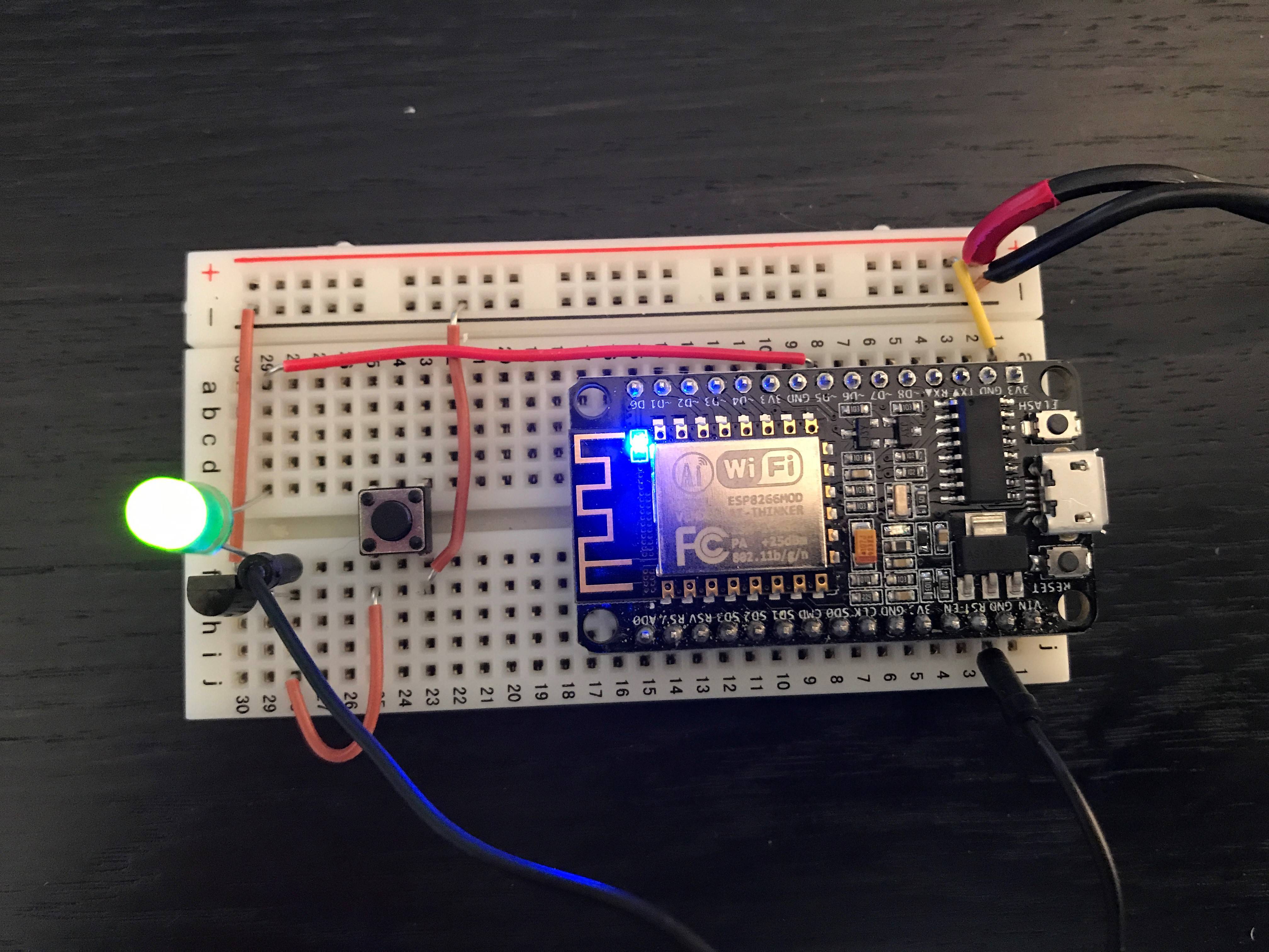
I have a circuit with a pushbutton and a transistor. As soon as I press the button, the board get's grounded and starts up. Then it outputs current at pin 14 (connected to the resistor) so the board stays on after the button is released. The LED is just used as an indicator.
This works as expected. But after the board is powered on there's no use for the button, so I want to use it for something else. But how can I read if the button is pressed or not?
 

WBahn

Joined Mar 31, 2012
32,829
Connected to what resistor?

A schematic would sure be helpful.

There appear to be several power and ground connections to that board that are not connected -- this is generally a bad idea.

Which pin are you calling pin 14? Pin 14 would appear to be labeled "-D1" and is unconnected.

What kind of transistor is that? How is it connected?

Way too much crystal ball work required on this one.
 

Thread Starter

xenotpro

Joined May 1, 2017
3
1) There's no transistor.
2) Do I need to connect all power/ground connections?
3) Pin 14 is labeled D5 (but I think I meant to say GPIO 14)
4) It's an NPN transistor and its first pin is connected to ground, the second is connecteg to GPIO 14 and the thrid is connected to the ground an the board.
 

WBahn

Joined Mar 31, 2012
32,829
1) There's no transistor.
The why did your original post start with, "I have a circuit with a pushbutton and a transistor."?

What is that transistor-looking thing at the far left edge of your picture?

And the question remains -- where is this resistor you referred to?
2) Do I need to connect all power/ground connections?
Generally speaking, yes. That particular board may or may not function without all of the power/ground connections hooked up properly. If it does, it may have performance issues.

3) Pin 14 is labeled D5 (but I think I meant to say GPIO 14)
Okay -- which pin is GPIO 14? I'm not a mind reader! All I know is that you say it is connected to a resistor -- but I don't see a resistor anywhere in that picture.

4) It's an NPN transistor and its first pin is connected to ground, the second is connecteg to GPIO 14 and the thrid is connected to the ground an the board.
You just got done telling us (see item #1 above) that there's no transistor. Which is it?

A transistor has three pins -- collector, base, emitter. The ordering of the pins in the package varies from one transistor to another. It matters which is which.

POST A SCHEMATIC!!!!

You are making it FAR too difficult for anyone to waste their time trying to help you.
 

Thread Starter

xenotpro

Joined May 1, 2017
3
I think it's easier if a explain what I'm trying to do.
I want to use ONE button to both turn on the board and control my script (e.g. turing on/off LEDs, etc.). The transistor should ground the board as long as GPIO 14 is on HIGH. (so that the board can turn itself off). The button gives the board a jumpstart so it can power the transistor, after that I want to use the button otherwise.

I don't know if that's even possible with my setup. I doubt it, maybe you got a better way of doing it.
 

MrSoftware

Joined Oct 29, 2013
2,273
What processor is on the board? First see if it will sleep. Then see if it can be woken up via an interrupt. Then check if an interrupt capable input can be used for something different. If yes, then put your button on the interrupt pin. When its pressed it will cause an interrupt which will wake the processor. In the wake routine disable interrupts then use the button for something else. When you put the chip back to sleep,
re-enable interrupts. You're going to need to debounce your button though. In my very limited experience, debouncing the button in hardware will make your life much easiser than doing it in software, especially when the button is tied to an interrupt.

I'm just taking a stab at it, someone else might have a much better idea.
 

WBahn

Joined Mar 31, 2012
32,829
Yes, what you are trying to do is possible (assuming that a couple of things are true about the module you are using). There are several ways to do it. The key is to be able to isolate the output of the pushbutton switch from the circuit holding your board power grounded once the board comes up. A diode should do that nicely.

What is the state of the port pin prior to power up that you want to read the switch state with once it is up and running?
 
Top